
MARKETMAZE · ECOMMERCE TOOLS · RESEARCH
We compared 10 social media management platforms for ecommerce teams on publishing, approvals, community workflows, reporting, network coverage and real operating cost. The goal is simple: identify which tools make daily social execution easier at your team size.
Updated 25 September 2026 · Pricing and product claims checked against official vendor sources.
👋 New to this category?
Social media management software gives ecommerce teams one place to plan, approve, schedule, publish and measure organic social content across multiple networks. Better tools also centralize comments and messages, help teams coordinate approvals, and make reporting less manual. The right choice depends less on raw feature count than on your operating model: a solo marketer needs speed and simplicity, while a larger brand may need permissions, customer-care workflows, multibrand structure and integrations.
🧭 Jump to a tool
🏆 The quick answer
🏆 Best overall
Hootsuite
🌱 Best for getting started
Buffer
💸 Best value
Metricool
🏢 Best for larger teams / enterprise
Sprout Social
🧠 Best for advanced or technical users
Sprout Social
📸 Best for visual-first ecommerce teams
Later
MarketMaze take
For a broad all-in-one operating layer, Hootsuite is the safest default; Sprout Social is especially strong when social care, reporting and cross-functional workflow justify premium per-seat pricing. Agorapulse sits in an attractive middle ground for inbox plus approvals. Later and Planoly fit visual-first teams, while Buffer and Metricool deliver exceptional value. The best shortlist should start with your account count, approval needs, inbox volume and reporting expectations, not a generic feature checklist.
📊 Tool comparison & scores
Rank | Tool | Score | Best for | Pricing |
|---|---|---|---|---|
1 | Hootsuite | 92/100 | Broad multichannel social operations | From $99/user/mo annual |
2 | Sprout Social | 91/100 | Enterprise workflows and social care | From $199/seat/mo annual |
3 | Agorapulse | 88/100 | Inbox plus approval workflows | From $79/user/mo annual |
4 | Later | 86/100 | Visual-first content teams | From $18.75/mo annual |
5 | Metricool | 85/100 | Value and multibrand analytics | Free; paid from $20/mo annual |
6 | Buffer | 83/100 | Simple low-cost publishing | Free; Essentials $5/channel/mo |
7 | Sendible | 82/100 | Agencies and multiclient teams | From $35/mo |
8 | Loomly | 80/100 | Structured content approvals | From $49/mo annual |
9 | SocialBee | 79/100 | Evergreen content categories | From $29/mo |
10 | Planoly | 77/100 | Creator-led social commerce | From $14/mo annual |
Prices reflect publicly listed vendor pricing checked on 25 September 2026. Billing cadence, region, taxes, add-ons and extra profiles or seats can change the effective cost.
🧠 How the scoring works
This ranking uses MarketMaze proprietary scoring.
Dimension | Weight | What we look for |
|---|---|---|
Core job performance | 30% | Scheduling reliability, publishing breadth, calendar usability and engagement workflow quality. |
Ecommerce fit | 20% | Visual content support, product-oriented workflows, multibrand use and practical channel coverage. |
Workflow & control | 15% | Approvals, roles, assignments, shared calendars and controls for team collaboration. |
Integrations & implementation | 15% | Connected networks, application integrations, reporting exports and implementation effort. |
Pricing & value | 10% | Useful entry tier, included profiles and seats, and cost as teams scale. |
Scale & advanced capabilities | 10% | Enterprise governance, analytics depth, monitoring, APIs and multibrand operating support. |
Scores compare the assigned products against the same category-specific criteria. They are MarketMaze editorial scores based on current first-party product, pricing and documentation sources, not imported review-site ratings.
Probably yes ✅
You publish to several networks, multiple people touch content, approvals cause delays, or comments and messages are getting missed across native apps.
Maybe 🟡
You post frequently but have one owner and low inbox volume. A lightweight scheduler can help, but a full suite may not yet pay back.
Probably not yet ⏳
You publish occasionally to one or two channels and native scheduling, analytics and inbox tools still cover the workflow without meaningful manual overhead.
🥇 1. Hootsuite
92/100 · 💰 Budget · 🧩 Intermediate · 🏢 Mid-market–Enterprise · ⚙️ Specialist-led
🎯 Best for: Ecommerce teams that need publishing, inbox, monitoring and analytics in one mature workspace.
⚡ Choose Hootsuite if you want one established operating layer for publishing, engagement, monitoring and reporting across many networks.
Hootsuite remains one of the broadest social management suites in this group. Its Standard plan combines scheduling, a central inbox, monitoring, analytics and AI-assisted content tools, while higher tiers expand collaboration and reporting. For ecommerce teams running many channels, the advantage is breadth: operators can plan posts, manage replies and track performance without stitching together several point solutions. The tradeoff is cost and a denser interface than simpler schedulers.

📷 Hootsuite’s publishing workspace brings scheduling and content planning into a single cross-network view. Source: vendor website/documentation.
💚 What we like
Wide network coverage supports most mainstream ecommerce social channels from one publishing workspace.
Publishing, inbox, monitoring and analytics sit together, reducing handoffs between separate social tools.
Mature governance and enterprise options make it easier to scale across brands, markets and larger teams.
🟠 What to know
The entry plan is materially more expensive than lightweight schedulers, especially once multiple users are required.
Breadth creates a steeper learning curve, so teams should configure permissions, streams and reporting intentionally.
💡 Why this score: Hootsuite scores highest for breadth and operating maturity. It covers the core publishing job well, adds inbox, monitoring and analytics, and scales into enterprise governance. We deducted points for higher starting cost and complexity compared with focused tools such as Buffer or Later.
💰 Pricing: https://www.hootsuite.com/plans
✅ Best fit: Mid-market and enterprise ecommerce teams managing several social networks, brands or markets and wanting one consolidated operating layer.
🚫 Less ideal for: Small teams that mainly need simple scheduling and do not expect to use monitoring, inbox or governance features.
🧩 Key capabilities
Multichannel scheduling and publishing calendar
Central social inbox and response workflow
Social monitoring and listening options
Cross-network analytics and reporting
AI-assisted content creation tools
Enterprise permissions, governance and support
🔎 Official sources: Product · Pricing · Documentation

91/100 · 💰 Mid · 🧩 Intermediate · 🏢 Mid-market–Enterprise · ⚙️ Specialist-led
🎯 Best for: Larger ecommerce teams prioritizing collaboration, social care, advanced reporting and cross-functional workflows.
⚡ Choose Sprout Social if social is a shared operational function and you need strong inbox, analytics, permissions and team workflows.
Sprout Social is built for organizations where social publishing is only one part of the job. Standard includes five social profiles, a consolidated inbox, collaboration, monitoring and review management. Professional expands to unlimited profiles and deeper insights, while Advanced adds application programming interface access and helpdesk integrations. Ecommerce brands with dedicated social care or cross-functional teams get a particularly strong workflow, but pricing climbs quickly because plans are priced per seat.
📷 Sprout Social’s publishing interface supports calendar planning, collaboration and coordinated cross-network execution. Source: vendor website/documentation.
💚 What we like
Smart Inbox and collaboration features suit teams handling meaningful volumes of customer conversations and comments.
Professional and Advanced tiers add deeper reporting, integrations and controls for larger operating teams.
Strong governance makes it easier to coordinate brand, care, marketing and agency contributors in one environment.
🟠 What to know
Per-seat pricing makes Sprout one of the most expensive options in the comparison as teams grow.
Many small ecommerce teams will not use enough of its monitoring, care and reporting depth to justify the cost.
💡 Why this score: Sprout nearly matches Hootsuite on overall capability and is especially strong in collaboration, inbox and enterprise workflows. Its reporting and integration depth are excellent. The main score penalty is value: per-seat pricing rises quickly, making it harder to justify for small ecommerce teams.
💰 Pricing: https://sproutsocial.com/pricing/
✅ Best fit: Established ecommerce brands with dedicated social, customer care or agency teams that need strong workflow controls and reporting.
🚫 Less ideal for: Solo operators and lean teams whose main need is scheduling posts rather than managing complex engagement and governance.
🧩 Key capabilities
Cross-network publishing and content calendar
Consolidated Smart Inbox and collaboration
Keyword and location monitoring
Advanced analytics and competitor insights
Review management and social care tools
API and helpdesk integrations on higher tiers
🔎 Official sources: Product · Pricing · Documentation
🥉 3. Agorapulse
88/100 · 💰 Budget · 🧩 Intermediate · 🏢 SMB–Mid-market · ⚙️ Specialist-led
🎯 Best for: Growing ecommerce teams that want strong publishing, social inbox and approval workflows without enterprise-suite complexity.
⚡ Choose Agorapulse if you need a serious social inbox and structured approvals alongside scheduling, but want a clearer mid-market package.
Agorapulse combines a capable publishing calendar with a unified social inbox, reporting and increasingly structured team workflows. Standard includes unlimited scheduled posts, ten social profiles, inbox and basic reporting. Professional adds product tagging, ad-comment monitoring, assignments and team reporting, while Advanced adds moderation rules, saved replies and bulk actions. It is particularly compelling for ecommerce teams where organic publishing and community management need to live in the same daily queue.

📷 Agorapulse’s official publishing product page shows its calendar-led approach to coordinating scheduled content. Source: vendor website/documentation.
💚 What we like
Publishing and inbox workflows are tightly connected, which suits brands managing both content and customer conversations.
Professional and Advanced tiers add useful approval, assignment, moderation and reporting controls without a separate care product.
Ten social profiles on paid plans give growing teams a practical starting footprint across multiple channels.
🟠 What to know
Pricing is per user, so multi-person teams should model total seat cost rather than compare headline plan prices.
The strongest approval, moderation and collaboration features sit above the Standard plan, raising the realistic team budget.
💡 Why this score: Agorapulse scores well because it balances publishing, engagement and workflow depth with clearer mid-market packaging. Its inbox and approval features are stronger than many schedulers. It trails the top two on enterprise ecosystem depth and still becomes expensive as user count grows.
💰 Pricing: Standard is $79 per user/month billed annually, Professional $119, Advanced $149; monthly billing is $99, $149 and $199 respectively.
✅ Best fit: Growing ecommerce brands and agencies that need scheduling, approvals, social inbox and reporting in one operational workspace.
🚫 Less ideal for: Very small teams needing only basic scheduling, or global enterprises requiring the broadest ecosystem and governance stack.
🧩 Key capabilities
Unified publishing calendar with multiple views
Scheduling across major social networks
Social inbox for comments and messages
Team assignments and approval workflows
Automated moderation and saved replies
Reports, exports and social return-on-investment tracking
🔎 Official sources: Product · Pricing · Documentation
4️⃣ 4. Later
86/100 · 💰 Budget · 🧩 Beginner · 🏢 SMB–Mid-market · ⚙️ No-code
🎯 Best for: Visual ecommerce brands planning Instagram, TikTok and other content-heavy channels with lightweight collaboration.
⚡ Choose Later if your team thinks visually and wants planning, approvals, social inbox and analytics without a heavy enterprise suite.
Later has evolved from an Instagram-first scheduler into a broader social management platform, but visual planning is still its clearest strength. Starter covers one eight-profile social set, while Growth adds approvals, a social inbox, custom roles and much higher posting limits. Scale adds custom analytics, benchmarking, brand mentions and unlimited posts. For ecommerce brands built around visual merchandising, creators and frequent short-form content, Later feels more approachable than enterprise platforms.
📷 Later’s calendar-sharing workflow illustrates its visual planning and approval-oriented approach to social content. Source: vendor website/documentation.
💚 What we like
Visual planning remains intuitive for teams that organize campaigns around images, video and merchandising moments.
Growth adds approvals, custom roles and a social inbox at a relatively accessible price for small teams.
Supported profiles span Instagram, Facebook, Threads, Pinterest, TikTok, LinkedIn, YouTube and Snapchat.
🟠 What to know
Starter limits posts per profile and excludes the collaboration features most teams will eventually want.
Teams centered on deep social care, monitoring or enterprise governance may outgrow Later’s operating model.
💡 Why this score: Later earns a strong score for usability, visual planning and accessible team collaboration. Growth is a practical ecommerce tier and Scale adds meaningful analytics. It loses points for less sophisticated social-care and governance depth than the top enterprise-oriented suites.
💰 Pricing: https://later.com/pricing/
✅ Best fit: Small and mid-market visual ecommerce teams publishing frequently across Instagram, TikTok and adjacent channels with simple approvals.
🚫 Less ideal for: Organizations that treat social as a high-volume customer-care channel or need advanced enterprise monitoring and governance.
🧩 Key capabilities
Visual social content calendar
Scheduling for eight major social networks
Internal and external approvals on Growth
Social inbox on Growth
Best-time recommendations and AI content tools
Custom analytics and benchmarking on Scale
🔎 Official sources: Product · Pricing · Documentation
5️⃣ 5. Metricool
85/100 · 💰 Free · 🧩 Intermediate · 🏢 SMB–Mid-market · ⚙️ No-code
🎯 Best for: Cost-conscious ecommerce teams that want publishing, analytics and multibrand management in one flexible tool.
⚡ Choose Metricool if you want unusually broad analytics and scheduling value, especially when managing several brands or client accounts.
Metricool packs publishing, analytics, competitor tracking and reporting into a pricing model that starts with a genuinely useful free tier. Starter expands to multiple brands, unlimited publishing, LinkedIn, reports, Canva and Google Drive integrations. Advanced adds client and team management, roles, approvals, customizable reports, Looker Studio and an application programming interface. Ecommerce teams that care about performance visibility as much as scheduling get impressive breadth for the price.

📷 Metricool’s Planner shows cross-network scheduling in a calendar interface with campaign and content controls. Source: vendor website/documentation.
💚 What we like
The free plan can handle one brand and basic scheduling, making it practical for real evaluation before paying.
Starter combines unlimited publishing, long analytics history and reporting at a notably competitive price point.
Advanced adds approvals, roles, client management, Looker Studio and API access for more mature teams.
🟠 What to know
Some networks and features, including LinkedIn or X-related functionality, depend on paid tiers or add-ons.
The breadth of analytics and modules can feel denser than lightweight publishing-first tools for casual users.
💡 Why this score: Metricool scores highly on value because it combines useful publishing and unusually broad analytics at low entry prices. Advanced team controls improve its scale story. It loses a few points for feature complexity and for certain network capabilities being plan- or add-on-dependent.
💰 Pricing: https://metricool.com/pricing/
✅ Best fit: Ecommerce operators, agencies and multibrand teams that want scheduling plus deep reporting without paying enterprise-suite prices.
🚫 Less ideal for: Teams seeking the simplest possible scheduler or the deepest enterprise social-care workflow and helpdesk ecosystem.
🧩 Key capabilities
Multinetwork scheduling and planner
Cross-channel analytics and competitor tracking
PDF and presentation reports
Canva and Google Drive integrations
Team roles and approval workflows on Advanced
Looker Studio, API and automation integrations
🔎 Official sources: Product · Pricing · Documentation
6️⃣ 6. Buffer
83/100 · 💰 Free · 🧩 Beginner · 🏢 SMB · ⚙️ No-code
🎯 Best for: Lean ecommerce teams that want reliable scheduling, a clean workflow and predictable per-channel pricing.
⚡ Choose Buffer if your priority is fast, low-friction publishing and analytics rather than heavyweight social care or enterprise governance.
Buffer is the easiest recommendation here for teams that primarily need to plan and publish consistently. The free plan connects up to three channels with ten scheduled posts per channel, while Essentials costs $5 per channel monthly on annual billing and removes the scheduling cap. It also adds advanced analytics, community inbox, hashtag management and first-comment scheduling. The modular per-channel pricing stays attractive for small ecommerce teams with a focused social footprint.
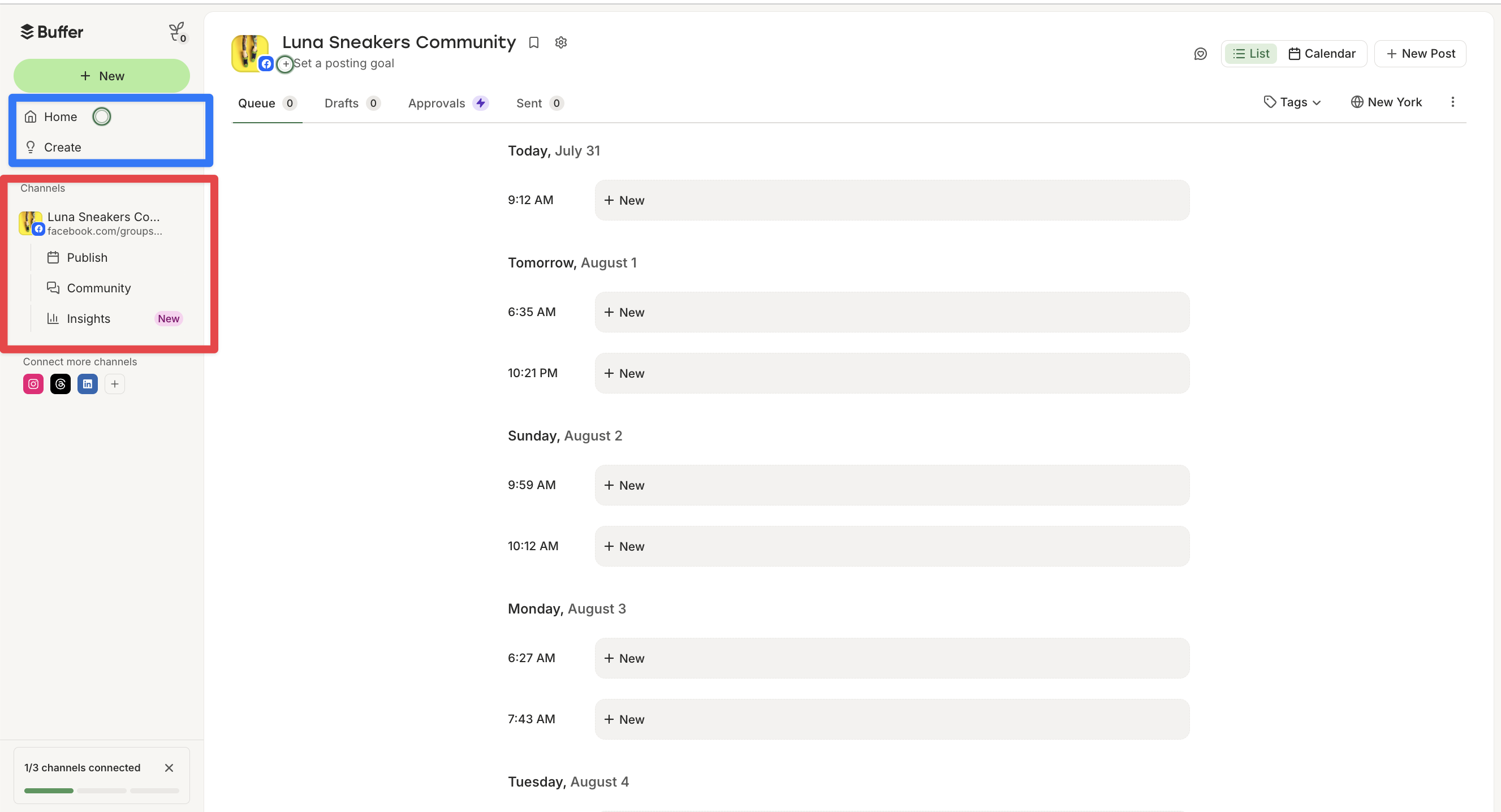
📷 Buffer’s dashboard emphasizes a straightforward publishing queue, calendar and channel-by-channel planning workflow. Source: vendor website/documentation.
💚 What we like
The interface and workflow are easy to understand, so teams can start publishing without a long implementation.
A meaningful free plan supports three channels, while Essentials scales in small increments by channel.
Essentials includes unlimited scheduled posts, analytics, community inbox and first-comment scheduling at low cost.
🟠 What to know
Per-channel pricing can become less compelling if a brand needs many profiles across many networks.
Collaboration, governance and social-care depth are lighter than tools designed for larger dedicated social teams.
💡 Why this score: Buffer earns strong marks for usability and value. It performs the core scheduling job extremely well and offers a useful free tier. We scored it below broader suites because inbox, approvals, governance and advanced enterprise reporting are not its central strength.
💰 Pricing: https://buffer.com/pricing
✅ Best fit: Solo marketers and small ecommerce teams that need dependable scheduling, basic analytics and community management without complexity.
🚫 Less ideal for: Large social teams needing formal approval chains, extensive permissions, deep monitoring or enterprise service integrations.
🧩 Key capabilities
Scheduling across major and emerging networks
Content queue and calendar planning
AI Assistant and idea management
Advanced analytics on Essentials
Community inbox and engagement workflow
API access and hashtag management
🔎 Official sources: Product · Pricing · Documentation
7️⃣ 7. Sendible
82/100 · 💰 Budget · 🧩 Intermediate · 🏢 SMB–Mid-market · ⚙️ Specialist-led
🎯 Best for: Agencies and ecommerce groups managing multiple brands, workspaces and approval processes from one platform.
⚡ Choose Sendible if you manage multiple brands or clients and need workspaces, approvals, reporting and inbox tools under one account.
Sendible is particularly well designed for agencies and teams that manage multiple brands. Core starts with six profiles and unlimited users in one workspace, while Plus adds three workspaces, 18 profiles and approval workflows. Premium adds content libraries, branded reports and campaigns, and higher tiers scale profiles and workspaces further. The combination of unlimited users and workspace structure can be economically attractive when many collaborators need access.

📷 Sendible’s Priority Inbox demonstrates the response and collaboration workflow alongside its publishing toolkit. Source: vendor website/documentation.
💚 What we like
Unlimited users on plans can materially improve economics for teams compared with strictly per-seat competitors.
Workspaces help agencies and multibrand ecommerce groups separate accounts, calendars, approvals and reporting cleanly.
Higher tiers add branded reports, content libraries and campaign organization suited to client-service workflows.
🟠 What to know
The interface and feature set are broader than a lightweight scheduler, so initial workspace setup matters.
Teams with only one or two social channels may pay for agency-oriented structure they do not need.
💡 Why this score: Sendible scores well for agency economics, workspace separation and collaboration. Unlimited users are a meaningful differentiator, especially for multiclient teams. It trails the leaders in enterprise ecosystem depth and the simplest tools in ease of adoption for very small teams.
💰 Pricing: https://www.sendible.com/pricing
✅ Best fit: Agencies, holding groups and ecommerce teams managing multiple brands or clients with shared contributors and approval workflows.
🚫 Less ideal for: Single-brand teams that need only basic publishing and can use a simpler, lower-cost scheduler.
🧩 Key capabilities
Multibrand workspaces and social profiles
Scheduling and content calendar
Priority inbox and response workflow
Approval workflows on Plus and above
Branded and standard reporting
Content libraries and campaign management
🔎 Official sources: Product · Pricing · Documentation
8️⃣ 8. Loomly
80/100 · 💰 Budget · 🧩 Intermediate · 🏢 SMB–Mid-market · ⚙️ Specialist-led
🎯 Best for: Small and mid-sized teams that want structured calendars, approvals and clear roles without per-seat pricing.
⚡ Choose Loomly if your content process needs formal review steps and clear calendars, but you do not need a full enterprise social-care suite.
Loomly focuses heavily on the content operations layer: calendars, scheduling, roles, approvals and analytics. Starter includes 12 social accounts, three users and unlimited calendars, while Beyond increases that to 60 accounts and unlimited users and adds custom roles, workflows and branding. This makes Loomly attractive when the main challenge is coordinating content production and sign-off rather than running a sophisticated social customer-care operation.
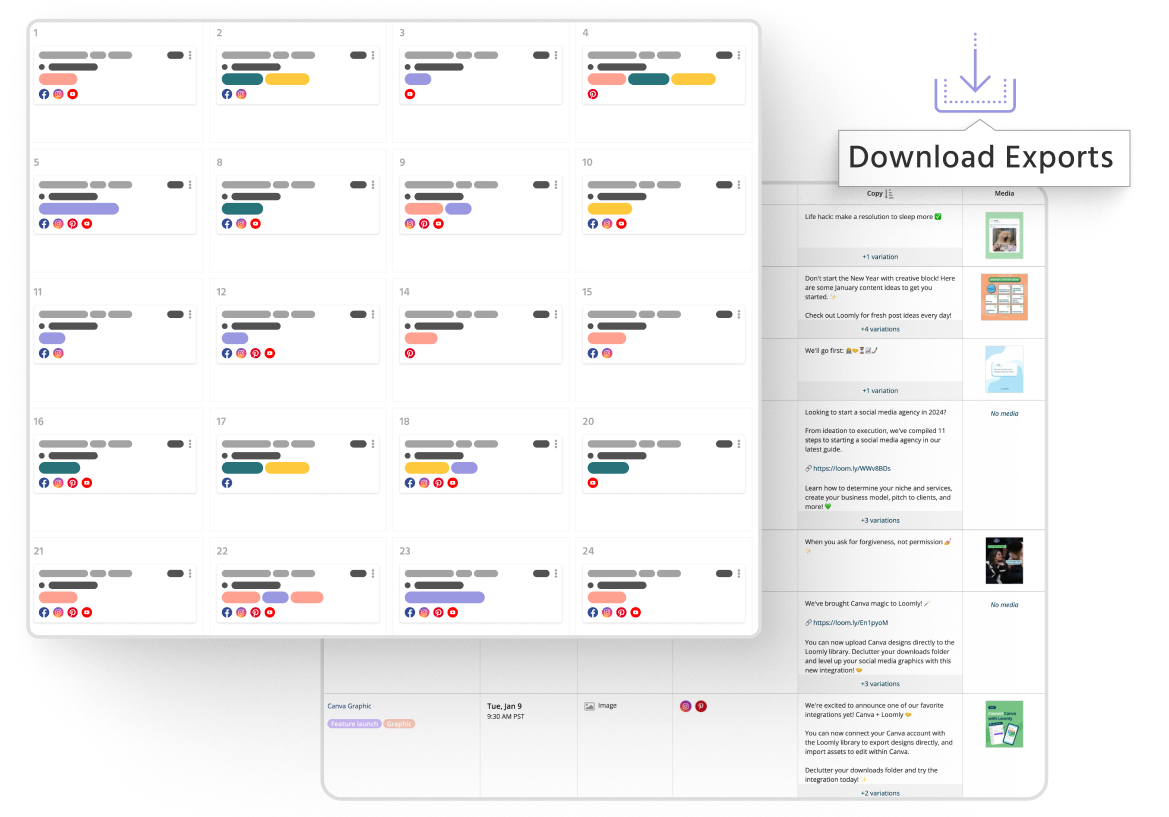
📷 Loomly’s calendar interface reflects its emphasis on structured planning, review and publishing workflows. Source: vendor website/documentation.
💚 What we like
Starter includes three users and 12 accounts, giving small teams a useful collaboration footprint immediately.
Approval workflows and roles are central features rather than an afterthought added only at enterprise scale.
Beyond offers unlimited users, custom workflows and branding for teams that need stronger process control.
🟠 What to know
Inbox and social-care functionality is less central to Loomly’s value proposition than content planning and approvals.
The jump from Starter to Beyond is significant, so teams should validate whether advanced workflow needs justify it.
💡 Why this score: Loomly performs strongly on structured content planning, approvals and team roles. Its plans can be attractive for collaborative teams because Starter includes multiple users. It scores lower on broader inbox, listening and social-care depth, and the price jump to Beyond is substantial.
💰 Pricing: https://www.loomly.com/pricing
✅ Best fit: Ecommerce content teams that need a disciplined calendar, multi-person approvals and clear publishing roles across several accounts.
🚫 Less ideal for: Brands prioritizing high-volume social customer service, advanced listening or the broadest enterprise integration ecosystem.
🧩 Key capabilities
Social content calendars and scheduling
Approval workflows and team roles
AI Assistant for content work
Advanced analytics
Link shorteners and campaign organization
Custom roles, workflows and branding on Beyond
🔎 Official sources: Product · Pricing · Documentation
79/100 · 💰 Budget · 🧩 Beginner · 🏢 SMB · ⚙️ No-code
🎯 Best for: Small ecommerce teams and agencies that want category-based scheduling, reuse and affordable AI-assisted content workflows.
⚡ Choose SocialBee if you want recurring content categories and evergreen scheduling to keep channels active with a small team.
SocialBee differentiates itself with category-based scheduling and evergreen content workflows that help small teams maintain a consistent posting rhythm. Bootstrap covers five profiles, Accelerate ten and Pro 25, with higher tiers adding more workspaces and users. The platform also includes AI content generation, analytics and approval features. For ecommerce brands that reuse educational, promotional and community content themes, the category model can reduce repetitive planning work.
📷 SocialBee’s scheduler shows its category-based planning approach and recurring content organization. Source: vendor website/documentation.
💚 What we like
Content categories make it easy to balance recurring promotional, educational and community themes over time.
Pricing remains approachable for small teams, with five profiles included at the entry Bootstrap tier.
AI creation, analytics, approvals and bulk editing create more depth than the simple scheduler label suggests.
🟠 What to know
Bootstrap and Accelerate include one user and one workspace, limiting collaboration until higher plans or add-ons.
Teams centered on sophisticated social care or enterprise governance will find deeper options elsewhere in this list.
💡 Why this score: SocialBee scores well for small-team value, recurring content workflows and useful AI-assisted production. Its category model is genuinely distinctive. We reduced the score because collaboration scales less generously on lower tiers and enterprise-grade care, integrations and governance are not its primary focus.
💰 Pricing: https://socialbee.com/pricing/
✅ Best fit: Small ecommerce brands, founders and agencies that rely on recurring content themes and want to automate a consistent cadence.
🚫 Less ideal for: Large organizations that require extensive permissions, deep care workflows, advanced listening or enterprise service integrations.
🧩 Key capabilities
Category-based evergreen scheduling
Publishing across major social networks
AI content generation
Analytics and report exports
Post approvals and internal notes
Bulk editing, imports and content sources
🔎 Official sources: Product · Pricing · Documentation
🔟 10. Planoly
77/100 · 💰 Budget · 🧩 Beginner · 🏢 SMB · ⚙️ No-code
🎯 Best for: Creator-led and small ecommerce brands that want visual planning, simple publishing and lightweight commerce features.
⚡ Choose Planoly if your social workflow is creator-led and you value visual planning, link-in-bio and lightweight selling tools.
Planoly is a straightforward option for creator-led and smaller ecommerce brands. Paid plans combine visual planning, unlimited uploads, link-in-bio, Instagram direct-message automation and commerce features, with workspaces and users increasing by tier. The Social Planner supports major publishing channels while reminders cover networks with limited direct publishing. It is easy to adopt and affordable, but it is less suited to complex approval, social-care and enterprise reporting workflows.

📷 Planoly’s current product visual shows the visual-first planning approach used across its social workflow. Source: vendor website/documentation.
💚 What we like
Visual planning is easy to grasp for creator-led brands and teams that organize content around product imagery.
Entry pricing is low, and paid plans include unlimited uploads plus link-in-bio and selling features.
Growth and Pro add more workspaces and users without introducing a heavy enterprise-style administration layer.
🟠 What to know
Team workflow, analytics and social-care depth are more limited than broader social management suites.
Some network workflows rely on reminders rather than the same level of direct publishing available on core channels.
💡 Why this score: Planoly scores well on accessibility, visual planning and creator-commerce fit at a low price. It covers the basic scheduling job cleanly. It ranks lower because analytics, approvals, social care and enterprise workflow controls are lighter than the other full social management platforms.
💰 Pricing: https://www.planoly.com/pricing
✅ Best fit: Creator-led stores, solo marketers and small ecommerce teams that want visual planning plus lightweight link-in-bio and commerce tools.
🚫 Less ideal for: Larger teams requiring formal approvals, broad inbox operations, deep reporting or enterprise controls across many brands.
🧩 Key capabilities
Visual Social Planner and calendar
Autopublishing to major social networks
Link-in-bio and creator commerce tools
Instagram direct-message automation
Hashtag and media management tools
Multiple workspaces and users on higher plans
🔎 Official sources: Product · Pricing · Documentation
🎯 Which tools should you actually shortlist?
Start with Hootsuite if you want one broad system for publishing, inbox, monitoring and analytics and expect your social operation to grow.
Shortlist Sprout Social if social care, cross-functional collaboration, reporting and enterprise integrations matter more than keeping per-seat cost low.
Try Agorapulse if your biggest operational pain is coordinating publishing, approvals and community response in one mid-market workspace.
Choose Later when visual planning, creator-style content and fast approvals are central to how your ecommerce brand works.
Compare Metricool when value, multibrand analytics and reporting breadth are priorities and you want a useful free starting point.
Use Buffer when the core need is simply getting content planned and published reliably with minimal training and low software spend.
🧪 Run this test before you buy
Run the same two-week workflow in every shortlisted tool with real accounts, real content and the people who will use it. Do not judge from a sales demo alone. The goal is to measure whether the platform reduces publishing friction, missed engagement and reporting work without adding unnecessary administration.
Connect the exact social profiles you expect to operate in production.
Build one full week of real posts across at least three different content formats.
Test platform-specific edits rather than publishing identical copy everywhere.
Route at least three posts through your real approval process.
Handle comments and messages for two working days inside the platform inbox.
Change a scheduled campaign after approval and measure how easy the revision is.
Create a report that your marketing lead would genuinely review each week.
Test mobile publishing or approvals if your team regularly works away from desktop.
Add one extra user, brand or profile to understand the real scaling cost.
Export your content and reporting data so you know what happens if you later switch tools.
📏 Record the same things for every vendor: setup time, publishing time per post, approval turnaround, inbox response handling, reporting time, missing network features, user friction, and total monthly cost at your expected seat and profile count.
🧾 10 questions to ask in every demo
Which of our exact networks and post formats can you publish directly today?
What profile, workspace and user limits apply to the plan we would realistically buy?
Which approval features require a higher tier, and can external approvers participate without paid seats?
Which comments, direct messages and ad comments appear in the unified inbox, and what is excluded?
How far back does analytics history go, and what reporting data can we export?
Can we create separate permissions, calendars and reporting for multiple brands or markets?
Which integrations are native, which rely on Zapier or APIs, and which require premium plans?
How does pricing change if we double users, brands or social profiles over the next year?
What happens when a social network changes its application programming interface or publishing permissions?
How can we export scheduled content, engagement history and reports if we leave the platform?
❓ Frequently asked questions
There is no single best tool for every team. Hootsuite offers the broadest balanced operating layer in this comparison, while Sprout Social is strong for larger teams and social care. Buffer and Metricool are better value for leaner teams, and Later is particularly attractive for visual-first ecommerce workflows.
You probably do once you manage several networks, multiple contributors, approvals or enough comments and messages that native apps create missed work. If one person publishes occasionally to one or two channels, native scheduling and analytics may still be sufficient and cheaper.
Which tool is best for small ecommerce teams?
Buffer is the simplest low-cost starting point for straightforward scheduling. Metricool is stronger when analytics and reporting matter, while SocialBee is useful for recurring evergreen content categories. Later and Planoly make sense when visual content planning is central to the brand’s workflow.
Which tool is best for larger ecommerce teams?
Sprout Social and Hootsuite offer the strongest combination of permissions, collaboration, inbox, reporting and enterprise options in this group. Agorapulse is a strong alternative for teams that need approvals and social inbox depth without moving fully into an enterprise-oriented platform.
Entry pricing ranges from free plans at Buffer and Metricool to premium per-seat plans at Sprout Social. The headline subscription rarely tells the whole story. Model your expected users, profiles, brands, approval features, analytics tier and any add-ons before comparing total monthly cost.
What features matter most for ecommerce social teams?
Prioritize reliable publishing to your actual networks, platform-specific post editing, approvals, a usable inbox, reporting that saves manual work and pricing that scales with your account structure. Visual planning, product tagging and creator workflows can matter more for consumer brands, while governance matters more as teams grow.
🔍 About this research
MarketMaze researches and scores each tool using its proprietary scoring methodology. Product details and pricing are checked against official vendor sources. Screenshots are from vendor websites, documentation, official demos, or MarketMaze product captures and are used to illustrate the products being reviewed.
Last research check: 25 September 2026.
MarketMaze compared the assigned products against the same category-specific criteria using current vendor pricing, product pages and documentation. Scores are MarketMaze editorial scores; no third-party review scores were imported.
