
MARKETMAZE · ECOMMERCE TOOLS · RESEARCH
12 Best Ecommerce Shipping Labels & Delivery Management Software
The best shipping software is not simply the tool with the most carriers. It is the one that fits your shipping origin, contracted rates, order volume, automation needs and technical setup without turning fulfillment into another systems project.
Updated 27 September 2026 · Pricing and product claims checked against official vendor sources.
This comparison focuses on software that helps ecommerce merchants create labels and manage outbound delivery workflows. It includes merchant dashboards and API-led platforms, but not outsourced warehouses or third-party logistics networks. Carrier availability, shipping origin and your own negotiated contracts materially change the economics, so published software prices are only one part of the buying decision. The ranking therefore weighs the core shipping job, ecommerce fit, workflow control, implementation, value and ability to scale.
🧭 Jump to a tool
🏆 The quick answer
Best overall
ShipStation
The broadest balance of merchant workflow, automation, carrier coverage and room to scale.
Best for getting started
Shippo
Easy to start in the app, with a clean path into APIs as shipping gets more technical.
Best value
Pirate Ship
Zero software subscription for US sellers that mainly need USPS and UPS postage.
Best for larger teams
nShift
Enterprise delivery controls, broad carrier connectivity and ERP/WMS integration.
Best for technical teams
EasyPost
API-first shipping infrastructure for custom products and operational systems.
Best for cross-border
Easyship
International courier choice, duties, taxes and customs workflows are central to the product.
MarketMaze take
For most growing ecommerce teams, ShipStation and Shippo are the safest starting points because both cover the everyday merchant workflow without forcing an API project. Easyship is the stronger cross-border specialist, while Sendcloud is especially compelling in supported European markets. EasyPost and nShift move further toward infrastructure and enterprise delivery management. At the value end, Pirate Ship and Packlink PRO are hard to ignore when their carrier and geography constraints match your business.
📊 Tool comparison & scores
Rank | Tool | Score | Best for | Pricing |
|---|---|---|---|---|
1 | ShipStation | 95/100 | Growing ecommerce teams that want a broad multi-carrier shipping control center | Starter from $14.99/month for 50 shipments; Standard from $29.99/month; Premium from $349.99/month. A 30-day trial is advertised. |
2 | Shippo | 93/100 | SMBs that want an easy merchant dashboard with the option to grow into APIs | Starter is free for up to 30 labels per month; using your own carrier account on Starter is $0.05 per label. Pro starts at $17/month; Premier is custom. |
3 | Easyship | 91/100 | Cross-border ecommerce brands that need courier choice, duties and taxes, and international shipping controls | Free plan available. Paid plan pricing varies by country; Enterprise pricing is handled through sales. |
4 | Sendcloud | 90/100 | European ecommerce teams that want shipping, tracking and returns in one merchant platform | Free up to 20 parcels/month. Published paid plans start at €28/month plus per-label fees; country-specific pricing applies. Enterprise is custom. |
5 | EasyPost | 89/100 | Technical teams that want shipping infrastructure and APIs rather than a merchant-first operating console | EasyPost Wallet carrier access is free up to 3,000 labels. Bring-your-own carrier accounts start at $20/month plus per-label fees. Enterprise plans are custom. |
6 | ShippyPro | 88/100 | Higher-volume ecommerce teams that need multi-carrier orchestration, shipping rules and API options | Professional starts at €199/month on monthly billing for 2,000 labels; annual and two-year discounts are offered. Enterprise pricing is custom. |
7 | nShift | 87/100 | Large European and global shippers that need very broad carrier connectivity and enterprise delivery controls | Custom quote. nShift describes tiered subscription plans, with pricing tailored to the deal and implementation scope. |
8 | Shipmondo | 85/100 | Nordic and European ecommerce teams that want shipping, order handling and pick-and-pack in one platform | Free plan available. Essentials is DKK 99/month and Pro is DKK 249/month. Using your own carrier agreement can add a per-label fee depending on volume. |
9 | AfterShip Shipping | 84/100 | Brands already using AfterShip that want label creation and carrier management in the same post-purchase ecosystem | Essentials starts at $9/month for 1,200 labels per year. Pro starts at $69/month for 24,000 labels per year. Enterprise is custom. |
10 | ShippingEasy | 82/100 | US-focused small ecommerce teams that want straightforward labels, discounted rates and automation | Starter is free for up to 25 shipments/month. Growth starts at $19.99/month for 26–200 shipments, with higher-volume tiers available. |
11 | Packlink PRO | 81/100 | European small merchants that want a free shipping dashboard and pay only for the carrier services they use | The core Packlink PRO platform is free; merchants pay for the shipping services they book. Regional paid add-ons or subscription options may vary by market. |
12 | Pirate Ship | 78/100 | US small shippers that mainly want inexpensive USPS and UPS postage with zero software subscription | Free software with no monthly, markup or per-label software fees; merchants pay for postage purchased through the platform. |
🧠 How the scoring works
This ranking uses MarketMaze proprietary scoring.
Core job performance — 30%
Ecommerce fit — 20%
Workflow & control — 15%
Integrations & implementation — 15%
Pricing & value — 10%
Scale & advanced capabilities — 10%
Ties are resolved by Ecommerce fit first, then Core job performance. We do not use G2, Capterra or other review-site ratings as scoring inputs.
🤔 Do you need dedicated shipping software?
Probably yes ✅
You ship enough orders that copying addresses, comparing services or printing labels manually is creating errors, wasted time or inconsistent customer updates.
Maybe 🟡
You already get labels from a store platform or carrier portal, but want better rates, more carriers, automation, international shipping or a cleaner returns and tracking workflow.
Probably not yet ⏳
You ship only a handful of parcels, use one carrier successfully and do not yet have enough repetitive work to justify another operating system.
#1 ShipStation
95/100 · 💰 Budget · 🧩 Intermediate · 🏢 SMB–Mid-market · ⚙️ No-code
🎯 Best for
Growing ecommerce teams that want a broad multi-carrier shipping control center
⚡ Choose ShipStation if ...
you want mature automation, strong channel coverage and a path from simple labels into more advanced fulfillment workflows.
ShipStation is the strongest all-round merchant shipping platform in this set. It combines order import, carrier rate comparison, label buying and printing, shipping rules, tracking, returns and increasingly deeper inventory and warehouse capabilities. It is especially practical when several storefronts and carriers need to run through one operational queue. The trade-off is breadth: teams should spend time designing rules, user permissions and carrier setup rather than treating it like a basic label printer.
📷 ShipStation carrier settings interface. Source: official vendor website/documentation.
💚 What we like
Broad carrier, marketplace and store coverage for centralizing day-to-day shipping.
Strong automation and batch workflows for repetitive fulfillment decisions.
Can expand into returns, inventory, warehouse and API-driven workflows without replacing the core shipping layer.
🟠 What to know
The interface and configuration surface are broader than simpler SMB label tools.
Real shipping economics still depend on origin, carrier contracts, package profile and service mix.
💡 Why this score
ShipStation leads because it is unusually complete across the core merchant job, ecommerce fit, workflow control and integrations. Its pricing is not the cheapest in the set, but the platform can carry a merchant much farther before a separate enterprise shipping stack becomes necessary.
💰 Pricing
Starter from $14.99/month for 50 shipments; Standard from $29.99/month; Premium from $349.99/month. A 30-day trial is advertised.
✅ Best fit
Multi-store ecommerce teams, growing brands and operators that need automation across several carriers and channels.
🚫 Less ideal for
Very small US-only shippers that mainly want the cheapest possible postage with almost no configuration.
🧩 Key capabilities
Import and manage orders from multiple selling channels
Compare carrier services and rates
Buy and print labels individually or in batches
Build shipping automations and routing rules
Handle tracking, returns and customer delivery updates
Extend workflows through integrations and shipping APIs
🔎 Official sources
#2 Shippo
93/100 · 💰 Free · 🧩 Beginner · 🏢 SMB–Mid-market · ⚙️ No-code
🎯 Best for
SMBs that want an easy merchant dashboard with the option to grow into APIs
⚡ Choose Shippo if ...
you want a low-friction start, broad carrier access and a clean bridge between no-code shipping and developer workflows.
Shippo balances accessibility and depth better than most shipping platforms. Merchants can connect stores, compare rates, create labels, handle international shipments and returns, and monitor shipping from the web app, while technical teams can use the same platform through APIs. That makes it a strong fit for businesses that want to start without a heavy implementation but do not want to migrate immediately when shipping becomes more sophisticated.
📷 Shippo product analytics interface. Source: official vendor website/documentation.
💚 What we like
Free entry tier makes it easy to validate the workflow before committing to paid software.
Strong mix of merchant-facing workflows and developer APIs.
Useful automation, international shipping and reporting capabilities for growing ecommerce teams.
🟠 What to know
Starter-plan economics change when you connect your own carrier accounts because a per-label fee applies.
Very complex warehouse execution may still require a dedicated warehouse management or fulfillment layer.
💡 Why this score
Shippo scores just behind ShipStation because the core shipping job and ecommerce fit are excellent, while setup remains approachable. ShipStation has the edge in operational breadth and advanced merchant controls; Shippo counters with a stronger low-friction entry point and flexible app-to-API progression.
💰 Pricing
Starter is free for up to 30 labels per month; using your own carrier account on Starter is $0.05 per label. Pro starts at $17/month; Premier is custom.
✅ Best fit
SMBs and mid-market ecommerce teams that value quick setup, broad carrier access and optional API depth.
🚫 Less ideal for
Operations that need a full warehouse-management system or highly customized enterprise transportation orchestration.
🧩 Key capabilities
Connect stores and import orders
Compare rates and purchase labels across carriers
Create international labels and customs data
Automate common shipping decisions
Manage returns and shipment tracking
Use APIs for custom shipping experiences
🔎 Official sources

#3 Easyship
91/100 · 💰 Free · 🧩 Intermediate · 🏢 SMB–Mid-market · ⚙️ No-code
🎯 Best for
Cross-border ecommerce brands that need courier choice, duties and taxes, and international shipping controls
⚡ Choose Easyship if ...
international shipping complexity is a primary buying criterion rather than an occasional edge case.
Easyship is particularly compelling for cross-border sellers. The platform combines multi-carrier label creation with pre-negotiated rates, connected carrier accounts, international customs workflows, duties and tax visibility, tracking and shipping rules. Merchants can work in the dashboard or use APIs. For a brand expanding across regions, the breadth of courier services and international tooling can remove a lot of manual comparison work, although actual plan pricing and available rates vary by shipping origin.

📷 Easyship shipping dashboard. Source: official vendor website/documentation.
💚 What we like
Strong cross-border workflow with duties, taxes and customs support.
Large courier-service network plus the option to connect your own accounts.
Dashboard and API routes let teams choose between operational simplicity and custom implementation.
🟠 What to know
Paid plan pricing is country-dependent, so the final software and shipping cost needs origin-specific validation.
Courier coverage and negotiated rates should be tested using your exact lanes and parcel mix.
💡 Why this score
Easyship scores highly because international shipping is not an add-on to the product; it is central to the workflow. Its core shipping functionality and ecommerce fit are strong, while country-specific pricing and operating differences make buyer-side testing more important than with a single-market tool.
💰 Pricing
Free plan available. Paid plan pricing varies by country; Enterprise pricing is handled through sales.
✅ Best fit
International SMB and mid-market merchants, especially brands shipping across multiple regions and carrier services.
🚫 Less ideal for
Teams whose shipping is simple, domestic and already optimized around one carrier contract.
🧩 Key capabilities
Compare courier services and shipping rates
Buy and print domestic and international labels
Calculate or surface duties and taxes
Generate customs documentation
Create shipping rules and automations
Connect stores, carrier accounts and APIs
🔎 Official sources
#4 Sendcloud
90/100 · 💰 Free · 🧩 Intermediate · 🏢 SMB–Mid-market · ⚙️ No-code
🎯 Best for
European ecommerce teams that want shipping, tracking and returns in one merchant platform
⚡ Choose Sendcloud if ...
you ship from supported European origins and want pre-negotiated rates, carrier contracts and branded post-purchase tools in one workflow.
Sendcloud is one of the strongest Europe-first merchant platforms in the comparison. It imports orders, supports multi-carrier label creation, lets merchants use Sendcloud rates or their own contracts, and extends into branded tracking, return portals and shipping automation. The product is designed around ecommerce operations rather than pure API infrastructure. Its main buying constraint is geography: supported shipping origins and local plan economics should be checked before standardizing on it.
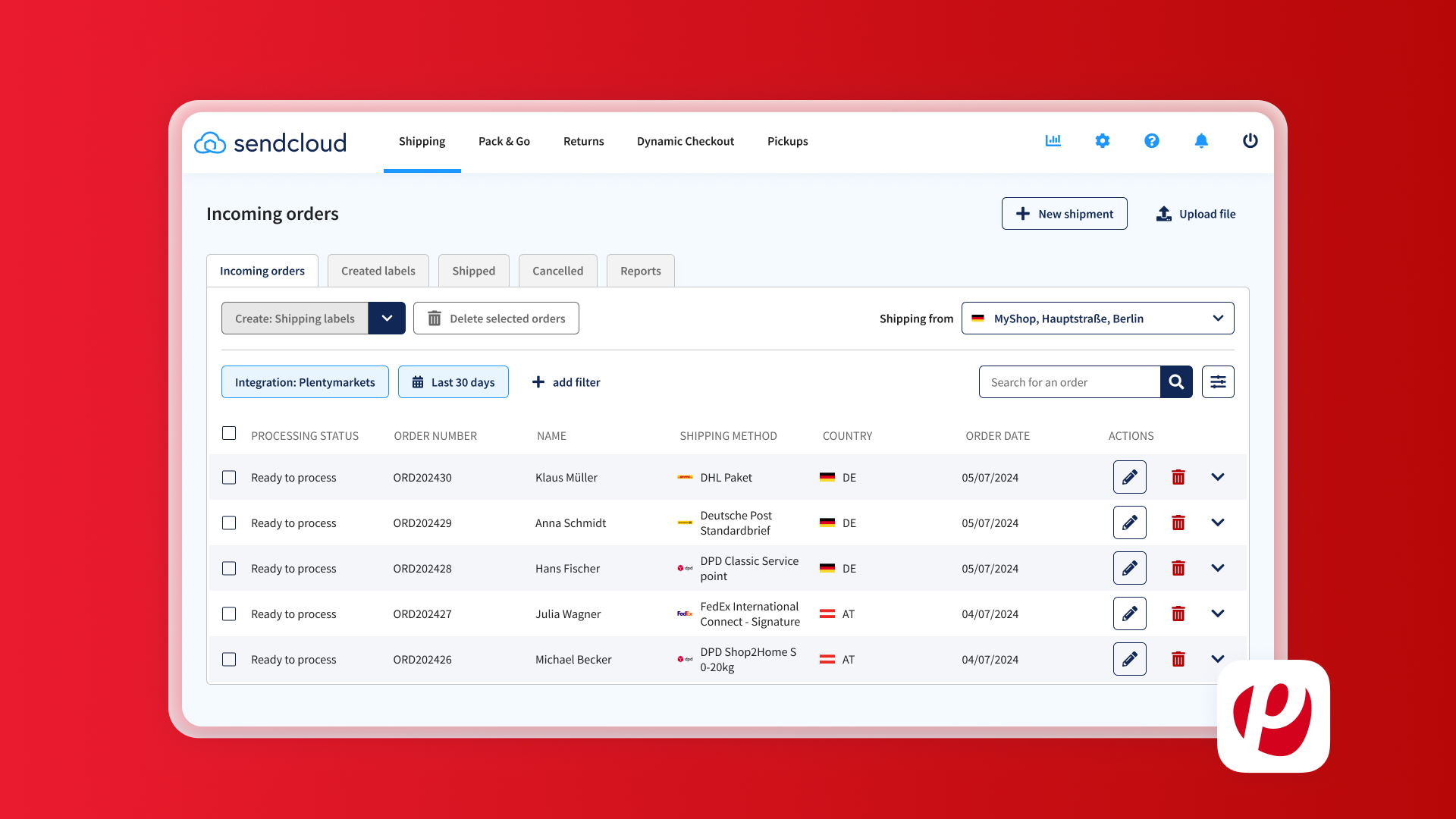
📷 Sendcloud incoming-orders shipping interface. Source: official vendor website/documentation.
💚 What we like
Strong European carrier and ecommerce integration footprint.
Combines outbound shipping with tracking and returns instead of treating them as separate add-ons.
Useful rules and automation for reducing repetitive label decisions.
🟠 What to know
Origin-country support matters; not every European market has the same access model.
Paid pricing combines subscription fees with per-label charges on published plans.
💡 Why this score
Sendcloud earns a top-tier score for European ecommerce fit, operational control and a cohesive post-purchase workflow. It trails the broader global leaders mainly because origin coverage and commercial terms are more region-dependent, but within its core European footprint it is a very complete merchant platform.
💰 Pricing
Free up to 20 parcels/month. Published paid plans start at €28/month plus per-label fees; country-specific pricing applies. Enterprise is custom.
✅ Best fit
European SMB and mid-market merchants managing multiple carriers, stores, tracking experiences and returns.
🚫 Less ideal for
Businesses shipping primarily from unsupported origins or teams looking for an API-first infrastructure layer.
🧩 Key capabilities
Import orders from ecommerce platforms
Create labels across multiple carriers
Use Sendcloud rates or connected carrier contracts
Automate carrier and shipping-method selection
Send branded tracking updates
Run a self-service return portal
🔎 Official sources
#5 EasyPost
89/100 · 💰 Free · 🧩 Advanced · 🏢 Mid-market–Enterprise · ⚙️ Developer-led
🎯 Best for
Technical teams that want shipping infrastructure and APIs rather than a merchant-first operating console
⚡ Choose EasyPost if ...
shipping needs to be embedded into your own product, operations stack or custom fulfillment workflow.
EasyPost is the most infrastructure-oriented option near the top of this list. Its APIs cover labels, rates, tracking, address verification, insurance and related shipping functions, while the EasyPost Wallet can provide access to carrier rates. That flexibility is valuable when shipping is part of a custom application or a deeply integrated operations stack. It is less naturally suited to teams that want a polished, all-in-one merchant dashboard as the center of their fulfillment process.
📷 EasyPost dashboard label-purchase interface. Source: official vendor website/documentation.
💚 What we like
Developer-first APIs cover the core shipping lifecycle.
Strong fit for custom products, marketplaces and deeply integrated operational systems.
EasyPost Wallet can simplify access to carrier rates without every merchant bringing a contract.
🟠 What to know
Implementation usually needs engineering ownership for the highest-value use cases.
A merchant that mainly wants a ready-made shipping desk may find a dashboard-first product simpler.
💡 Why this score
EasyPost scores extremely well on integrations, implementation flexibility and advanced scale. It gives up points on merchant-facing workflow simplicity because its biggest advantage appears when a company wants to build shipping into its own software or systems rather than operate only through a packaged dashboard.
💰 Pricing
EasyPost Wallet carrier access is free up to 3,000 labels. Bring-your-own carrier accounts start at $20/month plus per-label fees. Enterprise plans are custom.
✅ Best fit
Mid-market and enterprise teams with developers, custom fulfillment logic, marketplaces or embedded shipping requirements.
🚫 Less ideal for
Small merchants that want a turnkey dashboard and little or no technical implementation.
🧩 Key capabilities
Create labels through shipping APIs
Rate-shop carrier services
Verify shipping addresses
Track parcels programmatically
Add shipping insurance workflows
Embed shipping into custom applications and operations systems
🔎 Official sources
#6 ShippyPro
88/100 · 💰 Mid · 🧩 Intermediate · 🏢 Mid-market–Enterprise · ⚙️ Low-code
🎯 Best for
Higher-volume ecommerce teams that need multi-carrier orchestration, shipping rules and API options
⚡ Choose ShippyPro if ...
you need a more operationally controlled shipping layer with broad carrier connections and volume-based plans.
ShippyPro is built for teams that have moved beyond basic label printing into multi-carrier operations. It connects ecommerce channels and carriers, supports shipping rules, label and document generation, rate comparison, tracking and APIs. Published Professional plans start at materially higher monthly volumes than SMB-first tools, which makes the product easier to justify when shipment throughput is already substantial. Enterprise options add a more tailored path for complex logistics environments.
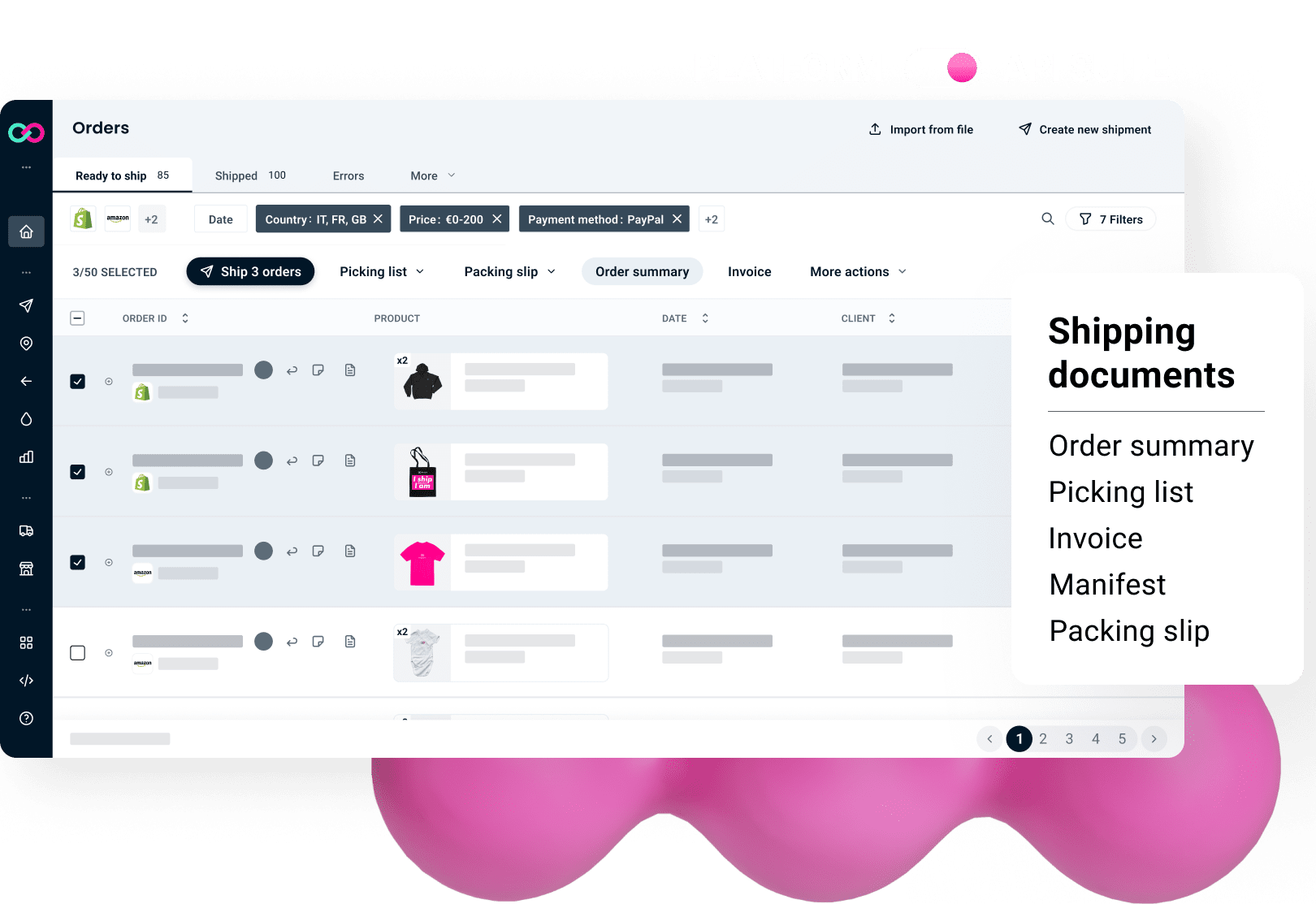
📷 ShippyPro shipping-document and order-management interface. Source: official vendor website/documentation.
💚 What we like
Designed around multi-carrier shipping at meaningful ecommerce volume.
Strong automation and shipping-rule controls.
API suite and integrations support more customized workflows as operations mature.
🟠 What to know
Entry pricing is higher than lightweight merchant shipping tools.
Teams should validate specific carrier connectors and commercial terms in each operating market.
💡 Why this score
ShippyPro ranks highly because its core shipping controls, carrier integrations and scale are strong. It is less attractive for very small merchants on price, but for established ecommerce operations the combination of rules, documents, integrations and APIs provides a capable bridge between merchant software and enterprise logistics tooling.
💰 Pricing
Professional starts at €199/month on monthly billing for 2,000 labels; annual and two-year discounts are offered. Enterprise pricing is custom.
✅ Best fit
Mid-market and enterprise ecommerce operations shipping enough volume to benefit from automation and multi-carrier control.
🚫 Less ideal for
Low-volume sellers that only need inexpensive label buying and simple store imports.
🧩 Key capabilities
Connect ecommerce channels and carrier accounts
Compare rates and create shipping labels
Automate carrier and service selection
Generate shipping and customs documents
Track shipments and delivery events
Use APIs for custom shipping workflows
🔎 Official sources
#7 nShift
87/100 · 💰 Enterprise price · 🧩 Advanced · 🏢 Mid-market–Enterprise · ⚙️ Enterprise implementation
🎯 Best for
Large European and global shippers that need very broad carrier connectivity and enterprise delivery controls
⚡ Choose nShift if ...
carrier breadth, ERP or WMS integration and enterprise delivery governance matter more than self-serve simplicity.
nShift Delivery is a mature delivery-management layer for organizations that need extensive carrier connectivity and controlled shipping workflows. It supports multi-carrier booking, batch label and document printing, rules, ERP and warehouse management system connections, tracking and returns. The product is positioned for more operationally complex environments than a typical SMB shipping app. Buyers should expect a sales-led commercial process and should validate the exact carrier, integration and implementation scope for each market.
📷 nShift shipment-viewer configuration interface. Source: official vendor website/documentation.
💚 What we like
Very broad carrier network and strong European logistics footprint.
Designed to connect with enterprise resource planning and warehouse systems.
Deep shipping controls including rules, batch printing, tracking and returns support.
🟠 What to know
Pricing is tailored rather than transparently self-serve.
Implementation and governance are heavier than with simpler merchant shipping dashboards.
💡 Why this score
nShift scores strongly on core shipping depth, workflow control, integrations and enterprise scale. It sits below ShippyPro and the top merchant platforms because setup and pricing are less accessible to smaller teams, but for complex carrier environments those same enterprise characteristics can be the reason to shortlist it.
💰 Pricing
Custom quote. nShift describes tiered subscription plans, with pricing tailored to the deal and implementation scope.
✅ Best fit
Mid-market and enterprise retailers, manufacturers and logistics teams with broad carrier and systems-integration needs.
🚫 Less ideal for
Small stores that want instant self-serve setup and transparent low-cost monthly plans.
🧩 Key capabilities
Book shipments across a broad carrier network
Batch-create labels and shipping documents
Apply smart carrier and service rules
Connect ERP and warehouse management systems
Track and trace shipments
Support returns and delivery-management workflows
🔎 Official sources

#8 Shipmondo
85/100 · 💰 Budget · 🧩 Intermediate · 🏢 SMB–Mid-market · ⚙️ No-code
🎯 Best for
Nordic and European ecommerce teams that want shipping, order handling and pick-and-pack in one platform
⚡ Choose Shipmondo if ...
you want a merchant-centric logistics workspace that can extend from labels into order management and warehouse execution.
Shipmondo combines shipping with a surprisingly broad ecommerce operations layer. Beyond carrier booking and labels, merchants can use order management, pick-and-pack workflows, automation, delivery checkout, returns and analytics. The product is especially relevant in its European and Nordic footprint, where supported carriers and integrations line up well with local ecommerce needs. Pricing is approachable, though businesses using their own carrier agreements should include per-label fees when comparing total cost.

📷 Shipmondo shipping workflow interface. Source: official vendor website/documentation.
💚 What we like
Strong combination of shipping, order management and pick-and-pack for ecommerce teams.
Low-cost entry plans with useful automation as volume grows.
Good operational tooling for teams that want fewer separate systems in the warehouse.
🟠 What to know
Carrier breadth is smaller than the largest global networks, so exact lanes need validation.
Using your own carrier agreements can introduce per-label transaction fees.
💡 Why this score
Shipmondo earns a strong score for value, ecommerce fit and operational breadth. It lacks the global carrier scale of the leaders, but merchants in its strongest markets get an unusually cohesive combination of labels, order management, warehouse workflows and automation at accessible software pricing.
💰 Pricing
Free plan available. Essentials is DKK 99/month and Pro is DKK 249/month. Using your own carrier agreement can add a per-label fee depending on volume.
✅ Best fit
European SMB and mid-market merchants, especially teams that want shipping and practical warehouse/order workflows together.
🚫 Less ideal for
Enterprises that require the broadest possible global carrier network and complex multinational governance.
🧩 Key capabilities
Book shipments and print carrier labels
Manage imported ecommerce orders
Run pick-and-pack workflows
Automate repetitive shipping actions
Configure delivery checkout and returns
Use analytics, integrations and APIs
🔎 Official sources

#9 AfterShip Shipping
84/100 · 💰 Budget · 🧩 Intermediate · 🏢 SMB–Mid-market · ⚙️ Low-code
🎯 Best for
Brands already using AfterShip that want label creation and carrier management in the same post-purchase ecosystem
⚡ Choose AfterShip Shipping if ...
you want shipping execution to sit close to AfterShip tracking, returns and other post-purchase workflows.
AfterShip Shipping brings label creation, rate management and multi-channel order import into the wider AfterShip post-purchase suite. It can import orders from major commerce platforms, connect carrier accounts, create labels and support routing decisions through a merchant interface and APIs. The strongest reason to choose it is ecosystem fit: teams already standardizing on AfterShip for tracking or returns can reduce tool sprawl while keeping shipping data close to the rest of the delivery experience.

📷 AfterShip Shipping product interface. Source: official vendor website/documentation.
💚 What we like
Natural fit with the broader AfterShip tracking and returns ecosystem.
Supports multichannel order import and connected carrier accounts.
Accessible starting price with API options as workflows become more technical.
🟠 What to know
Shipping is one product inside a broader suite, so buyers should compare standalone depth with dedicated shipping leaders.
The strongest value appears when other AfterShip products are already part of the stack.
💡 Why this score
AfterShip Shipping scores well on ecommerce fit, integrations and value, especially for existing AfterShip customers. It trails the specialist leaders in mature shipping workflow depth, but the suite-level advantage can be significant when tracking, returns and shipping need to share one post-purchase ecosystem.
💰 Pricing
Essentials starts at $9/month for 1,200 labels per year. Pro starts at $69/month for 24,000 labels per year. Enterprise is custom.
✅ Best fit
SMB and mid-market brands already using, or planning to use, AfterShip for post-purchase operations.
🚫 Less ideal for
Buyers seeking the deepest standalone shipping workstation without interest in the wider AfterShip suite.
🧩 Key capabilities
Import orders from major ecommerce platforms
Connect carrier accounts and shipping services
Create and print shipping labels
Manage rates and shipping rules
Use APIs for shipping workflows
Connect shipping with tracking and post-purchase operations
🔎 Official sources
#10 ShippingEasy
82/100 · 💰 Free · 🧩 Beginner · 🏢 SMB · ⚙️ No-code
🎯 Best for
US-focused small ecommerce teams that want straightforward labels, discounted rates and automation
⚡ Choose ShippingEasy if ...
you want a simple merchant workflow for US shipping and do not need an enterprise transport stack.
ShippingEasy remains a practical SMB option for merchants that want order import, discounted carrier rates, label creation, automation and customer-facing tracking without an enterprise implementation. The product is particularly oriented toward US ecommerce workflows. Its free plan lowers the barrier to testing, while paid tiers expand shipment volume. Compared with the higher-ranked platforms, the trade-off is a narrower strategic ceiling for large, globally complex shipping operations.
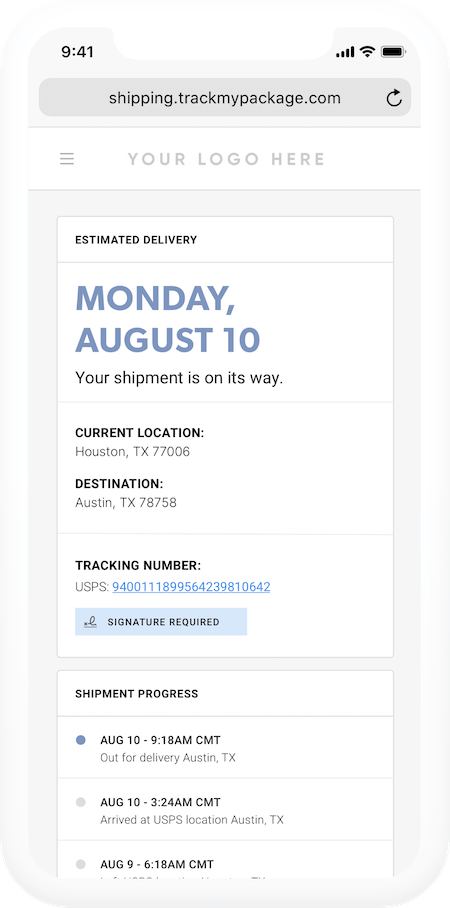
📷 ShippingEasy branded tracking interface. Source: official vendor website/documentation.
💚 What we like
Free starter tier makes evaluation inexpensive for small merchants.
Merchant-friendly order import and shipping automation are easy to understand.
Discounted USPS and UPS access is useful for US-centric sellers.
🟠 What to know
The product is more US-centric than global shipping platforms.
Large, multi-region enterprises may outgrow its operational and integration depth.
💡 Why this score
ShippingEasy scores well for SMB value, usability and ecommerce relevance. It is intentionally simpler than the enterprise-oriented tools above it, which helps smaller merchants get started quickly but reduces its score for advanced scale, global carrier breadth and complex implementation scenarios.
💰 Pricing
Starter is free for up to 25 shipments/month. Growth starts at $19.99/month for 26–200 shipments, with higher-volume tiers available.
✅ Best fit
US-based SMB ecommerce sellers that want simple labels, discounted rates and basic workflow automation.
🚫 Less ideal for
Global or enterprise operations that need deep carrier orchestration, multi-warehouse governance or developer-first infrastructure.
🧩 Key capabilities
Import orders from connected selling channels
Access discounted USPS and UPS rates
Buy and print shipping labels
Automate common shipping rules
Send tracking and delivery communications
Connect ecommerce stores and marketplaces
🔎 Official sources
#11 Packlink PRO
81/100 · 💰 Free · 🧩 Beginner · 🏢 SMB · ⚙️ No-code
🎯 Best for
European small merchants that want a free shipping dashboard and pay only for the carrier services they use
⚡ Choose Packlink PRO if ...
you want a low-cost way to connect stores, compare shipping options and manage labels without a software subscription.
Packlink PRO is a straightforward merchant shipping platform built around free access to the software and pay-as-you-ship carrier services. It connects popular ecommerce platforms and marketplaces, imports orders, supports bulk shipment management, label printing, tracking and shipping rules. For small European merchants that do not want another monthly software bill, that commercial model is attractive. The trade-off is less advanced workflow and enterprise depth than the higher-ranked platforms.
📷 Packlink PRO account interface. Source: official vendor website/documentation.
💚 What we like
No software subscription is required for the core PRO workflow.
Useful integrations with major ecommerce platforms and marketplaces.
Simple bulk shipment, label and tracking workflows fit smaller merchant teams.
🟠 What to know
Carrier pricing and service availability depend on route, origin and the services Packlink offers in the market.
Advanced enterprise controls and implementation depth are more limited than specialist platforms higher in the ranking.
💡 Why this score
Packlink PRO scores strongly on price-to-value and basic ecommerce fit. It is a sensible low-cost option for smaller European sellers, but its score is held back by a lower ceiling for advanced automation, integrations and enterprise-scale shipping governance compared with the leading platforms.
💰 Pricing
The core Packlink PRO platform is free; merchants pay for the shipping services they book. Regional paid add-ons or subscription options may vary by market.
✅ Best fit
European SMB merchants that want store integrations, carrier comparison and labels without a recurring core software fee.
🚫 Less ideal for
Large multi-country operations that need deep workflow control, custom implementation and enterprise carrier governance.
🧩 Key capabilities
Connect ecommerce stores and marketplaces
Import and manage orders
Compare carrier services and prices
Create and print shipping labels
Manage shipments in bulk
Track shipments and apply shipping rules
🔎 Official sources
#12 Pirate Ship
78/100 · 💰 Free · 🧩 Beginner · 🏢 SMB · ⚙️ No-code
🎯 Best for
US small shippers that mainly want inexpensive USPS and UPS postage with zero software subscription
⚡ Choose Pirate Ship if ...
your workflow is US-centric and you care more about simple discounted postage than broad global carrier orchestration.
Pirate Ship is the clearest value play in this comparison for small US shippers. The software is free, with no monthly subscription or per-label software fee, and focuses on discounted USPS and UPS postage, label creation, imports, batch workflows and tracking. It is intentionally narrower than global multi-carrier platforms. For Etsy, Shopify and other small sellers shipping mostly from the United States, that simplicity can be a strength rather than a limitation.

📷 Pirate Ship shipping interface illustration from its official site. Source: official vendor website/documentation.
💚 What we like
No monthly software fee or per-label software markup.
Very simple path to discounted USPS and UPS shipping.
Friendly workflow for small merchants, spreadsheets and common ecommerce integrations.
🟠 What to know
Carrier scope is intentionally narrow compared with global multi-carrier platforms.
Not designed for complex enterprise transport orchestration or large multinational carrier networks.
💡 Why this score
Pirate Ship gets the highest pricing-and-value marks in the set and performs well on the core small-merchant job. Its overall score is lower because carrier breadth, advanced workflow control, integrations and enterprise-scale capabilities are intentionally much narrower than the rest of the shortlist.
💰 Pricing
Free software with no monthly, markup or per-label software fees; merchants pay for postage purchased through the platform.
✅ Best fit
US-based small businesses and online sellers using USPS and UPS and prioritizing low software cost.
🚫 Less ideal for
Internationally complex operations or teams that need many carriers, enterprise governance and deep API orchestration.
🧩 Key capabilities
Buy discounted USPS and UPS postage
Create and print shipping labels
Import orders from ecommerce integrations
Upload spreadsheets for batch shipping
Manage shipment tracking
Use Simple Export Rate for eligible international parcels
🔎 Official sources
🎯 Shortlist these six first
ShipStation — best all-round merchant shipping control center.
Shippo — best balance of easy setup and API headroom.
Easyship — strongest cross-border orientation.
Sendcloud — excellent Europe-first shipping, tracking and returns stack.
EasyPost — best fit for developer-led embedded shipping.
nShift — strongest enterprise delivery-management candidate in this set.
🧪 Run this test before you buy
Do not compare shipping tools using a generic demo order. Use the same representative order set, carrier contracts and destination mix in every trial. Include your awkward cases, not just the easy domestic parcel. The winner is the system that handles your real exceptions with the least manual work while preserving the rates, controls and data your team needs.
Import orders from every store and marketplace you actually use.
Create a normal domestic label from order import to print.
Run a batch of at least 20 mixed orders and measure clicks and corrections.
Test your own carrier contract and the vendor’s negotiated rates on the same parcels.
Create an international shipment with realistic customs data.
Force a rule edge case such as weight, destination, service or SKU-based routing.
Process a return and check both staff and shopper experience.
Trace a shipment exception from carrier event to customer communication.
Add a second warehouse, user or ship-from location if that is on your roadmap.
Export shipment data or call the API so you know how portable the operating data is.
📏 Record the same things for every vendor: time to first label, steps per shipment, error rate, true monthly software cost, label fees, carrier-rate delta, exception handling time, implementation effort and any feature that requires a higher plan.
🎤 10 questions to ask in every demo
Which carriers and services are available from our exact ship-from countries?
Can we use our existing negotiated carrier contracts, and are there extra fees for doing so?
Which rules can automatically select carriers, services, packaging or warehouses?
How are customs data, duties, taxes and paperless trade handled for our international lanes?
What happens when a carrier API is unavailable or a label purchase fails?
How do you handle batch shipping, reprints, voids and split shipments?
What tracking and delivery-exception data is available to our team and customers?
Which ecommerce, ERP and warehouse integrations are native, and which require API work?
What changes in pricing when our monthly label volume doubles or we add locations?
How do we export our shipment history, configurations and tracking data if we leave?
❓ FAQ
What is ecommerce shipping software?
Ecommerce shipping software connects order sources with carriers so a merchant can compare services, buy and print labels, pass customs data, track shipments and automate repetitive decisions. Some products are merchant dashboards, while others are API infrastructure. The right category depends on whether staff will operate the tool directly or your developers will embed shipping into another system.
Is shipping software the same as a 3PL?
No. Shipping software helps your team or warehouse execute and manage deliveries. A third-party logistics provider, or 3PL, physically stores inventory and performs fulfillment for you. Some 3PLs use products in this list behind the scenes, but buying a shipping platform does not outsource the warehouse work itself.
Can shipping software really lower carrier costs?
It can, but not automatically. Some vendors provide pre-negotiated rates, while others let you connect your own carrier contracts. The better deal depends on origin, destination, weight, dimensions, service and volume. Compare the same parcel set using both the vendor rates and your own contracts before assuming the software will reduce postage.
What matters most for international shipping?
Check carrier availability from your origin, customs-data requirements, commercial invoices, duties and taxes, paperless trade support, service-point options and how returns work across borders. A platform may advertise many carriers globally while supporting only a subset from your specific ship-from country, so origin-specific testing matters more than the headline carrier count.
When should I choose an API-first shipping platform?
Choose an API-first platform when shipping needs to be embedded into your product, marketplace, warehouse system or custom operations flow. It makes the most sense when developers own the workflow and a packaged merchant dashboard would create duplicate steps. If operations staff simply need to import orders and print labels, a dashboard-first platform is usually faster to deploy.
How should I compare pricing?
Add the monthly subscription, per-label fees, charges for bringing your own carrier account, premium integrations, extra users or locations, and any implementation cost. Then model postage separately using your real shipment mix. A free software plan can still be more expensive overall if its available carrier rates are worse for your routes, and a paid plan can pay back quickly through automation.
About this research
MarketMaze reviewed the exact 12 tools assigned to this category and checked current product, pricing and documentation pages from the vendors. Scores focus on the shipping and delivery-management job defined for this comparison, not on review-site ratings or brand popularity. Pricing can change by country, volume and contract, so merchants should re-check final commercial terms before purchase.
