
MARKETMAZE · ECOMMERCE TOOLS · RESEARCH
9 Best SEO & Search Optimization Tools for Ecommerce (2026)
The right ecommerce SEO stack depends on the job: finding demand, diagnosing crawl and indexation problems, optimizing content, or implementing changes inside your store. We compared nine established tools across those distinct workflows so you can shortlist the right combination instead of buying overlapping software.
Updated 25 September 2026 · Pricing and product claims checked against official vendor sources.
👋 New to this category?
Ecommerce SEO software helps stores understand search demand, monitor what Google can discover and index, diagnose technical issues, optimize product and category content, and measure organic performance. No single tool is best at every layer. Research suites estimate market opportunity, crawlers inspect the site itself, Google Search Console reports first-party Google data, content tools guide page creation, and platform plugins help implement metadata and schema. The best stack usually combines two or three of these roles rather than forcing one product to do everything.
🧭 Jump to a tool
🏆 The quick answer
🏆 Best overall
Semrush
🌱 Best for getting started
Google Search Console
💸 Best value
Rank Math
🏢 Best for larger teams / enterprise
Ahrefs
🧠 Best for advanced or technical users
Screaming Frog SEO Spider
🛒 Best for WooCommerce
Yoast SEO
MarketMaze take
Start with Google Search Console even if you buy nothing else. Then add one primary analysis tool based on your bottleneck: Semrush, Ahrefs or SE Ranking for broad research; Screaming Frog or Sitebulb for technical depth; Surfer for content production; Rank Math or Yoast for WooCommerce execution. The biggest buying mistake is paying for several suites that answer the same research questions while leaving implementation ownership unclear.
📊 Tool comparison & scores
Rank | Tool | Score | Best for | Pricing |
|---|---|---|---|---|
1 | Semrush | 92/100 | Teams that want one broad SEO workspace for research, auditing, competitive | From $139/mo |
2 | Ahrefs | 91/100 | SEO teams prioritizing competitor research, backlinks, keyword discovery and deep site | From $129/mo |
3 | SE Ranking | 89/100 | Teams wanting rank tracking, audits and research with clearer packaged limits | From $129/mo |
4 | Screaming Frog SEO Spider | 88/100 | Technical SEOs who need granular crawling, extraction and diagnostics across complex | Free; $279/yr paid |
5 | Google Search Console | 87/100 | Every ecommerce site that needs first-party Google query, indexing and search-performance | Free |
6 | Sitebulb | 86/100 | Technical SEO teams that want deep crawling with stronger visual prioritization | Cloud from £95/mo |
7 | Rank Math | 85/100 | WooCommerce stores that want broad on-page and technical SEO controls inside | Free; Pro from €7.99/mo |
8 | Surfer | 84/100 | Content teams optimizing ecommerce editorial and collection-page copy around search intent | From ~$49/mo annual |
9 | Yoast SEO | 82/100 | WooCommerce teams that want guided, familiar on-page SEO and ecommerce-specific schema | $178.80/yr WooCommerce |
Prices are public list prices checked on 25 September 2026 and may vary by billing term, currency, usage, seats, add-ons or taxes.
🧠 How the scoring works
This ranking uses MarketMaze proprietary scoring.
Dimension | Weight | What we look for |
|---|---|---|
Core job performance | 30% | Depth and reliability for the primary SEO job the product is designed to perform. |
Ecommerce fit | 20% | Usefulness for product, collection, catalog, faceted-navigation and transactional search workflows. |
Workflow & control | 15% | How efficiently teams can investigate, prioritize, collaborate, export and repeat work. |
Integrations & implementation | 15% | Connections to store, analytics and search systems plus how actionable the outputs are. |
Pricing & value | 10% | Cost relative to useful limits, breadth and the amount of duplicated tooling avoided. |
Scale & advanced capabilities | 10% | Large-site limits, automation, APIs, multi-project support and depth for specialist teams. |
Scores are comparative within this category. Ties are broken first by ecommerce fit and then by core job performance, so a narrower specialist product can outrank a broader suite when it solves the ecommerce job more effectively.
🤔 Do you even need ecommerce SEO software?
Probably yes ✅
You have hundreds of indexable product or collection URLs, organic search matters commercially, and someone owns a recurring process for research, technical health and content improvements.
Maybe 🟡
Your store is still small but search is becoming material. Start with Search Console and one focused tool for the bottleneck you can actually fix this quarter.
Probably not yet ⏳
You have a tiny catalog, almost no search demand validated, or no capacity to change templates and content. Basic Search Console plus platform defaults may be enough for now.

🥇 1. Semrush
92/100 · 💰 Mid ($100–499) · 🧩 Advanced · 🏢 Mid-market–Enterprise · ⚙️ Specialist-led
🎯 Best for: Teams that want one broad SEO workspace for research, auditing, competitive intelligence and reporting
⚡ Choose Semrush if you want keyword, competitor, technical and AI-search workflows in one suite rather than stitching together specialist tools.
Semrush is the broadest all-rounder here for ecommerce teams that need research, technical diagnostics and ongoing visibility in one workspace. Its SEO stack combines keyword and competitor research, rank tracking, backlink analysis and Site Audit, while newer AI-search reporting adds another layer for teams watching discovery beyond classic results. The trade-off is breadth: it takes real setup and process discipline to avoid paying for modules your team rarely uses.

📷 Semrush Site Audit combines technical health, crawl issues and AI-search diagnostics in one overview. Source: vendor website/documentation.
💚 What we like
Broad research coverage connects keyword demand, competitors, backlinks and technical issues inside one recurring operating rhythm.
Site Audit prioritizes errors and warnings while exposing crawl detail that can be handed to content or development teams.
Strong reporting and competitive intelligence suit multi-brand, multi-market or agency-style ecommerce workflows that need repeatable visibility.
🟠 What to know
The product surface is large, so smaller stores can pay for capability they do not routinely use.
Useful outputs still need an experienced SEO operator to translate findings into catalog, template and internal-link changes.
💡 Why this score: Semrush scores highest because it covers the most core SEO jobs with strong competitive data, technical auditing, reporting and scale. It is not the cheapest or simplest option, but the breadth reduces tool switching for established ecommerce teams running an ongoing search program.
💰 Pricing: SEO starts around $139/month on the current monthly plan; broader SEO + AI Search bundles start higher, with larger plans for expanded limits and teams.
✅ Best fit: Growing ecommerce teams, agencies and multi-market brands that want one primary SEO suite for research, technical work and recurring reporting.
🚫 Less ideal for: Small stores that mainly need basic Search Console monitoring or a lightweight WooCommerce plugin rather than a broad research platform.
🧩 Key capabilities
Keyword and search-intent research
Competitive domain and keyword analysis
Technical Site Audit crawling
Rank tracking and visibility monitoring
Backlink research and link analysis
AI-search and reporting workflows
🔎 Official sources: Product · Pricing · Documentation
🥈 2. Ahrefs
91/100 · 💰 Mid ($100–499) · 🧩 Advanced · 🏢 Mid-market–Enterprise · ⚙️ Specialist-led
🎯 Best for: SEO teams prioritizing competitor research, backlinks, keyword discovery and deep site auditing
⚡ Choose Ahrefs if competitive research and link intelligence are central to your growth model and you want an excellent technical crawler beside them.
Ahrefs is a particularly strong choice when competitive research, backlink analysis and keyword discovery sit at the center of the SEO workflow. Site Audit adds a capable technical layer, including JavaScript crawling, health scoring and issue reporting, so teams can move from market opportunity to site diagnostics without leaving the platform. Ecommerce teams should still plan how findings become product, collection and template changes because Ahrefs is an analysis suite, not a merchandising workflow tool.

📷 Ahrefs Site Audit overview surfaces health, issue distribution and crawl diagnostics for a site. Source: vendor website/documentation.
💚 What we like
Excellent competitor and backlink data helps teams understand where category rivals earn visibility and authority before prioritizing work.
Site Audit covers technical and on-page issues with useful segmentation, internal-link opportunities and JavaScript crawling for modern storefronts.
Strong keyword tooling supports category, product and editorial research without requiring a separate discovery platform.
🟠 What to know
Usage limits and credit mechanics deserve attention before rollout, especially for larger teams with frequent exploratory analysis.
It is strongest as an expert research platform; non-specialists may need clearer internal workflows for turning findings into ecommerce changes.
💡 Why this score: Ahrefs is close behind Semrush because its research quality and technical auditing are exceptionally strong, especially for competitive and backlink-led programs. It loses a little ground on workflow breadth and implementation guidance, but remains a top choice for experienced ecommerce SEO teams.
💰 Pricing: Lite starts at $129/month, Standard at $249, Advanced at $449, with Enterprise from about $1,499/month on annual commitment; lower-cost Starter and free tools also exist.
✅ Best fit: In-house SEO teams, agencies and established ecommerce brands that make keyword, backlink and competitor intelligence a recurring part of planning.
🚫 Less ideal for: Beginners who mainly need guided on-page optimization or store-native controls and are unlikely to use advanced research data regularly.
🧩 Key capabilities
Site Explorer competitive research
Keywords Explorer demand research
Backlink and referring-domain analysis
Site Audit technical crawling
Rank Tracker monitoring
Internal-link opportunity discovery
🔎 Official sources: Product · Pricing · Documentation
🥉 3. SE Ranking
89/100 · 💰 Mid ($100–499) · 🧩 Intermediate · 🏢 SMB–Mid-market · ⚙️ Specialist-led
🎯 Best for: Teams wanting rank tracking, audits and research with clearer packaged limits than larger enterprise-style suites
⚡ Choose SE Ranking if you need a capable all-round SEO platform but want a more contained operating model for projects, keywords and audits.
SE Ranking combines rank tracking, keyword and competitor research, backlinks, website auditing and reporting in a package that feels easier to scope than the largest SEO suites. Its Website Audit scans technical parameters, indexing, metadata, resources and links, while project tools tie those findings to ongoing monitoring. The current plans have moved upmarket in price, but they also include substantial keyword, audit and API capacity, making the platform attractive to growing teams that need breadth without maximum enterprise complexity.
📷 SE Ranking’s project navigation brings Website Audit beside rankings, competitors, backlinks and reporting. Source: vendor website/documentation.
💚 What we like
Balanced toolkit covers recurring jobs most ecommerce SEO teams need without forcing separate products for every workflow.
Website Audit checks technical, indexation, metadata, resource and link issues and provides explanations for identified problems.
Project-based organization and reporting make it practical for agencies or teams managing multiple stores, markets or business units.
🟠 What to know
The latest plans are no longer a low-cost option, so buyers should model keyword, audit and project limits before committing.
Specialist tools can still go deeper in individual areas such as crawling, backlink intelligence or content optimization.
💡 Why this score: SE Ranking scores well because it offers unusually balanced coverage across tracking, research, audits and reporting with a manageable workflow. Its current pricing is higher than its historic positioning, but the included limits and breadth still make sense for serious SMB and mid-market SEO programs.
💰 Pricing: Core is $129/month, Growth $279/month, with lower effective monthly rates on annual billing; Enterprise uses custom pricing.
✅ Best fit: Growing ecommerce brands and agencies that want one operational SEO platform with rank tracking, audits, competitive research and reporting.
🚫 Less ideal for: Very small stores looking for a cheap starter tool, or technical specialists who only need the deepest possible crawler.
🧩 Key capabilities
Daily rank tracking
Keyword and competitor research
Website Audit crawling
Backlink checking and monitoring
SEO reporting
API and MCP access on current plans
🔎 Official sources: Product · Pricing · Documentation

4️⃣ 4. Screaming Frog SEO Spider
88/100 · 💰 Free · 🧩 Advanced · 🏢 All sizes · ⚙️ Specialist-led
🎯 Best for: Technical SEOs who need granular crawling, extraction and diagnostics across complex ecommerce sites
⚡ Choose Screaming Frog SEO Spider if you want direct control over how a storefront is crawled, filtered, rendered and exported for technical investigation.
Screaming Frog SEO Spider is the specialist choice when the problem is not “what keywords should we target?” but “what exactly is happening across thousands of URLs?” The desktop crawler exposes response codes, canonicals, directives, metadata, internal links, duplicate content, JavaScript rendering and many other technical signals. Its free tier crawls up to 500 URLs, while the paid license removes that cap and unlocks advanced configuration. It is powerful, but the interface assumes the operator understands technical SEO.
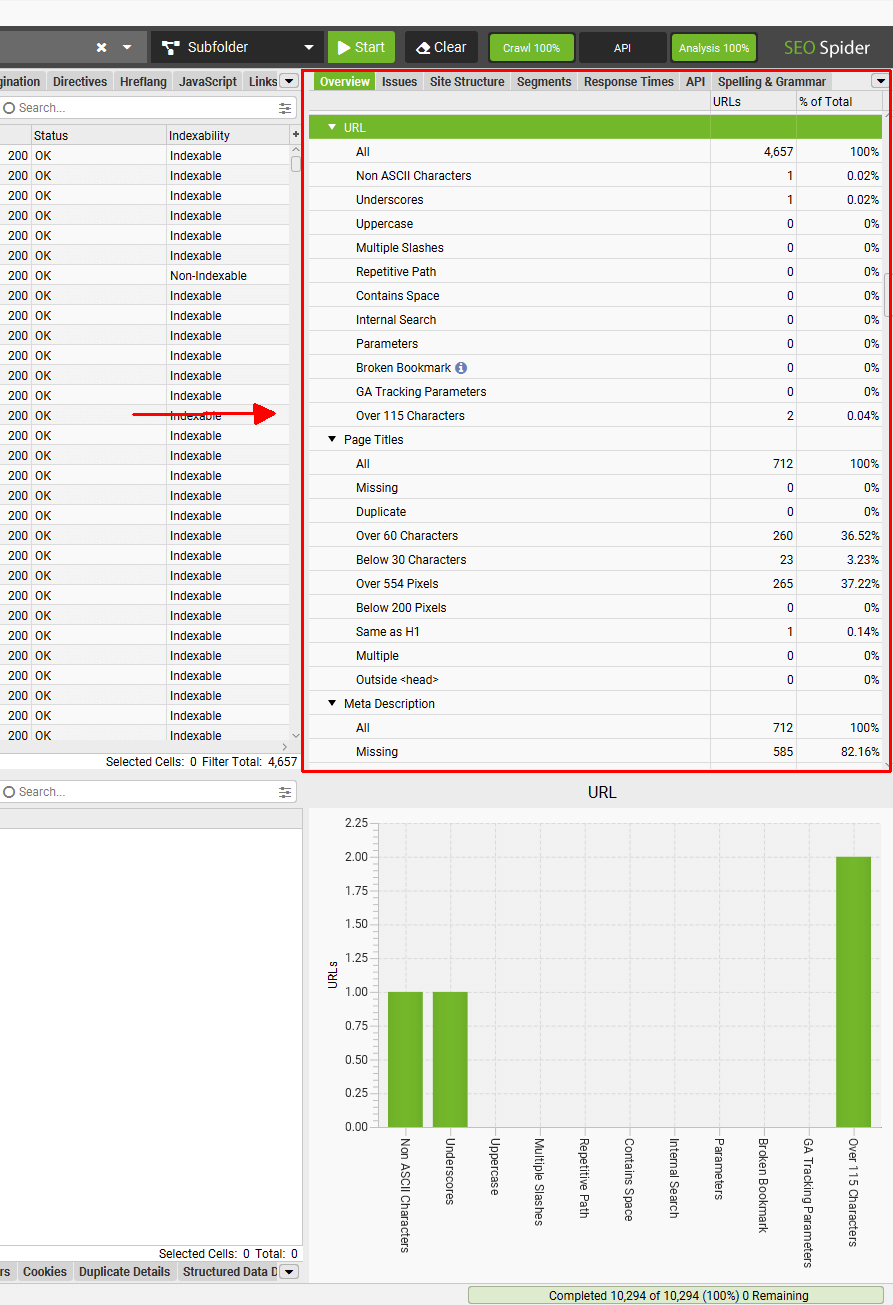
📷 Screaming Frog’s crawl overview exposes URL-level technical signals and issue counts in real time. Source: vendor website/documentation.
💚 What we like
Granular crawl controls let specialists reproduce complex ecommerce scenarios, including JavaScript rendering, authentication, exclusions and custom extraction.
The crawler is excellent for migrations, faceted navigation, redirect analysis, metadata audits and large-scale internal-link investigations.
A meaningful free version lets teams test the workflow on smaller sites before buying a license.
🟠 What to know
It is a desktop specialist tool rather than a broad research suite, so keyword demand and competitor strategy need other sources.
Large crawls and advanced configurations can be intimidating for marketers without hands-on technical SEO experience.
💡 Why this score: Screaming Frog scores highly on core technical performance and value. It is narrower than full SEO suites, but for crawling and diagnostics that specialization is a strength. Ecommerce teams with complex catalogs often get more actionable technical evidence here than from lighter, dashboard-first audit tools.
💰 Pricing: Free for crawls up to 500 URLs. The paid SEO Spider license is $279 per user per year and unlocks unlimited crawling plus advanced features.
✅ Best fit: Technical SEOs, developers and agencies auditing complex catalogs, migrations, faceted navigation, JavaScript storefronts or large internal-link structures.
🚫 Less ideal for: Teams that want a guided all-in-one SEO workflow with keyword research, rank tracking and executive dashboards in the same product.
🧩 Key capabilities
Full-site technical crawling
JavaScript rendering
Redirect and response-code audits
Canonical and directive analysis
Custom extraction and search
GA, GSC and PageSpeed integrations
🔎 Official sources: Product · Pricing · Documentation

5️⃣ 5. Google Search Console
87/100 · 💰 Free · 🧩 Intermediate · 🏢 All sizes · ⚙️ Low-code
🎯 Best for: Every ecommerce site that needs first-party Google query, indexing and search-performance diagnostics
⚡ Choose Google Search Console if you need the source-of-truth view of how Google sees, indexes and surfaces your store before buying another SEO platform.
Google Search Console is the non-negotiable baseline for ecommerce SEO because it provides first-party Google data rather than modeled estimates. Performance reports show clicks, impressions, click-through rate and average position, while indexing and URL Inspection tools help diagnose whether product and collection pages can appear in Search. It does not replace keyword research, competitive analysis or a full crawler, but every serious SEO stack should start here because paid tools are easier to interpret when grounded in Search Console data.

📷 Google Search Console URL Inspection shows indexing status, crawl details and page-level search eligibility signals. Source: vendor website/documentation.
💚 What we like
First-party Google performance data is essential for validating which queries and pages actually receive impressions and clicks.
Indexing reports and URL Inspection help isolate crawl, canonical, fetch and eligibility problems on important ecommerce URLs.
It is free, works alongside every other tool here and creates a reliable baseline for measuring SEO changes.
🟠 What to know
Search Console is diagnostic rather than prescriptive; it will not build a keyword strategy or prioritize every technical fix for you.
Data is Google-specific and aggregated, so competitor research and deeper crawling still require additional tools.
💡 Why this score: Search Console earns a high score because its first-party Google data is irreplaceable and free. It is not a complete SEO suite, so it scores lower on workflow breadth and advanced competitive features, but nearly every ecommerce team should use it regardless of what else they buy.
💰 Pricing: Free. Google provides Search Console as a no-cost service for site owners and SEO teams.
✅ Best fit: Every ecommerce business, from a new store to an enterprise brand, as the core measurement and indexing layer of the SEO stack.
🚫 Less ideal for: Teams expecting a single tool to handle competitor research, backlink analysis, comprehensive crawling, content briefs and workflow management.
🧩 Key capabilities
Search query performance
Page and URL performance
Page indexing reports
URL Inspection and live tests
Sitemap submission and monitoring
Core Web Vitals and enhancement reports
🔎 Official sources: Product · Pricing · Documentation

6️⃣ 6. Sitebulb
86/100 · 💰 Budget (<~$100/mo) · 🧩 Advanced · 🏢 SMB–Mid-market · ⚙️ Specialist-led
🎯 Best for: Technical SEO teams that want deep crawling with stronger visual prioritization and communication
⚡ Choose Sitebulb if you want a crawler that explains and prioritizes issues instead of mainly exposing raw URL-level data.
Sitebulb sits between a highly technical crawler and a presentation-ready audit platform. It crawls deeply, checks hundreds of SEO issues and turns findings into prioritized Hints, audit scores and visualizations that are easier to explain to stakeholders. Desktop Lite and Pro serve individual specialists, while Sitebulb Cloud supports larger, collaborative crawling. Ecommerce teams with complex architecture can benefit from its issue prioritization, especially when the SEO lead needs to communicate why a technical fix matters to product or engineering teams.
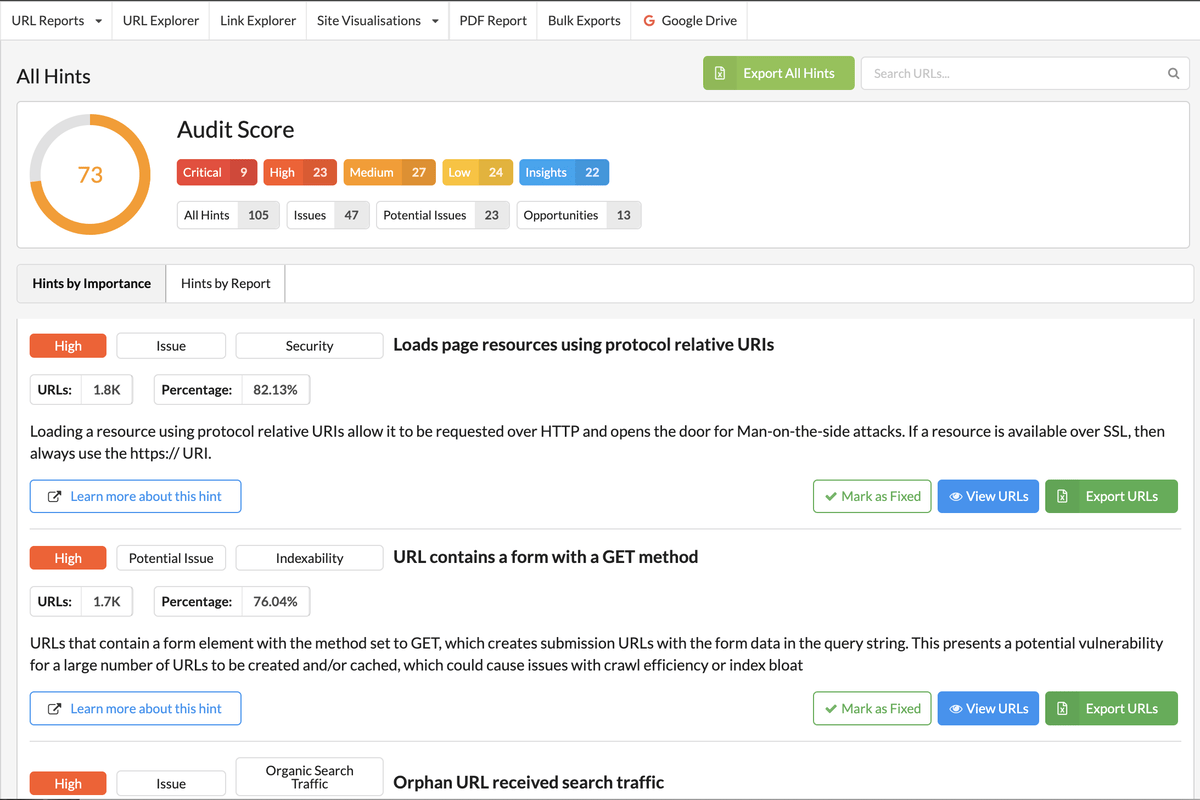
📷 Sitebulb turns crawl findings into an audit score and prioritized Hints that make technical issues easier to communicate. Source: vendor website/documentation.
💚 What we like
Prioritized Hints combine technical evidence with explanations, making findings easier to convert into a development backlog.
Strong visualization and reporting help SEO teams communicate architecture, internal-link and crawl problems beyond specialist audiences.
JavaScript crawling and deep audit controls support complex ecommerce sites while Cloud adds collaborative scale.
🟠 What to know
Desktop pricing is presented through an interactive calculator, so final cost depends on plan, billing term and user count.
It remains a specialist technical product and does not replace a full keyword, backlink or competitive-research suite.
💡 Why this score: Sitebulb scores strongly for technical audit depth and for turning crawler output into prioritized, understandable recommendations. It is narrower than all-in-one suites and less raw than Screaming Frog, which makes it particularly useful when technical specialists must communicate findings to broader ecommerce teams.
💰 Pricing: Desktop Lite and Pro use published interactive pricing with a 14-day Pro-equivalent trial; Sitebulb Cloud starts from £95/month.
✅ Best fit: Technical SEO consultants, agencies and in-house teams that need deep audits plus clearer prioritization, visualizations and stakeholder-ready reporting.
🚫 Less ideal for: Marketers mainly looking for keyword discovery, competitor traffic estimates or a lightweight plug-and-play optimization checklist.
🧩 Key capabilities
Technical website crawling
300+ SEO Hints on Pro
JavaScript crawling
Audit comparison and scheduling
Site architecture visualizations
Cloud crawling and collaboration
🔎 Official sources: Product · Pricing · Documentation
7️⃣ 7. Rank Math
85/100 · 💰 Free · 🧩 Intermediate · 🏢 SMB · ⚙️ No-code
🎯 Best for: WooCommerce stores that want broad on-page and technical SEO controls inside WordPress
⚡ Choose Rank Math if your store runs on WooCommerce and you want schema, metadata and indexation controls close to the publishing workflow.
Rank Math is a WordPress SEO plugin with meaningful WooCommerce functionality in both free and paid editions. It keeps metadata, schema, sitemap and indexation controls inside the content-management workflow, while the Pro WooCommerce module adds options such as brand and global identifier handling. That makes it practical for smaller ecommerce teams that want actionable page-level controls without a separate enterprise SEO suite. It is not a replacement for a crawler or competitive research platform, but it can be the execution layer for WordPress stores.
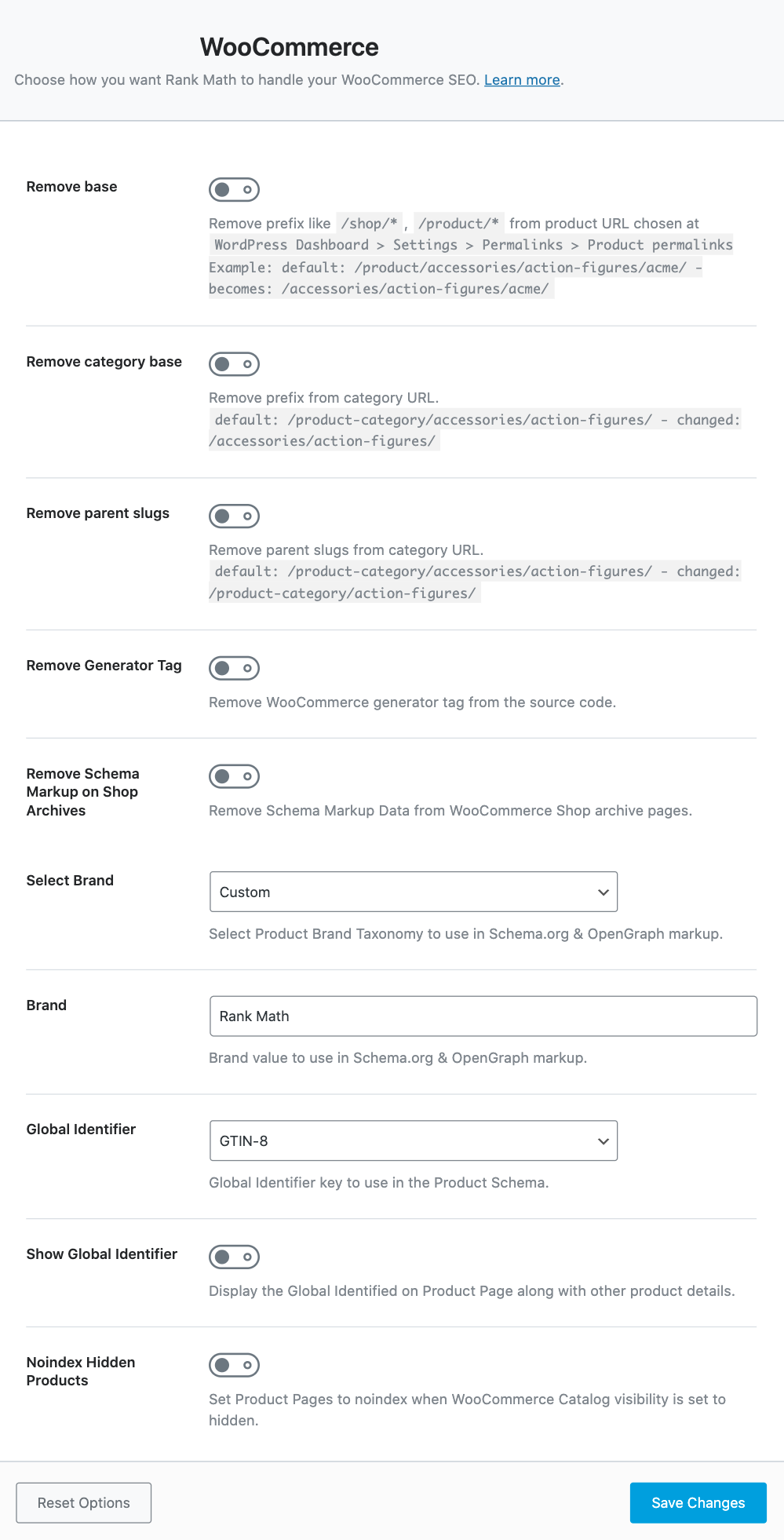
📷 Rank Math Pro exposes WooCommerce-specific SEO controls for product URLs, schema attributes and identifiers. Source: vendor website/documentation.
💚 What we like
Strong free tier gives WooCommerce stores useful metadata, schema and technical controls before they need a paid plan.
WooCommerce-focused settings keep implementation close to product publishing rather than in a separate analysis dashboard.
Paid tiers are inexpensive relative to full SEO suites and can cover multiple sites depending on the plan.
🟠 What to know
The value is platform-specific: non-WordPress stores should look elsewhere because Rank Math is not a general SEO suite.
Research, competitor intelligence and deep site crawling still require Search Console or specialist external tools.
💡 Why this score: Rank Math scores well for ecommerce fit, value and implementation simplicity on WooCommerce. Its scope is narrower than full research suites and technical crawlers, but within WordPress it turns SEO recommendations into concrete controls efficiently, including useful product schema and indexation options.
💰 Pricing: A capable free version is available. Pro pricing is currently advertised from €7.99/month billed annually for the first year, with higher Business and Agency tiers.
✅ Best fit: WooCommerce stores and WordPress teams that want a cost-effective SEO execution layer for metadata, schema, sitemaps and product settings.
🚫 Less ideal for: Shopify or custom-platform stores, or teams needing enterprise competitive intelligence and crawl analysis from one product.
🧩 Key capabilities
On-page SEO analysis
WooCommerce SEO module
Product schema controls
XML sitemaps
Indexation and robots controls
Redirects and internal SEO utilities
🔎 Official sources: Product · Pricing · Documentation
8️⃣ 8. Surfer
84/100 · 💰 Budget (<~$100/mo) · 🧩 Intermediate · 🏢 SMB–Mid-market · ⚙️ No-code
🎯 Best for: Content teams optimizing ecommerce editorial and collection-page copy around search intent
⚡ Choose Surfer if your biggest SEO bottleneck is producing and refreshing search-led content rather than diagnosing site architecture.
Surfer is a content optimization platform rather than a complete ecommerce SEO stack. Its Content Editor helps teams research competing pages, build outlines and optimize drafts against search-led recommendations, which is useful for buying guides, category copy and editorial content. It increasingly layers AI and search-visibility features into that workflow. For stores with strong technical foundations but inconsistent content execution, Surfer can make production more repeatable. It should usually sit beside Search Console and a crawler rather than replace them.
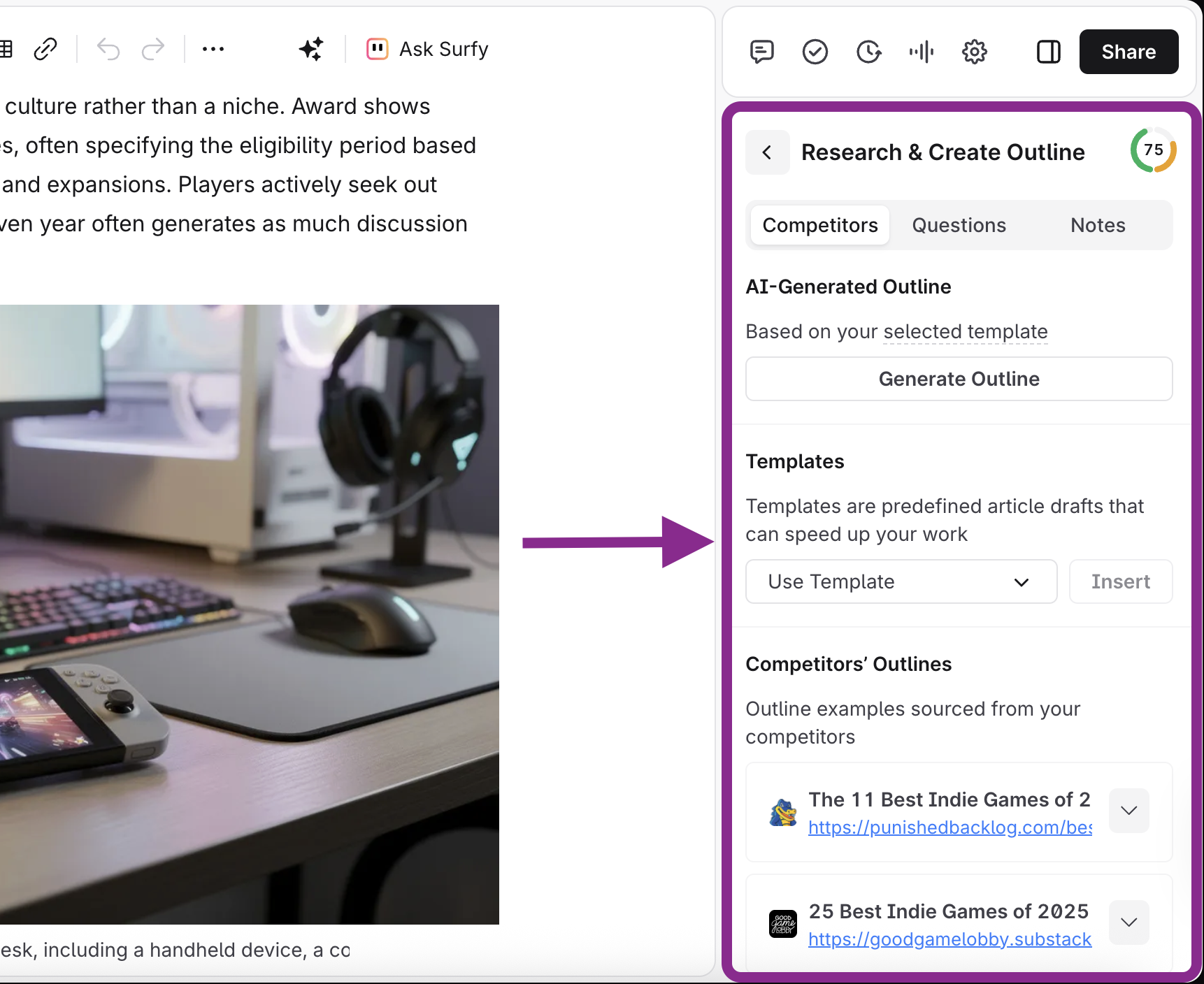
📷 Surfer Content Editor combines research, outline creation and optimization guidance inside the writing workflow. Source: vendor website/documentation.
💚 What we like
Content Editor gives writers a repeatable research-and-optimization workflow without forcing them into a full technical SEO suite.
Useful for scaling category guides, buying guides and editorial content where search intent and competing-page coverage matter.
No-code workflow is accessible to content teams while still giving SEO leads standardized briefs and optimization signals.
🟠 What to know
Content scores are directional rather than a guarantee of rankings and should not override brand, usefulness or conversion needs.
It is not the right primary tool for deep technical crawling, backlink research or first-party search-performance measurement.
💡 Why this score: Surfer scores well where the job is content execution: it makes research, briefing and optimization easy to operationalize. Its lower overall rank reflects category scope rather than poor execution; ecommerce teams still need Search Console and technical tooling around it for a complete SEO program.
💰 Pricing: Plans currently start from about $49/month on annual billing, with Standard around $99/month and larger Pro, Peace of Mind and Enterprise options.
✅ Best fit: Content-led ecommerce teams producing category copy, editorial guides and search-driven content at enough volume to benefit from a standardized workflow.
🚫 Less ideal for: Teams whose biggest SEO problems are indexing, JavaScript rendering, faceted navigation, crawl waste or backlink research.
🧩 Key capabilities
Content Editor optimization
Search-led outline generation
Competitor content analysis
Keyword and topic recommendations
AI-assisted content workflows
Content performance and visibility features
🔎 Official sources: Product · Pricing · Documentation
9️⃣ 9. Yoast SEO
82/100 · 💰 Budget (<~$100/mo) · 🧩 Beginner · 🏢 SMB · ⚙️ No-code
🎯 Best for: WooCommerce teams that want guided, familiar on-page SEO and ecommerce-specific schema support
⚡ Choose Yoast SEO if you prefer a mature WordPress workflow with guided checks and a dedicated WooCommerce bundle that includes Premium.
Yoast is the familiar WordPress option for teams that want SEO guidance directly in the publishing interface. For ecommerce, the dedicated Yoast WooCommerce SEO bundle includes Yoast SEO Premium and adds product-focused capabilities such as ecommerce schema, optimized product sitemaps and catalog-oriented controls. The workflow is approachable for marketers and store owners, and the plugin ecosystem is mature. Compared with specialist suites, however, it is primarily an implementation and guidance layer rather than a deep research, competitor or crawling platform.
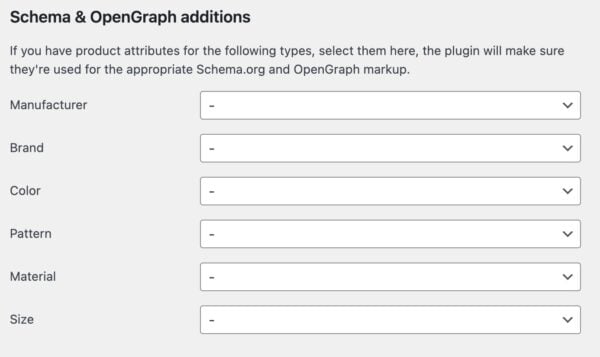
📷 Yoast WooCommerce SEO maps product attributes into schema and OpenGraph data from inside WordPress. Source: vendor website/documentation.
💚 What we like
Guided WordPress workflow is approachable for non-specialists who need practical checks while editing products and content.
WooCommerce bundle adds ecommerce schema, product sitemap handling and Premium features in one store-focused package.
Large documentation and training ecosystem makes it easier for smaller teams to learn repeatable on-page SEO habits.
🟠 What to know
The WooCommerce value is platform-specific and does not help Shopify, headless or custom ecommerce stacks.
Advanced research, technical crawling and competitor intelligence still require external SEO tools.
💡 Why this score: Yoast scores well on ease of use and WooCommerce fit but lower on breadth and advanced analysis. For the right WordPress store, that narrower scope is a benefit: it gives teams clear implementation controls without forcing them to operate a full specialist SEO platform.
💰 Pricing: Yoast SEO Premium is $118.80/year per site; the Yoast WooCommerce SEO bundle is $178.80/year excluding VAT and includes Premium plus ecommerce-specific features.
✅ Best fit: Small and mid-size WooCommerce stores that value guided on-page optimization, product schema and a familiar WordPress publishing workflow.
🚫 Less ideal for: Non-WordPress stores or advanced SEO teams looking for broad keyword data, competitor intelligence and deep technical crawling in one system.
🧩 Key capabilities
WordPress on-page guidance
WooCommerce product schema
Product sitemap optimization
SEO titles and meta descriptions
Redirect and internal-link tools
SEO training and documentation
🔎 Official sources: Product · Pricing · Documentation
🎯 Which tools should you actually shortlist?
If you want one primary SEO suite: compare Semrush, Ahrefs and SE Ranking using the same five real keyword, competitor and audit tasks from your store.
If technical debt is the bottleneck: shortlist Screaming Frog and Sitebulb, then test them on faceted URLs, canonicals, redirects and JavaScript templates.
If you are still establishing measurement: implement Google Search Console first, verify key properties and sitemaps, and use its data before adding modeled research tools.
If content production is the constraint: evaluate Surfer on one collection page and one editorial guide, measuring whether the workflow actually improves briefs and revisions.
If your store runs on WooCommerce: compare Rank Math and Yoast on schema, metadata, sitemap behavior and the exact publishing workflow your team already uses.
If you already own several SEO tools: shortlist nothing until you map overlap. Consolidating duplicate research suites can be more valuable than adding another dashboard.
🧪 Run this test before you buy
Do not judge SEO software from a polished demo account. Build a small evaluation pack from your own store: one commercially important collection, one product family, one underperforming content page and a known technical issue. Run the same pack through every shortlisted vendor. You are testing whether the tool changes a real decision, not whether it can generate more charts.
Find ten high-intent queries around one priority collection and explain which five deserve action first.
Identify the strongest competing domains and the pages that drive their relevant organic visibility.
Crawl a representative catalog section and surface indexation, canonical, redirect and internal-link problems.
Test how the tool handles faceted navigation, parameters, pagination and duplicated ecommerce URL patterns.
Check whether JavaScript-rendered content and links are visible when your storefront relies on client-side rendering.
Trace one reported issue from dashboard summary to the exact affected URLs and a fix your team can implement.
Export findings into the format your content, product or engineering team would actually use.
Measure how quickly a new operator can repeat the workflow without vendor assistance.
Review usage limits against a realistic month of projects, keywords, crawls, exports and team members.
Compare the recommendation against Search Console data and one manual inspection to catch misleading conclusions.
📏 Record the same things for every vendor: time to first useful finding, false positives, URLs or keywords covered, export quality, implementation clarity, collaboration friction, monthly limit consumed and the total cost at your expected usage.
🧾 10 questions to ask in every demo
Which limits will we hit first with our number of sites, keywords, pages, users and monthly crawls?
How do you handle JavaScript rendering, parameters, faceted navigation, canonicals and duplicate ecommerce URLs?
Which data is first-party, which is modeled, and how frequently is each dataset refreshed?
Can we connect Google Search Console and analytics data at page level without extra add-ons?
How does the platform prioritize issues, and can we customize priority around our commercial templates?
What historical data is retained if we downgrade, pause a project or change our plan?
Which exports, APIs and integrations are included at the plan you are quoting us?
Can we separate stores, countries or business units while still reporting across the portfolio?
What implementation or training work is normally required before a team gets repeatable value?
What would make you recommend a different plan, or a different type of SEO tool entirely, for our use case?
❓ Frequently asked questions
What does ecommerce SEO software actually do?
Ecommerce SEO software helps teams research search demand, diagnose technical and indexation issues, optimize product, collection and editorial pages, and monitor organic performance. The category is broad: suites such as Semrush and Ahrefs emphasize research, crawlers such as Screaming Frog inspect site behavior, Search Console reports Google data, and plugins such as Rank Math and Yoast help implement page-level controls.
What is the difference between an SEO suite and a technical crawler?
An SEO suite combines several datasets and workflows, typically keyword research, competitors, backlinks, rankings and some form of site audit. A technical crawler focuses much more deeply on the website itself, following URLs and exposing response codes, directives, canonicals, metadata, links, rendering and architecture. Ecommerce teams often use both because market opportunity and technical implementation are different problems.
What is the best starting point for Shopify or another hosted ecommerce platform?
Start with Google Search Console because it gives first-party Google performance and indexing data regardless of platform. Add a broad suite such as Semrush, Ahrefs or SE Ranking when you need keyword and competitor research. Add a crawler when technical complexity justifies it. WordPress plugins such as Rank Math and Yoast are not relevant to Shopify because they run inside WordPress and WooCommerce.
How much should an ecommerce team expect to spend on SEO tools?
You can start at zero with Google Search Console and free tiers from tools such as Screaming Frog or Rank Math. Serious research suites commonly start around the low hundreds of dollars per month, while team, enterprise and high-usage plans can become significantly more expensive. The useful budget question is not the sticker price but how many overlapping products you can avoid.
Do I need a technical SEO specialist to use these tools?
Not for every product. Search Console, Yoast, Rank Math and Surfer can be useful to marketers with moderate SEO knowledge. Deep crawlers and advanced suite workflows benefit much more from specialist ownership because the hard part is interpreting issues, understanding trade-offs and deciding what should actually change in a storefront. A tool can surface a canonical problem without knowing your intended merchandising architecture.
Can SEO tools improve product and collection page rankings automatically?
They can identify opportunities and support implementation, but they do not automatically create durable rankings. Search performance still depends on crawlability, indexation, relevance, content quality, internal linking, site authority, user intent and competition. Use software to make evidence and repeatable workflows better. Treat any score or optimization recommendation as an input to a commercial and editorial decision, not as a guarantee.
🔍 About this research
MarketMaze researches and scores each tool using its proprietary scoring methodology. Product details and pricing are checked against official vendor sources. Screenshots are from vendor websites, documentation, official demos, or MarketMaze product captures and are used to illustrate the products being reviewed.
Last research check: 25 September 2026.
Scores reflect the methodology above. Product capabilities, limits and prices can change after the research date, so confirm final commercial terms with the vendor before purchasing.
