
12 Best Ecommerce Platforms & Online Store Builders (2026)
Choosing your ecommerce platform means deciding where your catalog, storefront, checkout and daily operations will live. We compared 12 hosted, open-source and enterprise options so you can match the platform to your business model, technical resources and growth plans.
Updated 25 September 2026 · Pricing and product claims checked against official vendor sources.
👋 New to this category?
An ecommerce platform is the core system that holds your product catalog, storefront, cart, checkout and day-to-day store administration.
🏪 Hosted platforms run the infrastructure for you.
🧩 Open-source platforms give you more code and hosting control, but also more technical responsibility.
🏢 Enterprise commerce platforms are built for complex catalogs, B2B rules, multiple storefronts and deeper integrations.
Start with your operating model: a small brand usually values fast setup and predictable ownership, while a complex retailer may accept a longer implementation in exchange for control, scale and integration depth.
🧭 Jump to a tool
🏆 The quick answer
🏆 Best overall
Shopify
🌱 Best for getting started
Wix eCommerce
💸 Best value
WooCommerce
🏢 Best for larger teams / enterprise
Adobe Commerce
🧠 Best for advanced or technical users
Shopware
🌍 Best for complex global commerce
VTEX
MarketMaze take
The right platform depends less on the longest feature list and more on what you want your team to own. Start with your real catalog, markets, payment needs, content workflow and integration requirements. Shortlist two or three platforms that fit that operating model, then test the same store tasks in each. Compare the real implementation, maintenance burden and usable plan—not just the homepage feature count.
📊 Tool comparison & scores
Rank | Tool | Score | Best for | Pricing |
|---|---|---|---|---|
1 | 94/100 | Most brands that want a capable hosted platform without owning infrastructure | Basic from $29/month billed yearly | |
2 | 91/100 | WordPress teams that prioritize ownership, flexibility and control over the stack | Core platform free | |
3 | 90/100 | Growing merchants that need hosted commerce with stronger multi-store and B2B depth | Core $39/month or $29 annually | |
4 | 88/100 | Complex enterprise B2C and B2B commerce with demanding catalogs and custom architecture | Custom pricing | |
5 | 87/100 | Salesforce-centered enterprises that need large-scale B2C commerce connected to customer data | Contact Salesforce for pricing | |
6 | 85/100 | Small brands that want website design and ecommerce in one beginner-friendly builder | Commerce plans vary by market | |
7 | 84/100 | Technically capable European merchants needing open-source flexibility plus commercial scaling options | Community free; Rise from €600/month | |
8 | 83/100 | Design-led small brands selling through a polished content and commerce website | From $19/month annually in the US | |
9 | 82/100 | Large multichannel retailers combining B2C, B2B, marketplace and omnichannel operations | Custom quote | |
10 | 81/100 | Merchants wanting open-source ecommerce without tying the store to WordPress | Classic free; Hosted from €24/month | |
11 | 79/100 | Small businesses adding ecommerce to an existing site or simple online presence | Venture $35/month or $29 annually | |
12 | 78/100 | Merchants preferring a licensed self-hosted store with source access and one-time pricing | Store Builder Plus $1,490 once |
Prices are in US dollars where an amount is shown unless another currency is stated. Open-source “free” means the software license, not hosting, development or paid extensions. Enterprise and sales-led products require a custom quote.
🧠 How the scoring works
This ranking uses MarketMaze proprietary scoring.
Dimension | Weight | What we look for |
|---|---|---|
Core job performance | 30% | Storefront, catalog, cart, checkout and store administration depth |
Ecommerce fit | 20% | How naturally the platform supports real merchant workflows and selling models |
Workflow & control | 15% | Merchandising, content, orders, roles and everyday operating control |
Integrations & implementation | 15% | Payments, apps, APIs, data flow and realistic implementation choices |
Pricing & value | 10% | Headline price, required add-ons, fees and value for the target buyer |
Scale & advanced capabilities | 10% | Multi-store, international, B2B, headless and higher-complexity growth requirements |
Scores are editorial assessments of documented functional coverage, ecommerce fit and buying trade-offs—not measured conversion lifts or performance benchmarks. Each dimension is assessed out of 100, multiplied by its weight and summed, then rounded to the nearest integer. We reviewed official sources, not paid product accounts.
🤔 Do you even need ecommerce platform software?
Probably yes ✅
You need an owned storefront with a real product catalog, checkout, payment processing and order administration, or your existing system is creating obvious constraints around markets, integrations, content or daily operations.
Maybe 🟡
You sell a small catalog through marketplaces, social channels or an existing website. An embedded store or lightweight builder may solve the job without a complex migration or enterprise platform project.
Probably not yet ⏳
You are still validating whether customers want the product and can transact through an existing channel. Prove demand before creating a platform migration, integration program or expensive commerce stack.

🥇 1. Shopify
94/100 · 💰 Budget · 🧩 Beginner · 🏢 SMB–Mid-market · ⚙️ No-code
🎯 Best for: Most brands that want a capable hosted platform without owning infrastructure
⚡ Choose Shopify if you want the broadest practical mix of ease, ecosystem depth and room to grow.
Shopify is a hosted commerce platform combining storefront building, product management, checkout, payments, orders and a large app ecosystem. Merchants can launch without managing servers, then add specialist capabilities as the business becomes more complex. That makes it especially practical for teams that value speed and predictable platform ownership while still needing themes, application programming interfaces (APIs), multiple sales channels and a broad partner ecosystem.

📷 Shopify admin showing a return request workflow and the operational context available to the merchant. Source: vendor website/documentation.
💚 What we like
Hosted infrastructure removes much of the maintenance work that otherwise sits with a merchant or development team.
The app and partner ecosystem gives growing stores many ways to add specialist capabilities without replacing the core platform.
Checkout, payments, catalog and order workflows are integrated closely enough for a small team to operate from one system.
🟠 What to know
Apps, premium themes and specialist services can materially increase the real operating cost beyond the base subscription.
Teams needing unusual backend logic or complete infrastructure control can encounter platform constraints that open-source systems avoid.
💡 Why this score: Shopify scores highest because it balances core commerce, ecommerce-specific workflows, ecosystem coverage and implementation simplicity unusually well. It loses points mainly where deeply customized enterprise architectures need more infrastructure control and where an expanding app stack makes total cost harder to predict.
💰 Pricing: Basic from $29/month billed yearly or $39 monthly; Grow and Advanced cost more, while Plus starts from $2,300/month on longer terms.
✅ Best fit: Independent brands and growing multichannel merchants that want a managed commerce core, strong integrations and a large implementation ecosystem without running their own platform infrastructure.
🚫 Less ideal for: Teams that require complete source-level control, highly unusual transaction logic or a tightly self-hosted architecture from day one.
🧩 Key capabilities
Hosted storefront
Integrated checkout
App ecosystem
Multi-channel selling
Store analytics
Headless APIs
🔎 Official sources: Product · Pricing · Documentation
🥈 2. WooCommerce
91/100 · 💰 Free · 🧩 Intermediate · 🏢 SMB–Mid-market · ⚙️ Low-code
🎯 Best for: WordPress teams that prioritize ownership, flexibility and control over the stack
⚡ Choose WooCommerce if WordPress is already central to your site and you want maximum ownership of commerce configuration.
WooCommerce is the open-source ecommerce layer for WordPress. The core software is free, while hosting, payment processing, extensions and development are assembled around it. This gives merchants substantial control over the storefront, data model and hosting choices, and it can be a strong fit when content and commerce need to live in the same WordPress environment. The trade-off is ownership: updates, performance, security and extension compatibility require more active technical management than on a fully hosted platform.

📷 WooCommerce order details showing how commerce operations sit directly inside the familiar WordPress administration environment. Source: vendor website/documentation.
💚 What we like
The free open-source core gives merchants unusually high control over hosting, code, data and extension choices.
WordPress integration is a major advantage for businesses where editorial content and commerce must share one operating environment.
A broad extension ecosystem lets teams assemble specialist functionality instead of accepting one fixed platform feature set.
🟠 What to know
Hosting, backups, security, extension updates and performance become part of the merchant's operating responsibility or agency scope.
Extension costs and compatibility work can make the total stack less simple than the free core price suggests.
💡 Why this score: WooCommerce performs extremely well on flexibility, ownership and integration possibilities, and the free core creates strong value. It sits just below Shopify because day-to-day reliability and implementation quality depend much more heavily on the merchant's hosting, extension choices and technical operating discipline.
💰 Pricing: Core platform free; WooCommerce estimates hosting at roughly $25–$350/month for most stores, with paid extensions commonly $29–$299/year each.
✅ Best fit: Content-led brands, WordPress-native businesses and technically supported merchants that want control over hosting and code while choosing their own payment, extension and infrastructure stack.
🚫 Less ideal for: Teams that want one vendor to own hosting, upgrades, security and most implementation complexity without ongoing technical involvement.
🧩 Key capabilities
Open-source core
WordPress integration
Extension ecosystem
Checkout control
Catalog flexibility
REST APIs
🔎 Official sources: Product · Pricing · Documentation
🥉 3. BigCommerce
90/100 · 💰 Budget · 🧩 Intermediate · 🏢 SMB–Mid-market · ⚙️ Low-code
🎯 Best for: Growing merchants that need hosted commerce with stronger multi-store and B2B depth
⚡ Choose BigCommerce if you want hosted infrastructure but expect multi-storefront, B2B or composable requirements to arrive early.
BigCommerce is a hosted ecommerce platform spanning storefronts, catalog, checkout, payments, multi-storefront capabilities and enterprise extensions. It sits between simpler website builders and heavier enterprise suites, which makes it relevant for brands that want managed infrastructure without giving up more advanced commerce architecture. Its 2026 pricing model ties self-service plans more explicitly to gross merchandise value (GMV) and payment-provider choices, so merchants should model scale costs rather than compare only the headline subscription.

📷 BigCommerce control panel combining store performance indicators and day-to-day commerce administration in one hosted environment. Source: vendor website/documentation.
💚 What we like
Hosted infrastructure is paired with multi-storefront, B2B and headless options that support more complex growth paths.
The platform supports a broad range of payment providers and exposes substantial commerce functionality through APIs.
Merchants can start on self-service plans while retaining a clearer route into higher-volume enterprise deployment.
🟠 What to know
Current self-service plans include GMV thresholds and can add fees when orders use Open Payment Providers.
The 2026 pricing structure makes payment configuration and sales volume important parts of the total-cost calculation.
💡 Why this score: BigCommerce scores strongly on core commerce depth, scalability and integration control without asking merchants to self-host. It trails the two leaders because GMV thresholds, overage mechanics and payment-provider fees add purchasing complexity that smaller merchants must understand before committing.
💰 Pricing: Core $39/month or $29 annually; Growth $105/$79; Scale $399/$299 plus overage above its monthly GMV cap; Performance from $1,499/month annually.
✅ Best fit: Growing direct-to-consumer, B2B and multi-storefront businesses that want a managed platform with deeper native commerce architecture than a simple website builder usually provides.
🚫 Less ideal for: Very small sellers seeking the simplest fixed-cost setup, especially if their preferred payment provider carries additional platform fees.
🧩 Key capabilities
Hosted commerce
Multi-storefront
B2B commerce
Headless storefronts
Payment choice
Commerce APIs
🔎 Official sources: Product · Pricing · Documentation
4️⃣ 4. Adobe Commerce
88/100 · 💰 Enterprise price · 🧩 Advanced · 🏢 Enterprise · ⚙️ Enterprise implementation
🎯 Best for: Complex enterprise B2C and B2B commerce with demanding catalogs and custom architecture
⚡ Choose Adobe Commerce if catalog, B2B, multi-brand and integration complexity justify a dedicated enterprise implementation program.
Adobe Commerce is an enterprise commerce platform for complex business-to-consumer (B2C) and business-to-business (B2B) operations. Adobe offers cloud deployment models with core capabilities around catalog, checkout, transactions, global storefronts and extensibility. Its B2B layer adds company accounts, purchase approvals, quoting and customer-specific catalogs. This is not a typical owner-operator website builder: it makes most sense when dedicated commerce, engineering and implementation teams can use that flexibility to support genuinely complex requirements.

📷 Adobe Commerce admin illustrating the deeper catalog controls available to teams managing complex product structures. Source: vendor website/documentation.
💚 What we like
Strong B2B capabilities cover company accounts, negotiated quotes, approval workflows and customer-specific catalog and pricing structures.
API-first extensibility and enterprise integration options suit businesses with complex back-office systems and custom storefront requirements.
Multi-brand, multi-market and large-catalog use cases are first-class considerations rather than edge cases added later.
🟠 What to know
Pricing is sales-led, so buyers need a tailored commercial proposal before they can model the full platform cost.
Implementation normally requires specialist engineering, solution architecture and ongoing platform ownership beyond a typical ecommerce operations team.
💡 Why this score: Adobe Commerce scores highly because its core platform depth, B2B functionality, catalog scale and extensibility are exceptional for complex enterprises. The score is moderated by high implementation effort, sales-led pricing and the fact that many smaller merchants would pay for flexibility they do not need.
💰 Pricing: Custom pricing from Adobe through its enterprise commerce sales process.
✅ Best fit: Large retailers, manufacturers and multi-brand organizations with sophisticated B2C or B2B requirements, dedicated technical teams and enough operational complexity to justify an enterprise commerce program.
🚫 Less ideal for: Small stores, lean ecommerce teams and businesses that need to launch quickly without specialist developers or substantial implementation budget.
🧩 Key capabilities
Enterprise catalog
B2B accounts
Negotiated quotes
Multi-store architecture
API-first extensibility
Global commerce
🔎 Official sources: Product · Pricing · Documentation
5️⃣ 5. Salesforce Commerce Cloud
87/100 · 💰 Enterprise price · 🧩 Advanced · 🏢 Enterprise · ⚙️ Enterprise implementation
🎯 Best for: Salesforce-centered enterprises that need large-scale B2C commerce connected to customer data
⚡ Choose Salesforce Commerce Cloud if commerce must operate inside a broader Salesforce customer, data and service ecosystem.
Salesforce Commerce Cloud is the enterprise commerce offering within Salesforce's broader customer platform. Current B2C editions support templated and composable storefronts, multiple sites, price books and headless application programming interfaces (APIs), while higher tiers add broader order-management and personalization capabilities. The product becomes more compelling when a company already uses Salesforce data, service or customer systems, but it requires enterprise-level implementation and governance rather than a simple theme-and-checkout setup.

📷 Salesforce Commerce Cloud Business Manager showing the administration environment used to operate enterprise storefronts and sites. Source: vendor website/documentation.
💚 What we like
Strong fit for enterprises already running Salesforce customer data, service, marketing or order-management workflows.
Current B2C editions support composable storefronts, multiple sites, price books and headless commerce development patterns.
Higher-tier packaging can bring order management, personalization and analytics into the wider Salesforce commerce architecture.
🟠 What to know
Current B2C editions are sales-led, so public list pricing is not available for straightforward comparison.
Implementation, administration and partner dependencies can be excessive for merchants without a broader Salesforce strategy.
💡 Why this score: Salesforce scores strongly on enterprise scale, ecosystem integration and advanced B2C architecture. It sits below Adobe here because the value case is more dependent on the surrounding Salesforce stack, while sales-led pricing and implementation complexity make it unsuitable for most smaller ecommerce teams.
💰 Pricing: Contact Salesforce for pricing across current B2C Commerce editions.
✅ Best fit: Large consumer businesses already invested in Salesforce that need multi-site commerce, customer-data integration and enterprise operating controls across a connected customer technology stack.
🚫 Less ideal for: Independent small and mid-sized brands that do not use Salesforce broadly or cannot support enterprise implementation and partner costs.
🧩 Key capabilities
Multi-site commerce
Composable storefronts
Headless APIs
Price books
Order management
Data Cloud integration
🔎 Official sources: Product · Pricing · Documentation
6️⃣ 6. Wix eCommerce
85/100 · 💰 Budget · 🧩 Beginner · 🏢 SMB · ⚙️ No-code
🎯 Best for: Small brands that want website design and ecommerce in one beginner-friendly builder
⚡ Choose Wix if visual site creation matters as much as commerce and your operational complexity is still moderate.
Wix combines a visual website builder with ecommerce, payments, product management, marketing and business tools. Merchants can start building for free, then move to a plan that accepts payments when they are ready to sell. Its main advantage is accessibility: a small team can control design and basic commerce without assembling hosting or a developer stack. It is less compelling when catalogs, B2B rules, multi-store architectures or back-office integration become the defining requirements.

📷 Wix storefront example showing how the platform packages responsive site design and ecommerce in the same builder. Source: vendor website/documentation.
💚 What we like
The visual editor makes it realistic for a non-technical owner to control both brand presentation and store content.
Commerce, hosting and general website tools live in one product, reducing the number of systems a small team manages.
Merchants can build before paying, then choose a commerce-enabled plan when the store is ready to transact.
🟠 What to know
Pricing varies by country and subscription term, so buyers should verify the checkout price in their own market.
Complex catalogs, enterprise integration patterns and highly customized commerce logic are not the platform's natural sweet spot.
💡 Why this score: Wix earns a high score for accessibility, design control, integrated website tooling and value for smaller sellers. It gives up points on advanced commerce depth and scale compared with specialist enterprise platforms, but that trade-off is often sensible for an owner-led or lean brand.
💰 Pricing: Free to build; commerce-enabled pricing varies by location and term, with current Core pricing around $30/month on annual billing in the US.
✅ Best fit: Owner-led and small ecommerce brands that want attractive site creation, hosting and straightforward online selling in one environment without taking on a developer-led platform project.
🚫 Less ideal for: Complex multistore retailers, advanced B2B sellers and organizations driven by deep ERP, catalog or custom checkout integrations.
🧩 Key capabilities
Visual site editor
Product catalog
Online payments
Marketing tools
Marketplace selling
Developer platform
🔎 Official sources: Product · Pricing · Documentation
7️⃣ 7. Shopware
84/100 · 💰 Free · 🧩 Advanced · 🏢 Mid-market–Enterprise · ⚙️ Developer-led
🎯 Best for: Technically capable European merchants needing open-source flexibility plus commercial scaling options
⚡ Choose Shopware if open architecture matters and your team can support a more technical commerce implementation.
Shopware combines a free Community Edition with commercial Rise, Evolve and Beyond plans for more demanding businesses. That gives technical teams an open-source starting point while preserving a route into supported commercial features, B2B capabilities and broader enterprise scale. The trade-off is complexity: Shopware is much more attractive when developers or an experienced implementation partner are available, and the jump from free Community Edition to commercial plans is significant enough to model early.

📷 Shopware 6 administration and storefront experiences shown in an official Shopware migration visual. Source: vendor website/documentation.
💚 What we like
Community Edition provides a meaningful open-source commerce platform without a platform subscription for qualifying merchants.
Commercial tiers add a clear path toward B2B, advanced commerce and support as operational complexity increases.
The architecture gives technical teams substantial control over custom integrations, sales channels and storefront implementation choices.
🟠 What to know
Rise starts at €600 per month and Evolve at €2,400, creating a large step up from Community Edition.
Merchants without internal technical ownership or a capable implementation partner may find setup and maintenance unnecessarily demanding.
💡 Why this score: Shopware scores well on architectural control, ecommerce depth and its unusual bridge from open source to commercial enterprise plans. It loses points because setup is more technical than mainstream hosted builders, and the cost step between Community Edition and commercial tiers can be substantial.
💰 Pricing: Community Edition free; Rise from €600/month, Evolve from €2,400/month, Beyond custom priced.
✅ Best fit: Mid-market and enterprise merchants, particularly in Europe, that value open architecture, developer control and a commercial upgrade path for advanced B2B and scaling requirements.
🚫 Less ideal for: First-time store owners and lean teams that want a fully managed no-code launch with minimal ongoing technical ownership.
🧩 Key capabilities
Open-source edition
Commercial editions
Sales channels
B2B capabilities
Developer extensibility
Headless commerce
🔎 Official sources: Product · Pricing · Documentation

8️⃣ 8. Squarespace Commerce
83/100 · 💰 Budget · 🧩 Beginner · 🏢 SMB · ⚙️ No-code
🎯 Best for: Design-led small brands selling through a polished content and commerce website
⚡ Choose Squarespace Commerce if brand presentation and content are central and your commerce workflows remain relatively straightforward.
Squarespace combines its design-led website builder with product selling, payments, store management, marketing and business tools. It is especially easy to understand for a small brand that sees commerce as part of a broader editorial or portfolio-style website rather than as a complex operating system. Current plans start at accessible small-business pricing, while higher tiers expand business features. The platform becomes less compelling when advanced catalog logic, multistore operations or specialist enterprise integrations dominate the roadmap.

📷 Squarespace Commerce order management illustrating the simple operational layer paired with its design-focused site builder. Source: vendor website/documentation.
💚 What we like
Strong visual design tools help small brands keep the storefront, editorial content and broader website experience consistent.
Hosting, templates and store management are packaged together, keeping initial setup understandable for non-technical operators.
Annual plans start at an accessible price and allow a business to add commerce without assembling separate infrastructure.
🟠 What to know
The platform offers less depth for complex catalog, B2B, multistore and integration-heavy scenarios than specialist commerce systems.
Plan choice affects fees and business features, so sellers should compare the full commerce economics rather than headline price alone.
💡 Why this score: Squarespace scores highly for design, usability and the integrated website-plus-commerce experience. It ranks below Wix because advanced ecommerce operations and extensibility are more limited, but for a design-led small brand the simpler surface area can be a genuine advantage.
💰 Pricing: Current US annual pricing begins at $19/month for Basic, with Core, Plus and Advanced tiers above it.
✅ Best fit: Small design-conscious brands, creators and service-led businesses that need an attractive website with integrated selling but do not require a deeply customized commerce operating stack.
🚫 Less ideal for: Large catalogs, complex B2B workflows and businesses expecting multi-storefront architecture or heavy custom integration to be core requirements.
🧩 Key capabilities
Design templates
Fluid Engine
Product selling
Payments
Order management
Marketing tools
🔎 Official sources: Product · Pricing · Documentation
9️⃣ 9. VTEX
82/100 · 💰 Enterprise price · 🧩 Advanced · 🏢 Enterprise · ⚙️ Enterprise implementation
🎯 Best for: Large multichannel retailers combining B2C, B2B, marketplace and omnichannel operations
⚡ Choose VTEX if commerce, marketplace and omnichannel operating models need to coexist inside one enterprise platform strategy.
VTEX is an enterprise commerce platform aimed at businesses running complex B2C, B2B, marketplace and omnichannel models. Its buying motion is consultation-led: VTEX asks prospects about company size, annual gross merchandise value and implementation needs before discussing pricing. That signals the right buyer clearly. VTEX is worth considering when unified commerce architecture is genuinely strategic, but it is not designed to compete with self-service website builders for a small merchant launching a simple direct-to-consumer store.

📷 VTEX Admin order interface illustrating the operational control expected in a complex enterprise commerce environment. Source: vendor website/documentation.
💚 What we like
B2C, B2B, marketplace and omnichannel models are positioned as connected parts of the same enterprise commerce strategy.
The platform is designed for organizations whose commerce operations span multiple channels, teams, markets and business models.
Enterprise implementation support and solution engineering match the complexity of customers the platform is designed to serve.
🟠 What to know
Pricing is not publicly listed and requires a sales conversation tied to business scale and implementation needs.
The product is excessive for merchants that only need a straightforward owned storefront and standard direct-to-consumer operations.
💡 Why this score: VTEX scores strongly on scale, marketplace capability and multichannel architecture, but its fit is narrower than the higher-ranked general platforms. Sales-led pricing and implementation demands reduce accessibility, while enterprise teams with unified-commerce requirements may value those same capabilities highly.
💰 Pricing: Custom quote; VTEX directs prospects to a solution engineer for tailored pricing and implementation guidance.
✅ Best fit: Enterprise retailers and manufacturers operating across B2C, B2B, marketplaces and physical or digital channels that need a platform designed for complex unified-commerce coordination.
🚫 Less ideal for: Small and mid-sized brands seeking transparent self-service pricing, a quick no-code launch or a simple standalone direct-to-consumer storefront.
🧩 Key capabilities
B2C commerce
B2B commerce
Marketplace model
Omnichannel operations
Enterprise APIs
Order workflows
🔎 Official sources: Product · Pricing · Documentation
🔟 10. PrestaShop
81/100 · 💰 Free · 🧩 Intermediate · 🏢 SMB–Mid-market · ⚙️ Low-code
🎯 Best for: Merchants wanting open-source ecommerce without tying the store to WordPress
⚡ Choose PrestaShop if you want a dedicated open-source commerce stack and are comfortable owning more technical decisions.
PrestaShop is an open-source ecommerce platform with two clear entry routes: the free self-hosted Classic edition and a Hosted offer that packages hosting, support and commerce services. That makes it useful for merchants who want more control than a closed website builder provides without making WordPress the foundation. As with other open systems, the free software price is only part of the economics: hosting, modules, maintenance, development and upgrade work should be included when comparing it with managed platforms.

📷 PrestaShop back office showing the product management controls available in its dedicated ecommerce administration environment. Source: vendor website/documentation.
💚 What we like
Classic provides a free open-source commerce core for teams that want code, hosting and deployment control.
The Hosted option creates a simpler route for merchants that prefer bundled hosting and support around the same platform.
A dedicated ecommerce architecture avoids making WordPress or a general website builder the center of the commerce stack.
🟠 What to know
Self-hosted merchants must budget for hosting, modules, maintenance, security and technical ownership beyond the free download.
The quality and cost of a finished store depend heavily on implementation choices and extensions selected around the core.
💡 Why this score: PrestaShop earns a solid score for open-source control, ecommerce focus and an accessible free entry point. It ranks below Shopware because its enterprise scaling story is less differentiated here, while it also lacks the operational simplicity that pushes the hosted leaders higher.
💰 Pricing: Classic is a free self-hosted download; Hosted starts from €24 excluding VAT per month and includes hosting and support.
✅ Best fit: Small and mid-market merchants with technical support that want a dedicated open-source ecommerce system and control over hosting, modules and storefront implementation choices.
🚫 Less ideal for: Teams that want one hosted vendor to own platform maintenance, infrastructure, upgrades and support with minimal technical involvement.
🧩 Key capabilities
Open-source core
Hosted option
Product catalog
Module ecosystem
Checkout
Multi-language stores
🔎 Official sources: Product · Pricing · Documentation
1️⃣1️⃣ 11. Ecwid by Lightspeed
79/100 · 💰 Budget · 🧩 Beginner · 🏢 SMB · ⚙️ No-code
🎯 Best for: Small businesses adding ecommerce to an existing site or simple online presence
⚡ Choose Ecwid if you want to add a manageable store to an existing website without rebuilding the whole site.
Ecwid by Lightspeed is built around a simple idea: add ecommerce to an existing website or launch a lightweight store without turning the website platform into a larger development project. Paid plans expand product limits, channels, staff access and operational features, while setup remains approachable for small teams. It works especially well when commerce is being layered onto an existing web presence. Businesses expecting complex catalog structures, custom workflows or enterprise architecture will usually outgrow its intended level of control.
📷 Ecwid order details showing the compact administration workflow available to a small merchant managing fulfillment and payment. Source: vendor website/documentation.
💚 What we like
The store can be added to an existing site, which avoids a full website migration just to start selling.
Plan structure is easy to understand, with product limits and operational features increasing as the merchant grows.
No-code setup and built-in store administration suit owner-operators that do not want a developer-led implementation.
🟠 What to know
Product limits and advanced features vary materially by plan, so realistic catalog size should guide the subscription choice.
Large retailers with complex integrations, B2B logic or multi-store architecture will find the platform comparatively constrained.
💡 Why this score: Ecwid scores well for simplicity, value and its distinctive ability to add commerce to an existing site. Its lower position reflects narrower advanced workflow and scale capabilities, not weak execution of the small-business use case it is actually designed to serve.
💰 Pricing: Venture $35/month or $29 annually for up to 100 products; Business $65/$49; Unlimited $149/$119.
✅ Best fit: Owner-operated and small businesses that already have a website, need straightforward online selling and prefer a no-code store layer over a full site-platform migration.
🚫 Less ideal for: Complex multibrand retailers, advanced B2B sellers and teams whose roadmap depends on deep custom backend logic or enterprise integration architecture.
🧩 Key capabilities
Embeddable store
Instant Site
Social selling
Marketplace selling
Subscriptions
Mobile management
🔎 Official sources: Product · Pricing · Documentation
1️⃣2️⃣ 12. CS-Cart
78/100 · 💰 Premium · 🧩 Intermediate · 🏢 SMB–Mid-market · ⚙️ Low-code
🎯 Best for: Merchants preferring a licensed self-hosted store with source access and one-time pricing
⚡ Choose CS-Cart if source access and one-time Store Builder licensing matter more than a fully managed subscription model.
CS-Cart sells separate products for online stores and multi-vendor marketplaces. For this comparison, the relevant product is CS-Cart Store Builder, not Multi-Vendor. Store Builder combines a visual editor, product and order administration, an app marketplace and full code access, with licenses sold primarily as one-time purchases. That model can appeal to merchants who dislike recurring platform subscriptions, but hosting, updates beyond included periods, technical maintenance and implementation still need to be included in long-term operating cost.
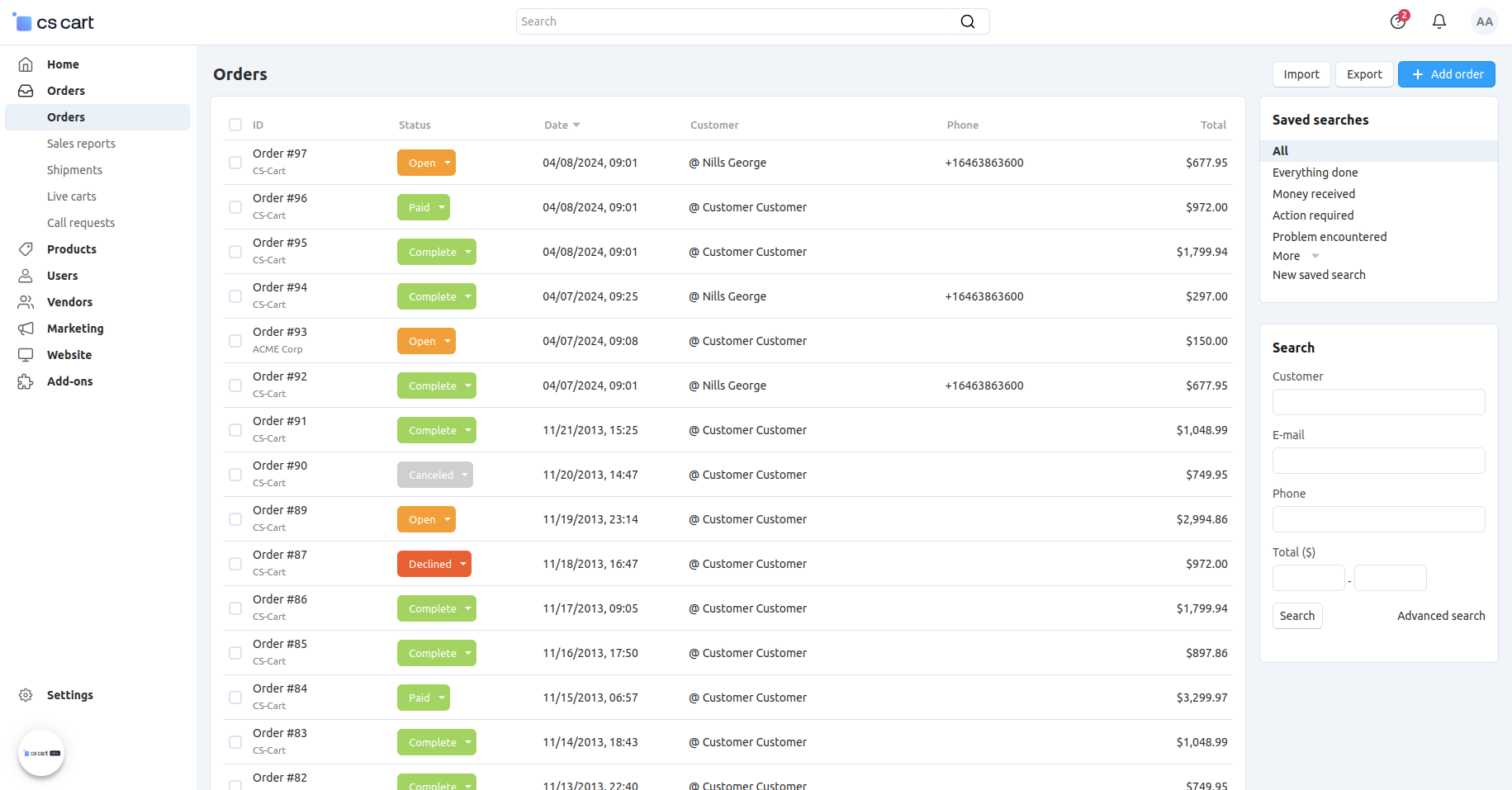
📷 CS-Cart administration showing the order-management workspace used by merchants running the self-hosted Store Builder product. Source: vendor website/documentation.
💚 What we like
One-time Store Builder licensing gives buyers a different cost model from recurring subscriptions common in hosted platforms.
Full code access creates meaningful customization freedom for teams that want to control their self-hosted commerce implementation.
Ultimate adds multiple storefronts and location-related capabilities for merchants that need more than a single basic store.
🟠 What to know
Hosting, maintenance and updates outside included support periods remain part of the merchant's long-term ownership responsibility.
CS-Cart Store Builder and Multi-Vendor solve different problems, so buyers should not treat marketplace features as standard store functionality.
💡 Why this score: CS-Cart is a credible specialist choice for merchants prioritizing source access and one-time licensing. It ranks lower overall because the ecosystem is smaller and the merchant assumes more technical ownership than on hosted leaders, while its distinctive pricing model makes direct monthly comparisons imperfect.
💰 Pricing: Store Builder Plus $1,490 one time; Ultimate $3,590; Unlim $7,990, with different included update and support periods.
✅ Best fit: Technically supported small and mid-market merchants that prefer self-hosting, source-code access and an upfront software license instead of a conventional recurring platform subscription.
🚫 Less ideal for: Non-technical teams wanting fully managed infrastructure, automatic platform operations and a very large third-party app and agency ecosystem.
🧩 Key capabilities
Self-hosted commerce
Full code access
Visual editor
Multiple storefronts
REST API
App marketplace
🔎 Official sources: Product · Pricing · Documentation
🎯 Which tools should you actually shortlist?
Small first store: start with Wix, Squarespace and Shopify if you want hosted infrastructure and minimal technical ownership, then compare how each handles your real catalog.
Growing direct-to-consumer brand: shortlist Shopify and BigCommerce, then add WooCommerce when WordPress ownership and custom control justify more technical responsibility.
Content-led WordPress business: put WooCommerce on the list first, then compare Shopify if reducing infrastructure and extension maintenance matters more than WordPress-native control.
Mid-market technical team: compare BigCommerce, Shopware and PrestaShop around integrations, multistore needs, implementation ownership and the true cost of the commercial or extension stack.
Enterprise B2C or B2B: evaluate Adobe Commerce, Salesforce Commerce Cloud and VTEX against exact catalog, account, market, order-management and customer-data requirements.
Existing site or self-hosted preference: consider Ecwid for adding commerce without a rebuild, and CS-Cart when source access plus one-time licensing are explicit requirements.
🧪 Run this test before you buy
Do not choose a commerce platform from a polished demo or generic feature matrix. Give every serious candidate the same realistic store brief, then record where the platform handles the work natively, where an app or custom build appears, and who on your team would actually own that work after launch.
Import the same 20 products, including variants, images, collections, attributes and at least one awkward catalog edge case.
Build the same home page, collection page and product page, then make one mobile-specific layout change without developer help.
Configure the same promotion using a percentage discount, a bundle or threshold condition and one excluded product group.
Set up the payment methods, currency and checkout fields you genuinely need in your primary merchant and customer markets.
Place a test order, edit it, partially refund it, cancel it and run the normal return or post-purchase workflow.
Connect one essential system such as your email platform, accounting tool, ERP or warehouse workflow and inspect the actual data flow.
Create a second market or storefront scenario with a different currency, language, catalog rule or price where your roadmap requires it.
Add a second staff user and test the permissions, approval or access controls that matter in daily store administration.
Export products, customers and orders so you understand data portability before the platform becomes the system of record.
Model a 24-month cost using realistic sales, apps, payment choices, support, implementation and internal operating time instead of base subscription alone.
📏 Record the same things for every vendor: setup time, steps requiring code, required paid apps, payment and platform fees, missing workflows, integration effort, admin usability, storefront performance, data-export quality and realistic 24-month cost.
🧾 10 questions to ask in every demo
Which parts of our planned implementation are included in the platform, and which require paid apps, add-ons or custom development?
How does our price change as gross merchandise value, orders, storefronts, users, products or API usage increase?
Which payment providers can we use in our merchant countries, and does the platform add any provider or transaction fee?
Who owns upgrades, security patches, hosting performance and incident response under the deployment model you are proposing?
Which of our required integrations are native, partner-built or custom, and who supports them when data stops syncing?
How are multiple markets, currencies, languages, catalogs, customer groups and storefronts represented in the underlying data model?
What can our ecommerce team change without a developer after launch, and which workflows normally remain developer-owned?
What reporting and raw-data export options are available, and how quickly can we access order, customer and product data?
What onboarding, migration and support resources are included in our proposed plan, and which services are billed separately?
If we leave later, how do we export products, customers, orders, content and configuration, and what cannot be moved cleanly?
❓ Frequently asked questions
What is an ecommerce platform?
An ecommerce platform is the core software used to run an online store. It normally manages the product catalog, storefront, cart, checkout, payments or payment integrations, customer and order administration, plus connections to other business tools. Hosted platforms also operate the underlying infrastructure. Open-source platforms expose more code and deployment control, which can be valuable but transfers more responsibility for hosting, updates, security and implementation to the merchant or its technical partner.
What is the difference between an ecommerce platform and a website builder?
A website builder is primarily designed to create and publish websites, while an ecommerce platform is designed around transactions, products, checkout and order operations. The distinction is increasingly blurred because Wix and Squarespace include meaningful commerce, while Shopify includes a full site builder around a commerce core. The practical question is whether the system handles your catalog, payments, promotions, markets and operational workflows without unreasonable workarounds.
What are the main alternatives to Shopify?
There is no single substitute because the best alternative depends on what you want to change. WooCommerce gives WordPress teams more ownership and hosting control. BigCommerce provides hosted commerce with deeper multi-store and B2B options. Wix and Squarespace simplify site building for smaller brands. Shopware and PrestaShop suit more technical open-source strategies, while Adobe Commerce, Salesforce Commerce Cloud and VTEX address complex enterprise requirements.
How much does ecommerce platform software usually cost?
The range is extremely wide. Hosted small-business plans can begin around $20 to $40 per month, while open-source software may be free but still requires hosting, extensions and maintenance. Mid-market commercial platforms can cost hundreds or thousands per month, and enterprise products often use custom pricing plus implementation services. Always model payment fees, apps, themes, support, development, migration and internal operating time alongside the subscription or license.
How hard is it to implement or change ecommerce platforms?
Difficulty depends on catalog size, historical orders, customer accounts, subscriptions, content, search engine optimization URLs, integrations and custom business rules. Moving a small catalog between hosted platforms can be manageable; moving a heavily customized multistore or B2B setup can become a major program. Before buying, export real data from the shortlisted platform and map every system that reads or writes commerce data so future portability is understood rather than assumed.
Should I choose hosted or open-source ecommerce?
Choose hosted commerce when you want the vendor to carry more responsibility for infrastructure, security updates and platform operations. Choose open source when control over hosting, code and architecture creates enough business value to justify the added technical ownership. Neither model is automatically cheaper. A free open-source core can require significant engineering, while a hosted subscription can reduce internal work but add app, transaction or platform fees as the business grows.
🔍 About this research
MarketMaze researches and scores each tool using its proprietary scoring methodology. Product details and pricing are checked against official vendor sources. Screenshots are from vendor websites, documentation, official demos, or MarketMaze product captures and are used to illustrate the products being reviewed.
Last research check: 25 September 2026.

