
MARKETMAZE · ECOMMERCE TOOLS · RESEARCH
10 Best Ecommerce Payment Gateways & Checkout Payments (2026)
Payment providers can look interchangeable until you compare where your business can onboard, which methods customers can use, how fees stack up and how much checkout control you actually get. These 10 options cover the main ecommerce paths.
Updated 25 September 2026 · Pricing and product claims checked against official vendor sources.
👋 New to this category?
A payment gateway is the checkout-side technology that securely passes payment details for authorization, but modern providers often bundle much more: processing, acquiring, wallets, local payment methods, fraud tools, payouts and reporting. That means this list mixes full-stack processors, platform-native payments and checkout services that solve overlapping jobs. The right comparison starts with your merchant country and platform, then moves to customer payment methods, currencies, total fees, settlement terms and integration effort. A familiar wallet such as Amazon Pay or PayPal can also complement a primary processor rather than replace it.
🧭 Jump to a tool
🏆 The quick answer
🏆 Best overall
Stripe
🌱 Best for getting started
Shopify Payments
💸 Best value
Mollie
🏢 Best for larger teams / enterprise
Adyen
🧠 Best for advanced or technical users
Checkout.com
🛍️ Best for omnichannel sellers
Square
MarketMaze take
Stripe is the most balanced default when you need broad payment coverage and room to customize. Adyen and Checkout.com become more compelling as payment performance, local acquiring and enterprise operations matter. Shopify Payments is the obvious benchmark for eligible Shopify stores, while Mollie is especially strong for European merchants. Do not select on headline rate alone: model your real card mix, cross-border fees, foreign exchange, payout timing and the cost of running the integration.
📊 Tool comparison & scores
Rank | Tool | Score | Best for | Pricing |
|---|---|---|---|---|
1 | Stripe | 95/100 | Flexible global ecommerce payments | 2.9% + $0.30 US cards |
2 | Adyen | 92/100 | Enterprise global and omnichannel | $0.13 + method fee |
3 | Checkout.com | 90/100 | Global digital enterprise | Custom quote |
4 | Shopify Payments | 88/100 | Native Shopify checkout | Varies by plan/market |
5 | PayPal | 86/100 | Wallet reach and recognition | From 2.99% + fixed fee US cards |
6 | Mollie | 84/100 | European ecommerce | From 1.80% + €0.25 European consumer cards |
7 | Worldpay | 82/100 | Global acquiring breadth | Market-specific |
8 | Square | 80/100 | SMB omnichannel commerce | From 2.9% + $0.30 online US |
9 | Authorize.net | 77/100 | US/Canada gateway flexibility | $25/mo + transaction fees |
10 | Amazon Pay | 75/100 | Amazon-oriented shopper wallet | 2.9% + $0.30 US domestic |
Published prices above are reference points, not a full cost model. Rates vary by country, card type, payment method, currency, volume and negotiated contract.
🧠 How the scoring works
This ranking uses MarketMaze proprietary scoring.
Dimension | Weight | What we look for |
|---|---|---|
Core job performance | 30% | Authorization, payment-method breadth, checkout reliability, payouts and core transaction handling. |
Ecommerce fit | 20% | Merchant eligibility, online checkout quality, subscriptions, wallets and relevant local payment methods. |
Workflow & control | 15% | Refunds, captures, disputes, reconciliation, reporting and operational visibility for finance teams. |
Integrations & implementation | 15% | Hosted options, platform plugins, application programming interfaces, webhooks, documentation and implementation effort. |
Pricing & value | 10% | Published or negotiated cost relative to capability, including recurring and transaction-related fees. |
Scale & advanced capabilities | 10% | International acquiring, multi-currency support, optimization, enterprise controls and complex business-model support. |
Scores combine current official product information with category-specific evaluation. They are comparative editorial scores, not a guarantee of payment performance for a specific merchant account. In the size tags below, SMB means small and medium-sized business.
🤔 Do you even need payment gateway software?
Probably yes ✅
You sell online across several markets, need more local payment methods, or your current provider is constraining authorization, checkout control, reporting or settlement. A stronger payments layer can remove real conversion and operational bottlenecks.
Maybe 🟡
Your commerce platform already includes a native processor that covers your country and customer needs. In that case, compare the native option first, then add another provider only when a specific gap justifies the extra complexity.
Probably not yet ⏳
You are pre-launch or processing very little volume with straightforward domestic card needs. Start with the simplest eligible option, validate demand and only introduce multi-provider routing or specialist wallets when you have evidence they solve a real problem.
🥇 1. Stripe
95/100 · 💰 Budget · 🧩 Advanced · 🏢 All sizes · ⚙️ Developer-led
🎯 Best for: Merchants wanting the broadest balance of global reach, payment methods, checkout control and developer tooling.
⚡ Choose Stripe if you want one flexible payments stack that can start simple and grow into a heavily customized global checkout.
Stripe combines a mature payments processor with hosted Checkout, embeddable payment elements, payment links, subscriptions, fraud tooling and a broad API surface. It supports more than 135 currencies and a large catalog of local payment methods, while giving teams a path from low-friction hosted checkout to deeper custom integration. That range makes Stripe unusually adaptable across startup, mid-market and international ecommerce use cases.
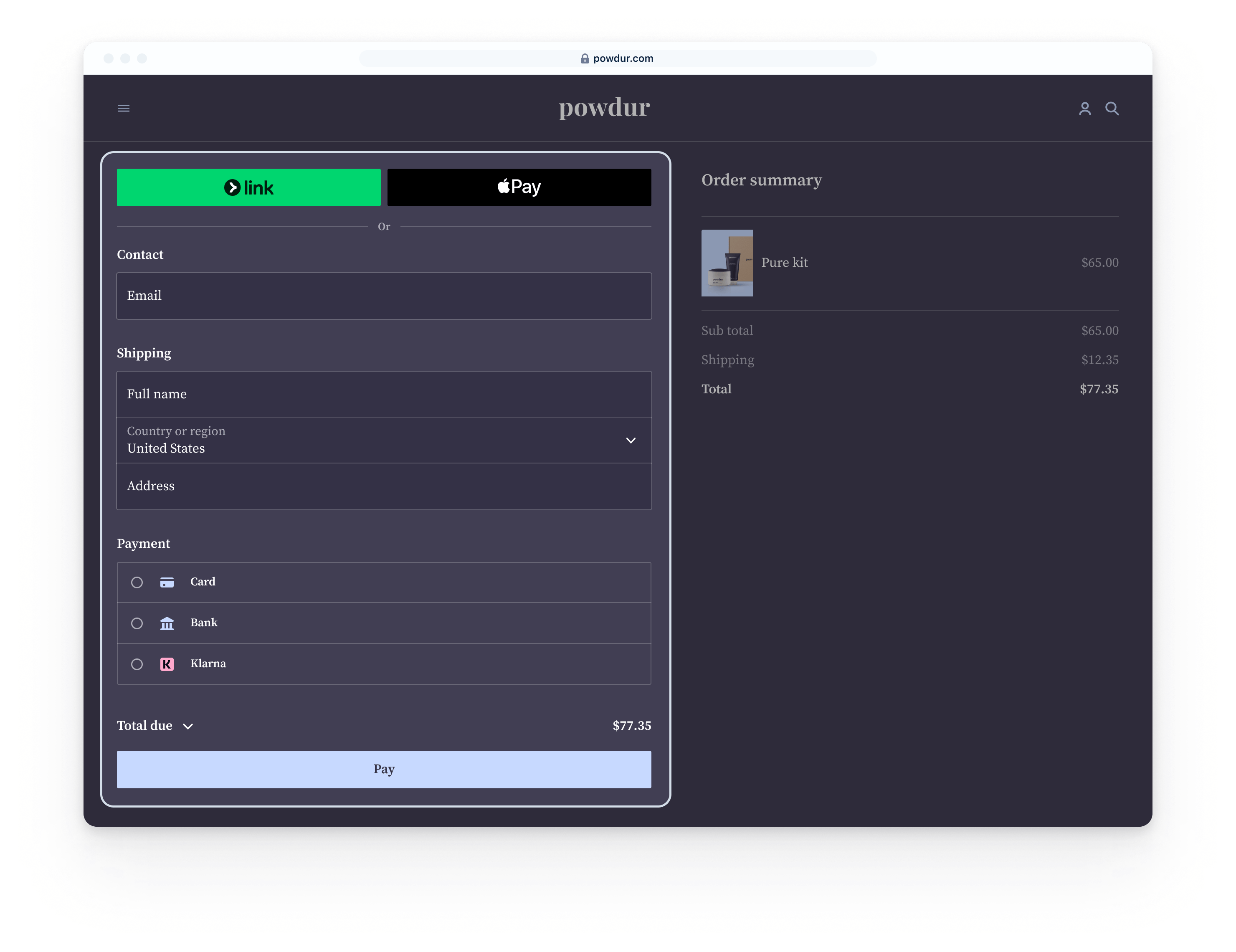
📷 Stripe Checkout shows a hosted checkout flow with payment details and order context. Source: vendor website/documentation.
💚 What we like
Hosted Checkout and Payment Links reduce launch effort, while Elements and APIs leave room for deeper control later.
Broad international coverage, local acquiring and payment-method support make it easier to expand without rebuilding the payment stack.
Documentation, test tooling and ecosystem integrations are strong enough for both common store platforms and custom commerce.
🟠 What to know
Costs can rise with international cards, currency conversion and additional products, so model the full fee stack rather than the headline rate.
Advanced implementations still require engineering ownership for webhooks, payment states, retries, reconciliation and edge cases.
💡 Why this score: Stripe leads because it covers the largest share of common ecommerce payment needs without forcing a single implementation model. It is especially strong on developer experience, checkout flexibility and international expansion, while remaining accessible through hosted options. The main trade-off is that total cost and operational complexity grow with a more global or customized setup.
💰 Pricing: US standard online card pricing is 2.9% + $0.30 per successful domestic card transaction. International cards add 1.5%, and currency conversion adds 1% when required. Other payment methods and products have separate pricing.
✅ Best fit: Digital-first ecommerce businesses that expect to add markets, currencies or payment methods and want one platform that supports both hosted and custom checkout.
🚫 Less ideal for: Teams that only need the simplest platform-native checkout and do not want to own payment integration logic or engineering maintenance.
🧩 Key capabilities
Hosted Stripe Checkout
Embeddable Payment Element and Elements
100+ payment methods
Multi-currency processing and local acquiring
Subscriptions, saved payment methods and payment links
APIs, webhooks, testing and fraud integrations
🔎 Official sources: Product · Pricing · Documentation
🥈 2. Adyen
92/100 · 💰 Enterprise price · 🧩 Advanced · 🏢 Mid-market–Enterprise · ⚙️ Enterprise implementation
🎯 Best for: Larger international merchants that want unified payments, local acquiring and sophisticated optimization across markets and channels.
⚡ Choose Adyen if payment performance, local acquiring, global expansion and unified online plus in-person operations justify a more enterprise-grade implementation.
Adyen is built for merchants that treat payments as a strategic infrastructure layer rather than a plug-in. Its platform combines gateway, processing and acquiring in many markets, with online, mobile and point-of-sale capabilities managed through one environment. The payoff is strong control over authorization, local payment methods, routing and reporting. The trade-off is a more demanding onboarding and integration motion than simpler small-business products.

📷 Adyen documentation illustrates how its online payment components connect the shopper, merchant and payments platform. Source: vendor website/documentation.
💚 What we like
Single-platform architecture can unify online and physical payments, customer data and reporting for complex international businesses.
Local acquiring, many regional payment methods and payment optimization features support sophisticated cross-border expansion strategies.
Drop-in, Components and API-only integration paths give technical teams meaningful control over checkout and payment flows.
🟠 What to know
Adyen is usually a better fit once payment volume, geography or operational complexity justify enterprise implementation and commercial discussions.
Pricing combines a processing fee with payment-method costs, so comparable economics require a merchant-specific volume and mix model.
💡 Why this score: Adyen scores close to Stripe because its core payment infrastructure, local acquiring footprint and enterprise optimization capabilities are exceptional. It is especially compelling for large multi-market or omnichannel merchants. It ranks slightly lower for this general ecommerce list because smaller teams face a steeper implementation and commercial path than with more self-serve options.
💰 Pricing: Adyen lists a $0.13 processing fee per transaction plus a payment-method fee. Card pricing can use Interchange++ depending on market and scheme. There are no setup or monthly fees listed for standard processing, but merchant terms vary.
✅ Best fit: Mid-market and enterprise merchants operating across countries, currencies or channels where authorization performance, local acquiring and centralized payments operations materially affect economics.
🚫 Less ideal for: Small stores that want immediate self-serve onboarding, a very simple pricing model or a purely no-code gateway with minimal implementation work.
🧩 Key capabilities
Drop-in, Components and API-only checkout
Local acquiring in multiple markets
Global and local payment methods
Online, app and point-of-sale payments
Risk, authentication and revenue optimization tooling
Centralized reporting, reconciliation and payment operations
🔎 Official sources: Product · Pricing · Documentation
🥉 3. Checkout.com
90/100 · 💰 Enterprise price · 🧩 Advanced · 🏢 Mid-market–Enterprise · ⚙️ Enterprise implementation
🎯 Best for: Global digital merchants that want a modern enterprise payments stack, flexible checkout UI and payment-performance tooling.
⚡ Choose Checkout.com if you are scaling internationally and want configurable hosted interfaces plus deep API control inside an enterprise payments relationship.
Checkout.com focuses on global digital businesses that want processing, acquiring and checkout technology through one enterprise platform. Flow provides prebuilt hosted payment interfaces, while APIs support deeper customization and payment orchestration. The platform emphasizes international acceptance, performance data and local payment methods. Pricing is sales-led rather than a universal public rate, so the strongest fit is usually a merchant with enough volume and complexity to evaluate negotiated economics.
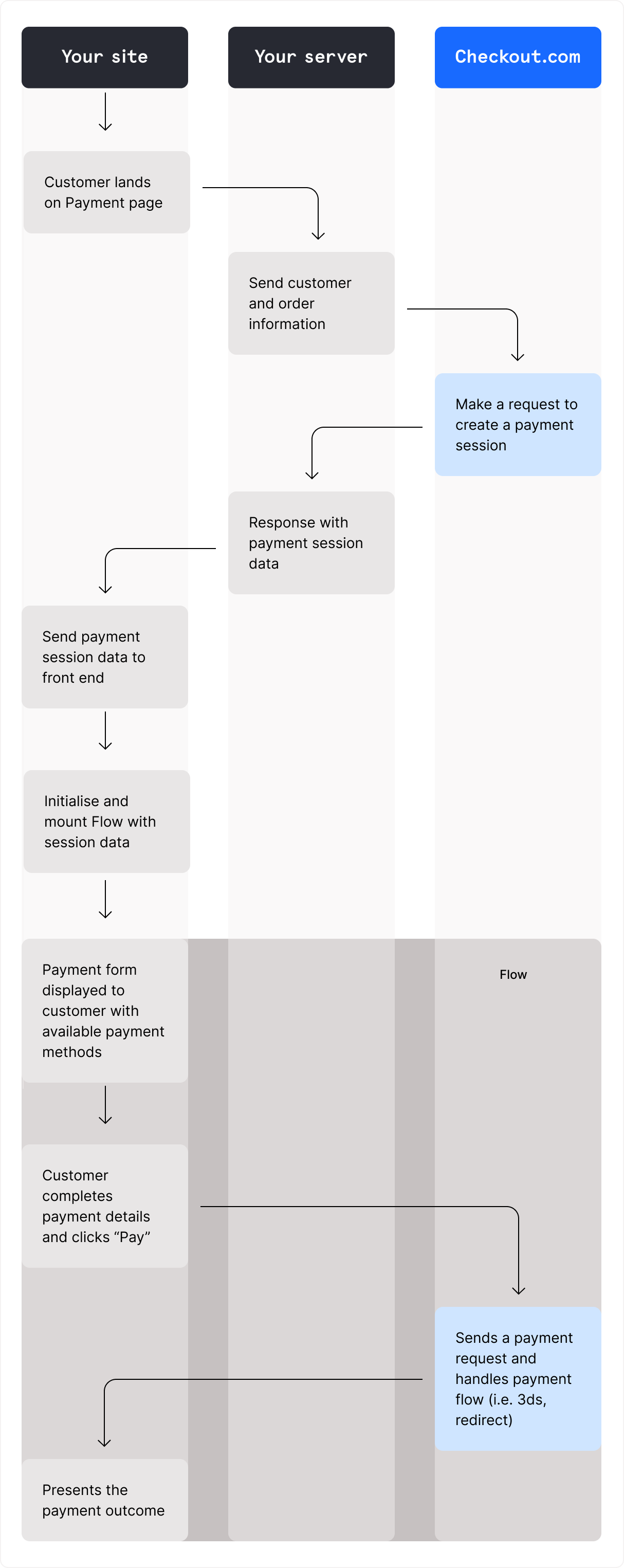
📷 Checkout.com Flow presents payment methods through a prebuilt, configurable checkout interface. Source: vendor website/documentation.
💚 What we like
Flow gives teams a faster hosted-interface path without giving up access to a broader API-first enterprise payments stack.
Support for many currencies and domestic processing markets makes the platform relevant for fast-growing cross-border digital merchants.
Payments, authentication, tokens, disputes and reporting can be managed through a consistent set of enterprise tools and APIs.
🟠 What to know
Public pricing is not a simple universal percentage, so procurement needs a quote based on geography, method mix and volume.
The platform is oriented toward larger digital businesses, making it heavier than necessary for a straightforward small-store setup.
💡 Why this score: Checkout.com scores highly for modern checkout components, international payments depth and enterprise-grade APIs. It is particularly attractive when a digital merchant wants control without building every interface from scratch. It trails the top two because sales-led positioning and custom economics make it less accessible for smaller merchants seeking immediate self-serve setup.
💰 Pricing: Custom pricing. Checkout.com says it can offer flat-rate pricing or Interchange++ depending on the merchant and does not charge setup or account-maintenance fees. Actual rates depend on business profile, markets and payment mix.
✅ Best fit: Scaling digital commerce companies with significant cross-border volume that want enterprise acquiring and processing plus configurable checkout components and payment-performance capabilities.
🚫 Less ideal for: Early-stage merchants that need public, instantly comparable pricing and a fully self-serve signup path for a basic online store.
🧩 Key capabilities
Flow hosted payment interfaces
Payments API and payment sessions
Cards, wallets and local payment methods
Multi-currency and domestic processing coverage
Authentication, tokenization and recurring payments
Disputes, reporting and payment performance tooling
🔎 Official sources: Product · Pricing · Documentation

4️⃣ 4. Shopify Payments
88/100 · 💰 Budget · 🧩 Beginner · 🏢 SMB–Mid-market · ⚙️ No-code
🎯 Best for: Shopify merchants that want the lowest-friction native payment setup, unified admin and no separate gateway integration.
⚡ Choose Shopify Payments if your store already runs on Shopify and Shopify Payments supports your merchant country and required payment methods.
Shopify Payments is the default payments path for eligible Shopify merchants because it is built directly into the store admin and checkout. Setup, payouts, disputes and transaction reporting sit alongside orders rather than in a separate provider dashboard. It is not a general-purpose gateway for stores on other platforms, and availability varies by merchant country. Within Shopify, however, the integration advantage is hard to match.

📷 Shopify's payments settings keep provider configuration inside the same admin used to run the store. Source: vendor website/documentation.
💚 What we like
Native setup removes a separate gateway account and keeps payments, orders, payouts and disputes inside the Shopify admin.
Using Shopify Payments avoids Shopify's additional third-party transaction fee that can apply when another provider processes orders.
Built-in compatibility with Shopify checkout reduces implementation risk and makes major card and wallet methods easier to activate.
🟠 What to know
Only Shopify stores can use it, and the business must be located in a Shopify Payments-supported country and meet eligibility requirements.
Processing rates vary by Shopify plan and market, so compare your actual plan pricing rather than relying on one global headline rate.
💡 Why this score: Shopify Payments ranks highly because ecommerce fit matters, and for an eligible Shopify merchant it removes substantial setup and operational friction. Native checkout, unified reporting and its fee structure make it a strong default. Its score is capped by platform lock-in and country eligibility.
💰 Pricing: Rates vary by Shopify plan, card type and market. Shopify states there is no separate Shopify Payments setup fee, and stores using it avoid the additional third-party transaction fee that applies when an external provider is used for eligible orders.
✅ Best fit: Shopify stores in supported countries that want a native checkout and back office, straightforward activation and minimal payment integration work.
🚫 Less ideal for: Merchants on another commerce platform, businesses in unsupported countries or teams that need a processor independent from their storefront platform.
🧩 Key capabilities
Native Shopify checkout processing
Cards and supported accelerated wallets
Payouts and reconciliation in Shopify admin
Disputes and chargeback management
Multi-currency capabilities with Shopify Markets support
No separate third-party gateway integration
🔎 Official sources: Product · Pricing · Documentation
5️⃣ 5. PayPal
86/100 · 💰 Budget · 🧩 Beginner · 🏢 All sizes · ⚙️ Low-code
🎯 Best for: Merchants that want a familiar consumer wallet plus card checkout and broad international shopper recognition.
⚡ Choose PayPal if adding a widely recognized wallet and checkout option can improve payment choice and trust for your customer base.
PayPal can play two roles in ecommerce: a recognizable wallet button and a broader checkout stack that also accepts cards and other methods. That makes it useful both as a primary checkout for some merchants and as a complementary option alongside another processor. Its reach is a major strength, but fee structure varies by transaction type and product, so merchants should separate PayPal-wallet economics from card-processing economics when comparing providers.
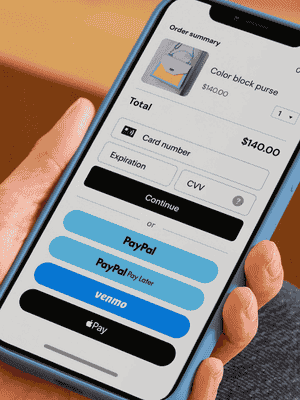
📷 PayPal's checkout experience combines PayPal with card, wallet and financing options depending on merchant setup. Source: vendor website/documentation.
💚 What we like
High consumer familiarity can add a trusted wallet option without asking buyers to create another merchant-specific account.
PayPal Checkout supports customers across more than 200 markets and can sit alongside card and alternative payment experiences.
Standard and expanded checkout options let merchants choose between simpler PayPal-led flows and more integrated card acceptance.
🟠 What to know
US pricing differs between PayPal Checkout and card processing, so the relevant rate depends on which payment experience customers use.
Adding PayPal beside another processor improves choice but can split reconciliation, disputes and payment operations across provider dashboards.
💡 Why this score: PayPal scores well for shopper reach, brand recognition and flexible deployment as either a wallet or broader checkout. It is especially valuable where customers actively prefer PayPal. It sits below the top infrastructure platforms because merchants may still pair it with another processor and its fee schedules require careful modeling.
💰 Pricing: In the US, standard PayPal Checkout is listed at 3.49% + a fixed fee, with the fixed fee at $0.49 for USD. Standard online card payments are listed at 2.99% + the fixed fee. International transactions can add 1.5%.
✅ Best fit: Ecommerce stores selling to audiences where PayPal is a meaningful payment preference and merchants that want a recognized wallet alongside card acceptance.
🚫 Less ideal for: Teams trying to consolidate every payment method, payout and reconciliation workflow into one neutral processor with a single simple fee model.
🧩 Key capabilities
PayPal wallet checkout
Online debit and credit card acceptance
Pay Later and eligible alternative methods
International customer reach
Recurring payments and saved credentials
Merchant checkout, reporting and dispute tools
🔎 Official sources: Product · Pricing · Documentation
6️⃣ 6. Mollie
84/100 · 💰 Budget · 🧩 Beginner · 🏢 SMB–Mid-market · ⚙️ No-code
🎯 Best for: European ecommerce businesses that want transparent pay-as-you-go pricing and strong local payment-method coverage.
⚡ Choose Mollie if Europe is your core market and local payment methods, simple onboarding and transparent transaction pricing matter more than maximum global breadth.
Mollie is a practical European payments choice with a strong mix of local methods, hosted checkout, payment links and platform integrations. It is particularly easy to evaluate because many method-specific prices are public and there is no standard monthly commitment for basic processing. The platform can support growing merchants, but its center of gravity remains Europe, so companies planning a truly global acquiring strategy should compare its geographic footprint with larger international processors.
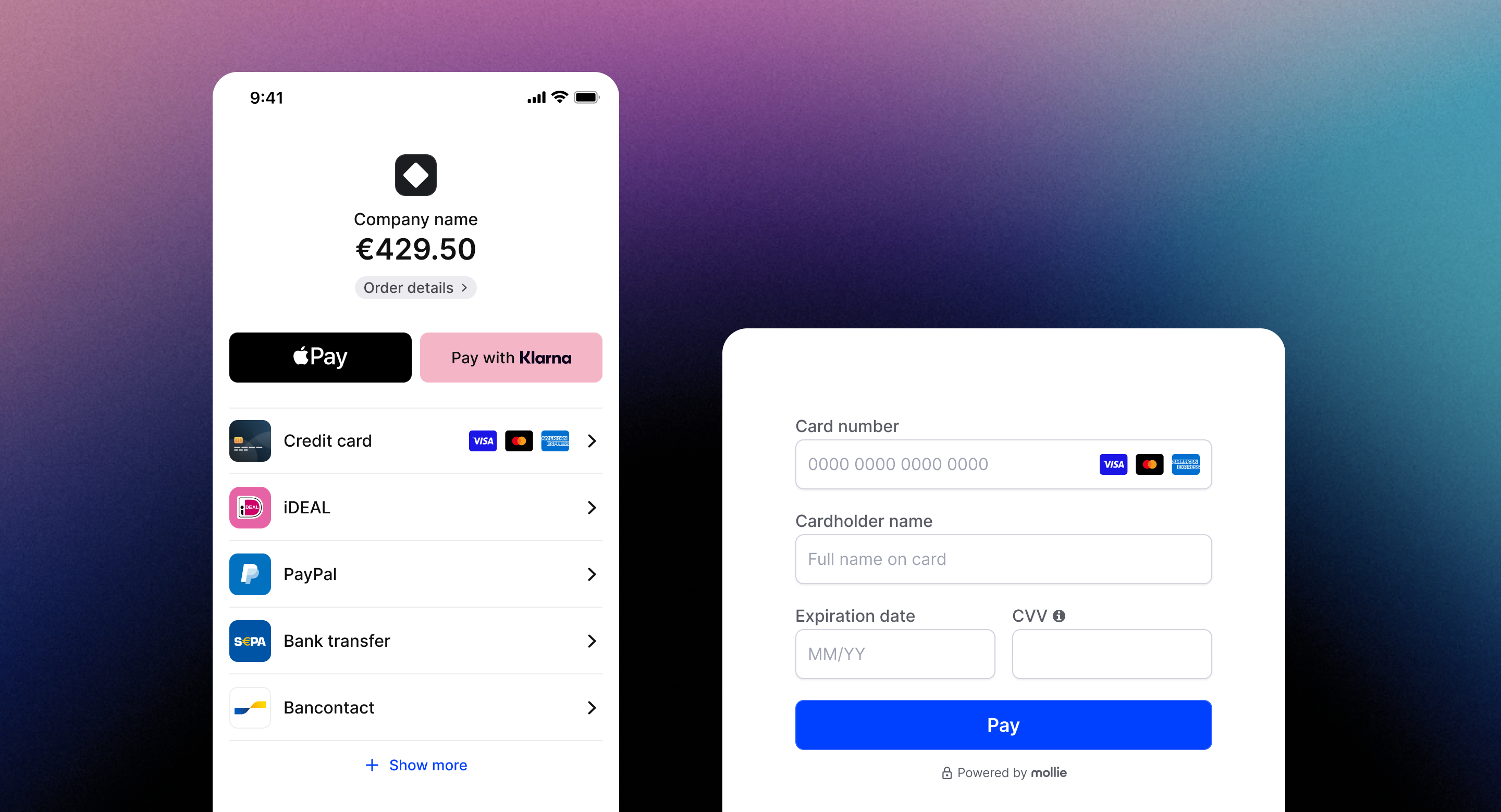
📷 Mollie's hosted checkout presents multiple local and card payment methods in a merchant-branded flow. Source: vendor website/documentation.
💚 What we like
Public method-by-method pricing makes it easier to estimate real payment costs before entering a sales process or contract negotiation.
European local methods such as iDEAL sit alongside cards, wallets and other options in one integration and hosted checkout.
Plugins, payment links and a hosted checkout give smaller teams practical no-code or low-code ways to start taking payments.
🟠 What to know
Merchants should confirm company-country eligibility and local acquiring needs because Mollie's strongest coverage is concentrated in European markets.
Card pricing differs for European Economic Area consumer, commercial and non-European cards, so international mix can materially change effective cost.
💡 Why this score: Mollie ranks strongly on value, transparency and European ecommerce fit. For an eligible merchant, local payment methods, hosted checkout and clear public rates reduce procurement and setup friction. Its score is lower than the global leaders because broader international expansion can require deeper acquiring coverage.
💰 Pricing: Public European pricing includes 1.80% + €0.25 for European Economic Area consumer cards, 2.90% + €0.25 for commercial cards and 3.25% + €0.25 for non-European Economic Area cards. Other methods have their own rates.
✅ Best fit: European small and mid-sized ecommerce merchants that want local payment methods, clear pay-as-you-go pricing and fast integration through hosted checkout or store plugins.
🚫 Less ideal for: Large global merchants that require the broadest acquiring footprint, extensive multi-region payment optimization or a single platform spanning many non-European markets.
🧩 Key capabilities
Hosted Mollie Checkout
European local payment methods
Cards and major digital wallets
Payment links and recurring payments
Store-platform plugins and APIs
Payout scheduling and transaction reporting
🔎 Official sources: Product · Pricing · Documentation
7️⃣ 7. Worldpay
82/100 · 💰 Budget · 🧩 Intermediate · 🏢 All sizes · ⚙️ Low-code
🎯 Best for: Merchants wanting established global acquiring plus hosted or embedded ecommerce checkout choices across many markets.
⚡ Choose Worldpay if you value a large acquiring footprint and want a provider that can support both smaller online stores and complex international operations.
Worldpay spans small-business ecommerce packages and enterprise global payments. Its online offering includes hosted checkout, embedded components and broader APIs, with extensive currency and market coverage. That breadth is useful for businesses that may outgrow a local gateway. The challenge is that products, pricing and contracting can differ by country and segment, so the evaluation needs to use the exact Worldpay package available to the merchant rather than treating the brand as one uniform plan.

📷 Worldpay's hosted payment page illustrates a checkout path where Worldpay handles the payment-entry interface. Source: vendor website/documentation.
💚 What we like
Wide geographic and currency coverage gives international merchants a credible path from domestic acceptance to cross-border payment operations.
Hosted payment pages and embedded components provide alternatives to building a complete card-data collection interface from scratch.
Worldpay can serve smaller merchants and large enterprises, which can reduce the need to change providers purely because volume grows.
🟠 What to know
Pricing and product packaging vary materially by market, so a UK small-business offer should not be assumed to match enterprise or other-country terms.
The breadth of the portfolio makes provider comparison less self-serve than a single global price page and one standardized product package.
💡 Why this score: Worldpay scores well for reach, acquiring depth and a range of online integration options. It can be a serious shortlist candidate for merchants that need established international processing. It ranks below the more digitally uniform platforms because product experience and economics can vary by market and merchant segment, making evaluation and implementation less consistent.
💰 Pricing: Pricing is market-specific. In the UK, Worldpay lists selected ecommerce rates from 1.3% + 20p for Visa and Mastercard consumer debit or credit cards and 2.9% + 20p for American Express and commercial cards. Larger merchants can receive custom pricing.
✅ Best fit: Businesses that want a long-established acquirer with international reach, hosted checkout options and a path from standard ecommerce acceptance to enterprise payments.
🚫 Less ideal for: Teams that prioritize one globally uniform self-serve package, identical public pricing across markets or a developer-first onboarding experience from day one.
🧩 Key capabilities
Hosted payment page
Embedded checkout components
Global card acquiring
Alternative and local payment methods
Multi-currency processing and settlement options
Enterprise APIs, reporting and payment operations
🔎 Official sources: Product · Pricing · Documentation
8️⃣ 8. Square
80/100 · 💰 Budget · 🧩 Beginner · 🏢 SMB–Mid-market · ⚙️ Low-code
🎯 Best for: Small and mid-sized merchants that want online payments tightly connected to Square's broader commerce and in-person ecosystem.
⚡ Choose Square if you already use Square or want online payments, point of sale and merchant operations from the same small-business ecosystem.
Square is strongest when online payments are part of a broader merchant setup that may also include point of sale, invoices or other Square products. For ecommerce, businesses can use Square Online, payment links or the Web Payments software development kit for custom sites. The developer tooling supports cards and several wallets, but Square's seller-country footprint is narrower than the largest global processors, which limits it for some international-first businesses.
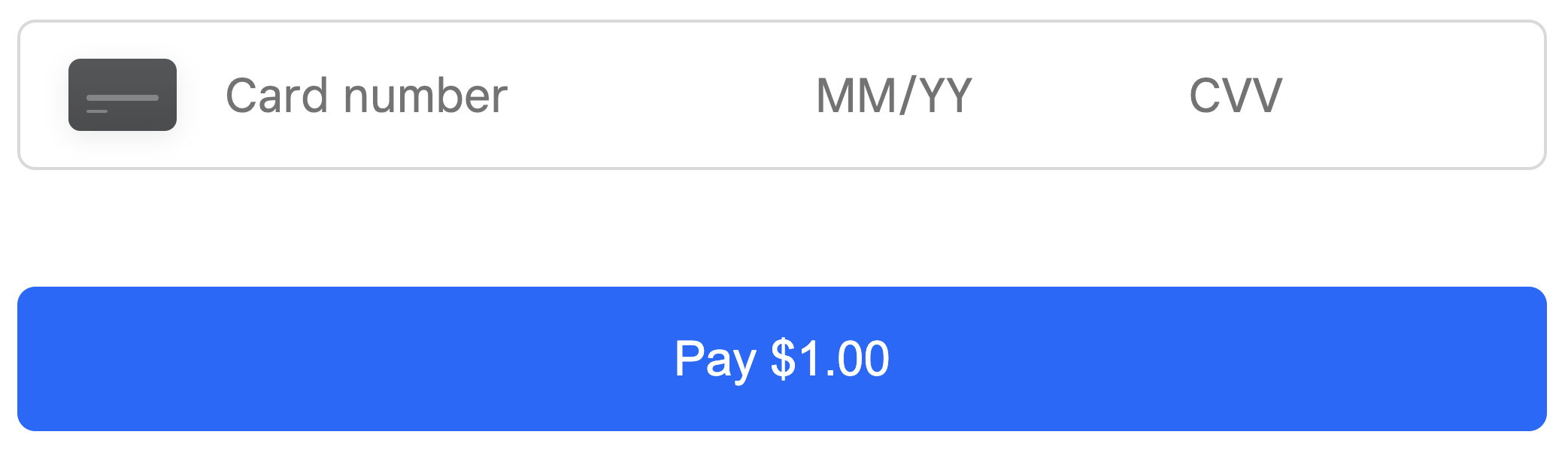
📷 Square's Web Payments card element provides a secure card-entry field that can be embedded in a custom checkout. Source: vendor website/documentation.
💚 What we like
Online and in-person payments can share one merchant ecosystem, which simplifies operations for retailers selling across website and physical locations.
Web Payments software development kit supports cards plus methods such as Apple Pay, Google Pay, Cash App Pay and Afterpay/Clearpay.
Clear public US pricing and an accessible small-business product set make initial cost and implementation easier to understand.
🟠 What to know
Seller availability is limited to supported Square countries, so it is not a universal acquiring solution for merchants incorporated anywhere.
Online transaction rates depend on Square plan and integration path, so compare Square Online and application programming interface pricing separately.
💡 Why this score: Square earns a solid score because its ecommerce payments are easy to combine with a broader small-business commerce stack. It is particularly strong for omnichannel sellers and teams already using Square. It ranks lower for globally ambitious pure-play ecommerce because merchant-country reach and advanced international acquiring are more limited than the leading global processors.
💰 Pricing: In the US, Square Online Free lists 3.3% + $0.30 for online card payments, while Plus and Premium list 2.9% + $0.30. The Online Payments application programming interface lists 2.9% + $0.30 for card transactions, with custom pricing available for qualifying volume.
✅ Best fit: Small and mid-sized merchants that sell online and in person, especially those already using Square point of sale or other Square business products.
🚫 Less ideal for: International-first ecommerce companies that need merchant onboarding across many countries, complex local acquiring strategies or highly customized enterprise payment routing.
🧩 Key capabilities
Square Online payments
Web Payments software development kit
Cards and digital wallets
Payment links and invoices
Unified online and point-of-sale payments
Payments application programming interface and webhooks
🔎 Official sources: Product · Pricing · Documentation
9️⃣ 9. Authorize.net
77/100 · 💰 Budget · 🧩 Intermediate · 🏢 SMB · ⚙️ Low-code
🎯 Best for: US and Canadian merchants that want a mature gateway and the option to use an existing merchant account.
⚡ Choose Authorize.net if you operate in the United States or Canada and want a long-established gateway with flexible merchant-account options.
Authorize.net remains a practical gateway for merchants that want payment acceptance without necessarily replacing their merchant account relationship. It supports an all-in-one option as well as gateway-only pricing, plus hosted and tokenized checkout tools through the Accept suite. The key constraints are geographic and architectural: merchant businesses must be based in the United States or Canada, and teams should choose current Accept integrations rather than older legacy patterns.
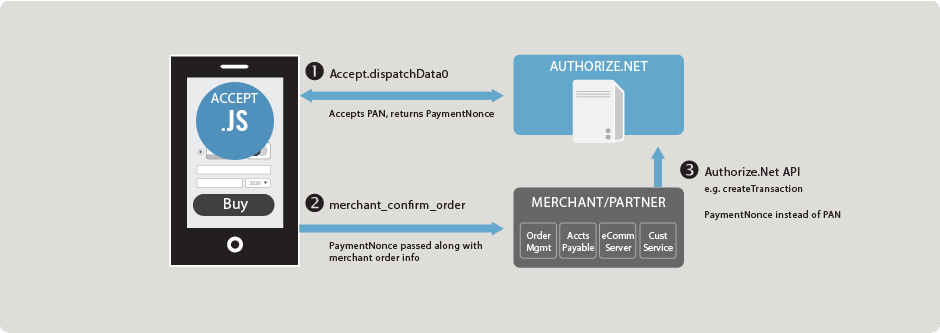
📷 Authorize.net's Accept.js documentation shows the tokenized payment flow between browser, merchant server and Authorize.net. Source: vendor website/documentation.
💚 What we like
Gateway-only pricing lets merchants connect Authorize.net to an existing compatible merchant account instead of buying a bundled processing package.
Accept Hosted and Accept.js reduce direct card-data exposure while still letting merchants control how payment collection fits their checkout.
Recurring billing, customer profiles, electronic checks and fraud tools cover many established small-business payment requirements.
🟠 What to know
Merchant businesses must be based in the United States or Canada, which makes the product unsuitable as a global merchant onboarding layer.
A monthly gateway fee applies, and older Authorize.net integration approaches exist, so new builds should follow current Accept and API documentation.
💡 Why this score: Authorize.net scores well for mature gateway functionality and merchant-account flexibility, especially in the US and Canada. It can still be a very sensible choice for established small businesses. It ranks below newer global platforms because its merchant geography is narrow, its pricing includes a monthly fee and its integration landscape carries more legacy history.
💰 Pricing: The all-in-one plan is listed at $25 per month plus 2.9% + $0.30 per transaction. Gateway-only pricing is $25 per month plus $0.10 per transaction and a $0.10 daily batch fee. Electronic check processing is listed separately.
✅ Best fit: US or Canadian merchants that want a proven gateway, need compatibility with an existing merchant account or prefer hosted and tokenized payment-entry options.
🚫 Less ideal for: Merchants incorporated outside the US and Canada or global digital businesses seeking one modern processor and acquirer across many legal entities.
🧩 Key capabilities
Payment gateway and all-in-one processing
Accept Hosted and Accept.js
Customer profiles and tokenization
Automated recurring billing
Electronic check acceptance
Fraud detection, reporting and transaction APIs
🔎 Official sources: Product · Pricing · Documentation

🔟 10. Amazon Pay
75/100 · 💰 Budget · 🧩 Intermediate · 🏢 SMB–Mid-market · ⚙️ Developer-led
🎯 Best for: Merchants that want Amazon account credentials as a familiar complementary wallet and checkout option.
⚡ Choose Amazon Pay if your customers use Amazon heavily and adding Amazon Pay could remove address or payment-entry friction alongside your primary processor.
Amazon Pay lets shoppers use payment and address information associated with their Amazon account on participating merchant sites. Its main value is familiarity and reduced data entry, especially as an additional checkout option rather than a complete replacement for a merchant's broader payments stack. Merchant availability and supported currencies are more limited than the widest global processors, so teams should evaluate it as a targeted conversion option for relevant audiences.
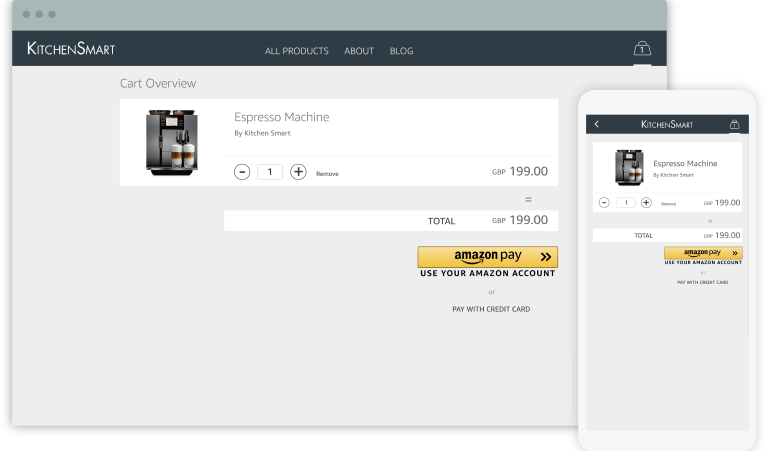
📷 Amazon Pay Checkout v2 shows the Amazon Pay button integrated into a merchant cart across desktop and mobile. Source: vendor website/documentation.
💚 What we like
Shoppers can use familiar Amazon credentials and stored payment information, reducing the need to re-enter payment details on the merchant site.
Checkout v2 provides hosted payment steps, decline recovery and strong customer authentication support within the Amazon Pay experience.
Transaction pricing is straightforward for standard US domestic web and mobile purchases, with no separate setup or monthly fee listed.
🟠 What to know
Amazon Pay is best treated as an additional payment option, not as a universal replacement for card acquiring and a complete global payment stack.
Merchant regions and supported ledger currencies are narrower than the broadest processors, so eligibility must be confirmed before integration work begins.
💡 Why this score: Amazon Pay earns points for a recognizable buyer experience and a focused way to reduce checkout friction for Amazon-oriented audiences. It is useful as a complementary wallet. Its score is lower because merchant coverage, currencies and product breadth are narrower than full-stack processors.
💰 Pricing: For US web and mobile purchases, Amazon Pay lists 2.9% + $0.30 for domestic transactions and 3.9% + $0.30 for cross-border transactions. Other products and regions can differ, and chargeback fees may apply.
✅ Best fit: Ecommerce merchants whose customers have strong Amazon usage and who want an additional recognizable payment button alongside a primary card processor or gateway.
🚫 Less ideal for: Businesses seeking one provider for broad merchant-country coverage, extensive local payment methods, global acquiring and all core payment operations.
🧩 Key capabilities
Amazon Pay checkout button
Amazon-account payment credentials
Hosted checkout experience
Address and payment selection
Decline recovery and authentication flows
APIs for one-time and recurring payment use cases
🔎 Official sources: Product · Pricing · Documentation
🎯 Which tools should you actually shortlist?
For the broadest general-purpose default: start with Stripe, then compare your exact country, payment-method mix and expected international volume against alternatives.
For large international or omnichannel operations: evaluate Adyen when local acquiring, payment optimization and one platform across online and physical channels matter.
For high-growth digital enterprise: put Checkout.com beside Adyen and Stripe if you want modern hosted components plus negotiated enterprise processing.
For Shopify stores: benchmark Shopify Payments first. Only add or replace it when eligibility, methods, geography or economics create a clear gap.
For European small and mid-sized ecommerce: include Mollie when transparent pricing and European local payment methods are central to conversion.
For omnichannel small business: shortlist Square when your website, point of sale and other merchant workflows should share one payments ecosystem.
🧪 Run this test before you buy
Do not compare payment providers from pricing pages alone. Build a small evaluation around your real legal entity, store platform, target markets and basket sizes. Run the same checkout and operations scenarios with each finalist, including at least one international card and one local payment method. The goal is to expose integration, fee and reconciliation differences before they become production problems.
Confirm your legal entity can onboard and that the provider supports every merchant country you plan to operate from.
Build or configure the real checkout on desktop and mobile, then verify the payment methods shown to customers in each target market.
Test authentication, including 3-D Secure where relevant, and confirm how the checkout handles additional customer verification.
Trigger a declined payment and inspect the retry, error messaging and recovery path rather than testing only successful transactions.
Run authorization, capture, partial capture, void and full or partial refund scenarios and record which actions are available to operations teams.
Follow a completed order into payout and reconciliation reporting, then match the provider's transaction, fee and settlement records to the order.
Test a cross-border purchase and currency conversion scenario so you can calculate the real combined processing and foreign-exchange cost.
If you sell subscriptions or save cards, test tokenization, recurring charges, failed renewals and how stored payment credentials are managed.
Open a dispute or review the sandbox equivalent and map the evidence, deadline, fee and user-permission workflow for your support and finance teams.
Measure implementation work across plugins, hosted checkout, application programming interfaces and webhooks, including monitoring and ownership after launch.
📏 Record the same things for every vendor: approval rate, checkout completion, payment methods shown, total fee by transaction type, foreign-exchange cost, payout timing, refund timing, reconciliation effort, implementation hours, support response and operational exceptions.
🧾 10 questions to ask in every demo
Which of our legal entities and merchant countries can you onboard today, and which require a different contract or setup?
Which payment methods will actually appear for customers in each of our target countries, currencies and device types?
What is our all-in cost on the transaction mix we provide, including cross-border, foreign exchange, authentication, dispute and other relevant fees?
What are our standard payout timings, settlement currencies, reserve rules and circumstances that can delay or hold funds?
Which integration path fits our stack, and how does each option change Payment Card Industry Data Security Standard compliance scope and engineering ownership?
Where do you provide local acquiring or authorization optimization, and how should we measure whether it improves approval rates for us?
How do partial capture, refunds, voids, disputes and chargebacks work operationally, including permissions and evidence deadlines?
How are saved credentials and recurring payments handled, and what happens to tokens if we later add or switch providers?
Which reports, exports, webhooks and identifiers should finance use to reconcile orders, fees, refunds, disputes and payouts?
What implementation support and service-level agreements (SLAs) are included at our expected volume, and who owns escalation after launch?
❓ Frequently asked questions
What is the difference between a payment gateway, processor and checkout service?
A gateway securely transmits payment information from the checkout for authorization. A processor moves transaction messages between the merchant, card networks and financial institutions. Modern providers often combine gateway, processing, acquiring, checkout UI, fraud and payouts, so the labels overlap. Platform-native products such as Shopify Payments bundle the payment layer into the commerce platform, while wallets such as Amazon Pay can sit alongside a primary processor as an additional way to pay.
Which payment gateway is the cheapest for ecommerce?
There is no universal cheapest option because the effective rate depends on merchant country, card type, local payment method, cross-border share, currency conversion, monthly fees, disputes and negotiated volume. Public headline rates are useful for screening, but model at least three realistic baskets: domestic consumer card, international card with currency conversion and a major local payment method. Then add payout, reconciliation and implementation costs before deciding.
Can an ecommerce store use more than one payment provider?
Yes. Many stores pair a primary processor with a wallet such as PayPal or Amazon Pay, and larger merchants may use multiple processors for geography, resilience or payment optimization. The benefit is broader payment choice and reduced dependency on one provider. The cost is more integration, reconciliation, dispute handling and reporting complexity, so add a second provider only when a specific conversion, coverage or resilience benefit justifies it.
How should I compare Stripe and PayPal?
Start by deciding whether you need a core payments infrastructure layer, a recognizable consumer wallet or both. Stripe is built around a broad processor, checkout and developer platform with many local methods and customization paths. PayPal brings a widely recognized account-based checkout and can also process cards. Compare them on your customer payment preferences, total transaction mix, target markets, recurring-payment needs and how much operational consolidation you want.
Which providers are strongest for international ecommerce?
Stripe, Adyen and Checkout.com are the strongest broad international candidates in this list, while Worldpay also has extensive global acquiring reach. The best fit still depends on where your merchant entity is based and where customers pay. For Europe-focused businesses, Mollie can be especially practical because of local methods and transparent pricing. Always verify current merchant-country eligibility, acquiring coverage, settlement currencies and payment methods before selecting a global provider.
How can I switch payment providers without damaging conversion?
Treat the move as a controlled checkout migration. Rebuild and test payment states in a sandbox, map refunds and reconciliation, confirm how saved credentials or subscription tokens will migrate, and run mobile plus international scenarios. If possible, roll out gradually and keep the previous provider available until authorization, checkout completion, payouts and support workflows are stable. A multi-provider period may add complexity, but it can reduce the risk of a hard cutover.
🔍 About this research
MarketMaze researches and scores each tool using its proprietary scoring methodology. Product details and pricing are checked against official vendor sources. Screenshots are from vendor websites, documentation, official demos, or MarketMaze product captures and are used to illustrate the products being reviewed.
Last research check: 25 September 2026.
This page is editorial research. Pricing, eligibility and availability can change by market, merchant profile, payment method and contract. Verify final commercial terms and supported markets directly with each provider before implementation.
