
MARKETMAZE · ECOMMERCE TOOLS · RESEARCH
12 Best Ecommerce Email Marketing & Automation Platforms (2026)
Grow an email audience and automate welcome messages, abandoned-cart recovery, product launches and repeat-purchase campaigns. We compared 12 platforms on ecommerce data, segmentation, workflow control, deliverability, reporting and realistic pricing for online sellers.
Updated 25 September 2026 · Pricing and product claims checked against official vendor sources.
👋 New to this category?
Ecommerce email platforms connect store behavior to messages. Automation means a shopper can enter a sequence after an action such as signing up, viewing a product, abandoning a cart or buying. Segmentation groups customers using data such as purchase history, engagement or location. Deliverability covers the controls that help legitimate messages reach inboxes. The practical question is not which tool sends email, because all of them do. It is which platform captures the commerce events you need, lets your team build and test flows safely, and stays economical as contacts and send volume grow.
🧭 Jump to a tool
🏆 The quick answer
🏆 Best overall
Klaviyo
🌱 Best for getting started
MailerLite
💸 Best value
Omnisend
🏢 Best for larger teams / enterprise
Dotdigital
🧠 Best for advanced or technical users
ActiveCampaign
🛍️ Best native Shopify option
Shopify Messaging
MarketMaze take
Start with the operating model, not the feature checklist. A small Shopify store may be better served by a simple native tool, while a lifecycle-heavy brand can justify deeper segmentation and reporting. Use the scores to understand overall fit, then shortlist two or three tools based on your store platform, list size, send volume, automation ambition and the people who will actually run the program.
📊 Tool comparison & scores
Rank | Tool | Score | Best for | Pricing |
|---|---|---|---|---|
1 | Klaviyo | 94/100 | Growth-focused ecommerce brands that want deep behavioral segmentation and mature lifecycle automation | Free; paid scales by profiles |
2 | Omnisend | 91/100 | Ecommerce teams wanting strong prebuilt automation and multichannel messaging without Klaviyo-level cost | Free; Standard from $16 |
3 | Sendlane | 88/100 | High-volume ecommerce senders prioritizing deliverability support and send-based rather than contact-based economics | Send-volume pricing |
4 | Drip | 87/100 | Ecommerce brands that want automation designed around shopper behavior, purchases and repeat revenue | Active people + send volume |
5 | Dotdigital | 86/100 | Larger commerce teams needing sophisticated cross-channel automation, integrations and structured program governance | Custom quote |
6 | ActiveCampaign | 84/100 | Teams combining ecommerce automation with broader customer relationship management and cross-business workflows | From about $15 |
7 | Mailchimp | 81/100 | Small businesses wanting familiar email marketing with accessible templates, campaigns and growing automation capability | Standard from $20 |
8 | Brevo | 80/100 | Cost-conscious teams wanting email automation, transactional messaging and multiple channels in one account | Free; Standard from $18 |
9 | GetResponse | 78/100 | Small businesses wanting email automation plus landing pages, funnels, webinars and broader campaign tools | Marketer $59 |
10 | Privy | 77/100 | Shopify-focused small brands combining list growth popups with straightforward email and SMS automation | From $30 |
11 | MailerLite | 76/100 | Budget-conscious small stores that need clean campaigns and approachable automation without heavy platform complexity | Free; Comfort from $12 |
12 | Shopify Messaging | 74/100 | Shopify merchants wanting native campaigns and basic lifecycle automations inside the Shopify admin | 10k emails free/month |
🧠 How the scoring works
This ranking uses MarketMaze proprietary scoring.
Dimension | Weight | What we look for |
|---|---|---|
Core job performance | 30% | Automation depth, segmentation, deliverability tooling and ecommerce event coverage. |
Ecommerce fit | 20% | Store integrations, product and order data, lifecycle templates and commerce reporting. |
Workflow & control | 15% | Builder usability, branching, testing, scheduling and day-to-day operator control. |
Integrations & implementation | 15% | Commerce platform coverage, APIs, data flow, migration and setup effort. |
Pricing & value | 10% | Price transparency and realistic cost at useful contact and send volumes. |
Scale & advanced capabilities | 10% | Governance, advanced analytics, high-volume sending and complex multi-team use cases. |
TOTAL | 100% |
🤔 Do you even need ecommerce email automation software?
Probably yes ✅
You have enough traffic or repeat orders that welcome, abandonment, post-purchase and win-back messages can run continuously. Manual campaigns alone leave obvious customer moments uncovered and make it harder to learn which lifecycle programs actually drive sales.
Maybe 🟡
Your store is growing, but list size and repeat purchase behavior are still developing. Start with a low-cost or native platform, prove two or three core flows, and upgrade only when segmentation, testing or reporting becomes a real constraint.
Probably not yet ⏳
You have very low traffic, few subscribers and limited purchase history. Focus first on product-market fit, conversion and list capture. A simple newsletter tool or Shopify-native messaging can cover the basics until automated lifecycle revenue becomes material.
🥇 1. Klaviyo
94/100 · 💰 Mid · 🧩 Intermediate · 🏢 SMB–Mid-market · ⚙️ Specialist-led
🎯 Best for: Growth-focused ecommerce brands that want deep behavioral segmentation and mature lifecycle automation
⚡ Choose Klaviyo if purchase and browsing data should drive highly granular lifecycle messaging across your store.
Klaviyo is built around customer profiles, commerce events and automated flows. Connect a store, sync browsing and purchase behavior, then use that data to trigger welcome, abandonment, post-purchase, replenishment and win-back sequences. Its segmentation and reporting are particularly useful when a team wants to keep campaign and automation decisions close to revenue data rather than relying mainly on opens and clicks.
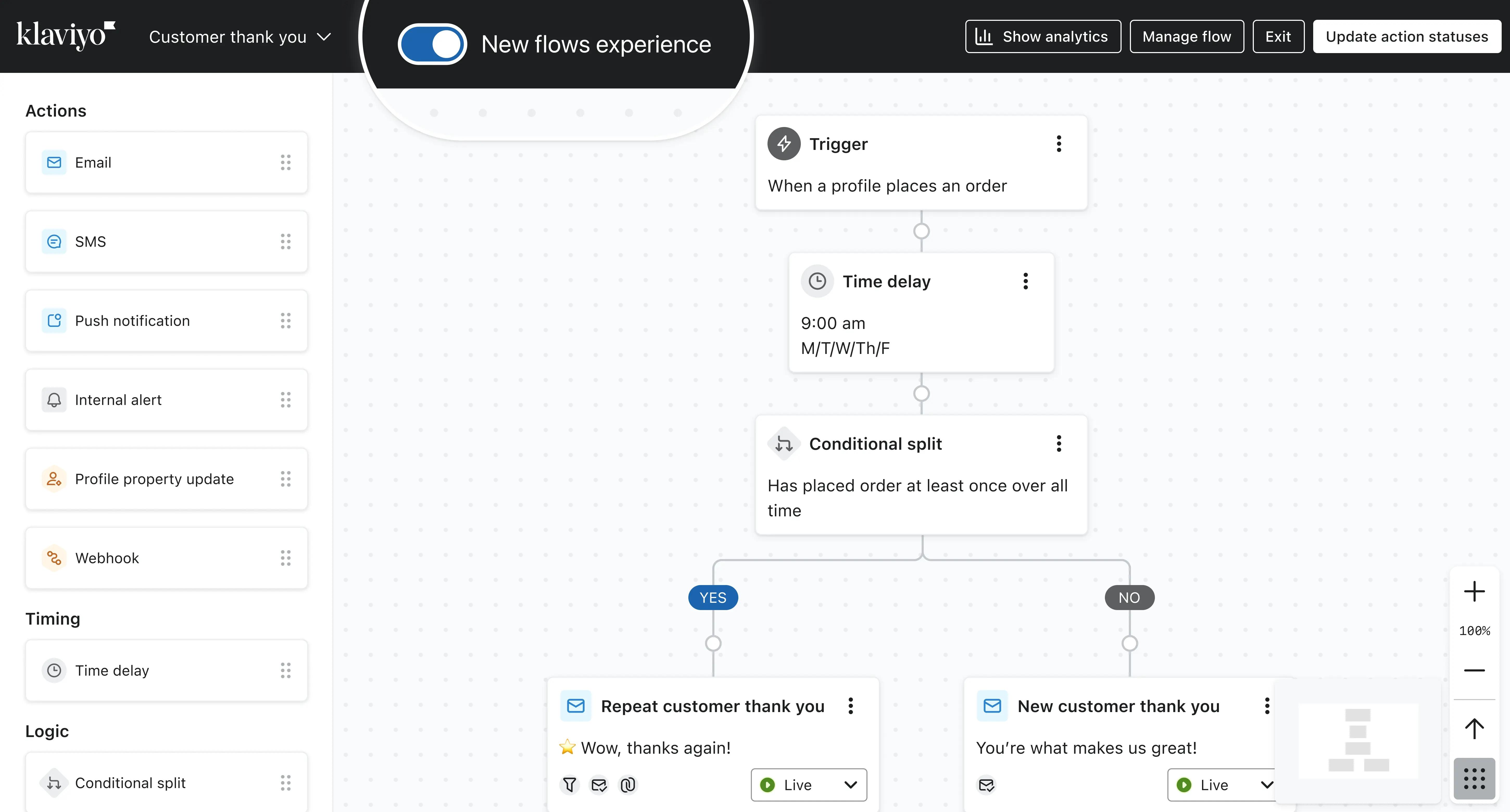
📷 Klaviyo’s flow builder shows the branching canvas used to assemble event-driven customer journeys. Source: vendor website/documentation.
💚 What we like
Deep ecommerce event data makes behavioral segments and flow triggers practical without stitching together several tools.
The visual flow builder supports branching, testing and multiple messaging channels while keeping customer context in one profile.
Revenue attribution, cohort-style analysis and flow reporting give operators useful feedback on which lifecycle programs actually sell.
🟠 What to know
Pricing rises with active profile count, so list hygiene and suppression discipline matter as a store scales.
The breadth of options can be excessive for small teams that only need newsletters and a few basic automations.
💡 Why this score: Klaviyo leads because it combines strong ecommerce data depth, flexible automation, mature segmentation and reporting in one operating model. It loses points on cost and complexity, but for brands ready to use behavioral data seriously, those trade-offs are usually easier to justify than missing core lifecycle control.
💰 Pricing: Free for up to 250 active profiles and 500 email sends monthly; paid email plans scale with active profile count and sending volume.
✅ Best fit: Brands with meaningful repeat purchase potential, enough traffic to support behavioral segmentation, and a marketer who will actively manage flows and deliverability.
🚫 Less ideal for: Very small stores that need only occasional campaigns, or teams that strongly prefer the lowest possible monthly software cost.
🧩 Key capabilities
Behavioral segmentation
Visual lifecycle flows
Ecommerce event triggers
Revenue attribution
A/B flow testing
Omnichannel messaging
🔎 Official sources: Product · Pricing · Documentation
🥈 2. Omnisend
91/100 · 💰 Budget · 🧩 Beginner · 🏢 SMB–Mid-market · ⚙️ No-code
🎯 Best for: Ecommerce teams wanting strong prebuilt automation and multichannel messaging without Klaviyo-level cost
⚡ Choose Omnisend if you want ecommerce-native workflows that a lean team can launch and manage quickly.
Omnisend focuses on ecommerce campaigns and automated workflows with email, SMS and web push in one builder. Stores can start from prebuilt flows for welcome, cart recovery, post-purchase and re-engagement, then add filters, splits and delays as requirements grow. It is easier to approach than many enterprise-style platforms while still exposing enough commerce data and reporting for a serious lifecycle program.
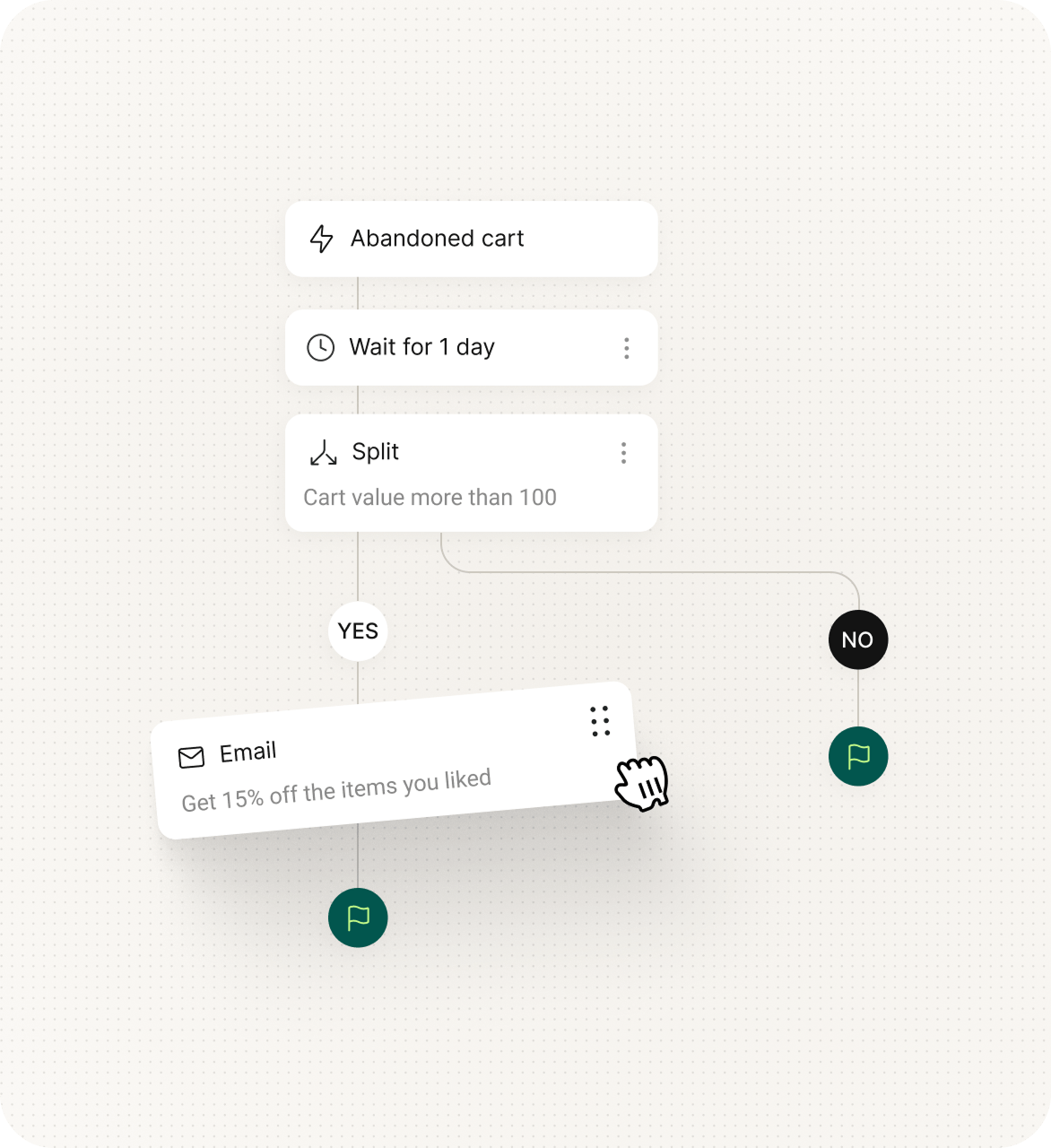
📷 Omnisend’s automation builder combines messages, delays and conditions in a visual ecommerce workflow. Source: vendor website/documentation.
💚 What we like
Prebuilt ecommerce workflows shorten the path from store connection to useful welcome, cart and post-purchase programs.
Email, SMS and web push can sit inside the same workflow, reducing the need to coordinate separate automation tools.
Current entry pricing is accessible, while most core automation capabilities remain available before a brand reaches enterprise scale.
🟠 What to know
Standard-plan billing includes non-subscribers who receive automated messages, so contact growth can raise the monthly bill unexpectedly.
SMS availability and pricing changed in 2026, so teams planning combined email and SMS should model the Pro plan carefully.
💡 Why this score: Omnisend scores just behind Klaviyo because its ecommerce focus, approachable workflow builder and value are unusually well balanced. It gives up some depth in segmentation, reporting and larger-scale orchestration, but many small and midsize stores will reach a productive setup faster and at lower cost.
💰 Pricing: Free plan includes 250 reachable contacts and 500 emails monthly; Standard starts at $16/month and Pro at $59/month before promotional discounts.
✅ Best fit: Small and midsize ecommerce brands that need automated lifecycle messaging, straightforward setup and room to add SMS or push later.
🚫 Less ideal for: Large teams that need extensive custom data models, highly specialized analytics or complex governance across many brands and regions.
🧩 Key capabilities
Prebuilt ecommerce flows
Conditional workflow splits
Email and SMS automation
Web push automation
Behavioral segmentation
Revenue reporting
🔎 Official sources: Product · Pricing · Documentation
🥉 3. Sendlane
88/100 · 💰 Mid · 🧩 Intermediate · 🏢 SMB–Mid-market · ⚙️ Specialist-led
🎯 Best for: High-volume ecommerce senders prioritizing deliverability support and send-based rather than contact-based economics
⚡ Choose Sendlane if a large customer database makes contact-based pricing painful and deliverability support matters operationally.
Sendlane is an ecommerce-oriented email and SMS platform that prices email around sending volume rather than stored profiles. Its automation builder supports behavior, event and trigger-based journeys, with segmentation, experiments, website tracking and direct ecommerce integrations. That model can be attractive for brands with large databases but selective sending habits, especially when migration help and deliverability support are part of the buying decision.

📷 Sendlane automation workflows connect triggers, timing and messages for email and SMS lifecycle sequences. Source: vendor website/documentation.
💚 What we like
Unlimited profiles can make the commercial model attractive for brands that retain large customer histories but send selectively.
Automation includes behavioral, event and trigger-based logic plus multivariate testing and revenue-oriented conversion tracking.
Paid tiers emphasize migration, support and proactive deliverability help, useful when email revenue is material to the business.
🟠 What to know
The pricing calculator is send-volume driven and less immediately transparent than simple contact-tier plans for quick comparison.
The platform has a smaller ecosystem and mindshare than the largest email vendors, which can affect hiring and agency familiarity.
💡 Why this score: Sendlane ranks highly because it aligns well with ecommerce lifecycle work and offers a differentiated send-volume model with strong service around deliverability. Its main deductions are ecosystem breadth and pricing clarity, not the core automation job. It is especially compelling when a large database makes profile-based billing inefficient.
💰 Pricing: Sendlane uses send-volume pricing with unlimited profiles. A 60-day free trial is available, and optional SMS is priced separately by credits.
✅ Best fit: Established ecommerce brands with large contact databases, meaningful send volume and a team that values hands-on migration and deliverability support.
🚫 Less ideal for: Tiny lists seeking the cheapest starter plan, or teams that depend on a very broad marketplace of third-party specialists.
🧩 Key capabilities
Send-volume pricing
Behavioral automations
Multivariate testing
Website tracking
Deep store integrations
Deliverability monitoring
🔎 Official sources: Product · Pricing · Documentation
4️⃣ 4. Drip
87/100 · 💰 Mid · 🧩 Intermediate · 🏢 SMB–Mid-market · ⚙️ Specialist-led
🎯 Best for: Ecommerce brands that want automation designed around shopper behavior, purchases and repeat revenue
⚡ Choose Drip if your email program is ecommerce-first and you prefer focused lifecycle tooling over a broad marketing suite.
Drip is designed specifically around ecommerce customer behavior. Connect a store, bring in browsing and order data, then use workflows, segments and dynamic content to react to what shoppers do. Prebuilt playbooks cover common lifecycle moments such as welcome, abandoned cart and win-back. The product stays more focused than broad customer relationship management suites, which can make it easier to operate for ecommerce teams.
📷 Drip’s workflow builder uses triggers, decisions and actions to route shoppers through automated lifecycle journeys. Source: vendor website/documentation.
💚 What we like
Ecommerce is the product’s core use case, so store events and revenue-oriented workflows feel native rather than bolted on.
Behavioral segmentation can combine browsing, purchasing and engagement signals to build practical lifecycle audiences.
Prebuilt playbooks cover common ecommerce journeys while the workflow builder still allows custom triggers, decisions and actions.
🟠 What to know
Pricing depends on both active people and email volume, so costs require modeling against the actual database and cadence.
Drip is less suitable when marketing automation must also cover a complex business-to-business sales CRM or large enterprise governance.
💡 Why this score: Drip earns a strong score for category focus, usable automation and ecommerce data fit. It is not as broad or enterprise-oriented as some alternatives, but that narrower scope is also a strength for operators who want customer lifecycle email rather than a sprawling marketing suite.
💰 Pricing: Pricing scales with active people and monthly email volume; a 14-day free trial includes the platform’s core features before sending limits expand on paid plans.
✅ Best fit: Direct-to-consumer brands with recurring lifecycle opportunities and a dedicated marketer who wants ecommerce behavior, workflows, segmentation and revenue tracking tightly connected.
🚫 Less ideal for: Businesses needing deep sales CRM, enterprise permissions, many non-commerce channels or a broad general-purpose marketing cloud.
🧩 Key capabilities
Ecommerce workflows
Behavioral segmentation
Dynamic content
Revenue attribution
Prebuilt playbooks
Store integrations
🔎 Official sources: Product · Pricing · Documentation
5️⃣ 5. Dotdigital
86/100 · 💰 Enterprise price · 🧩 Advanced · 🏢 Mid-market–Enterprise · ⚙️ Enterprise implementation
🎯 Best for: Larger commerce teams needing sophisticated cross-channel automation, integrations and structured program governance
⚡ Choose Dotdigital if lifecycle messaging spans multiple markets, systems and teams and requires enterprise-grade orchestration and support.
Dotdigital is a cross-channel marketing platform aimed at more complex teams and data environments. Its program builder uses start conditions, actions, delays, decisions and channel nodes to automate journeys, while integrations cover major commerce and business platforms. Compared with lighter email tools, it is better suited to organizations that expect formal implementation, multi-team ownership and advanced segmentation rather than a quick self-serve setup.

📷 Dotdigital’s program builder uses connected nodes to design governed, branching automated customer journeys. Source: vendor website/documentation.
💚 What we like
Program builder supports branching, delays, decisions and multiple messaging actions for sophisticated lifecycle journey design.
Strong integrations with Shopify, BigCommerce, Adobe Commerce and enterprise systems suit more complex commerce technology stacks.
Enterprise services and governance are better aligned with larger teams than many self-serve email platforms.
🟠 What to know
Public list pricing is not provided, so buyers need a sales process before they can compare total cost accurately.
Implementation and day-to-day operation are heavier than tools designed for a single marketer or small ecommerce team.
💡 Why this score: Dotdigital scores well because its automation depth, integration range and enterprise operating model are strong for complex commerce organizations. It ranks below lighter leaders for this list because price transparency and implementation burden reduce fit for the broader ecommerce market, not because it lacks advanced capability.
💰 Pricing: Custom quote; Dotdigital does not publish a standard self-serve list price for the platform.
✅ Best fit: Mid-market and enterprise commerce organizations with multiple systems, regions or teams that need governed lifecycle automation, complex integrations and structured implementation support.
🚫 Less ideal for: Small stores seeking instant self-serve onboarding, transparent low-cost tiers and a simple newsletter-plus-abandoned-cart setup with minimal specialist support.
🧩 Key capabilities
Program builder
Decision branching
Cross-channel journeys
Enterprise integrations
Contact data modeling
Governance controls
🔎 Official sources: Product · Pricing · Documentation
6️⃣ 6. ActiveCampaign
84/100 · 💰 Budget · 🧩 Intermediate · 🏢 SMB–Mid-market · ⚙️ Specialist-led
🎯 Best for: Teams combining ecommerce automation with broader customer relationship management and cross-business workflows
⚡ Choose ActiveCampaign if marketing automation must connect ecommerce activity with a wider customer relationship management process.
ActiveCampaign combines email marketing, automation, segmentation and customer relationship management in one platform. Ecommerce integrations bring store events into automations for abandoned carts, product blocks, coupons and purchase-based triggers. Its automation builder is flexible enough for complex branching and can reach beyond commerce into lead management and sales workflows, making it useful when one system must support several customer processes.
📷 ActiveCampaign’s visual automation canvas supports triggers, branching actions and reusable workflow recipes. Source: vendor website/documentation.
💚 What we like
Automation is flexible, with multiple triggers, branching, testing and a large library of recipes for common workflows.
Standard ecommerce integrations cover Shopify, WooCommerce and Square, with deeper integrations available on higher plans.
Broader CRM and automation capabilities can reduce tool sprawl when commerce marketing overlaps with lead or sales processes.
🟠 What to know
Starter limits automations to five actions, so serious lifecycle programs generally require a higher tier.
The product is broader than ecommerce, which adds concepts and configuration that a pure direct-to-consumer team may not need.
💡 Why this score: ActiveCampaign scores strongly on workflow flexibility, integrations and broader automation capability. It sits below ecommerce-native leaders because its product model serves more use cases than retail lifecycle marketing, so teams may trade some commerce-specific simplicity for wider customer relationship management power.
💰 Pricing: Starter begins around $15/month for smaller lists; Plus, Pro and Enterprise add progressively deeper automation, segmentation and ecommerce capabilities.
✅ Best fit: Growing companies that want one automation platform across ecommerce marketing, lead nurturing, sales handoffs and broader customer relationship management workflows in one system.
🚫 Less ideal for: Brands wanting the most ecommerce-native reporting and event model with minimal setup outside lifecycle email.
🧩 Key capabilities
Multi-step automation
Advanced segmentation
Ecommerce triggers
CRM workflows
A/B testing
Attribution reporting
🔎 Official sources: Product · Pricing · Documentation
7️⃣ 7. Mailchimp
81/100 · 💰 Budget · 🧩 Beginner · 🏢 SMB · ⚙️ No-code
🎯 Best for: Small businesses wanting familiar email marketing with accessible templates, campaigns and growing automation capability
⚡ Choose Mailchimp if ease, brand familiarity and broad small-business marketing features matter more than maximum ecommerce depth.
Mailchimp remains a broad email marketing platform with campaigns, forms, segmentation, reporting and visual automation flows. Connected stores can use ecommerce data for product blocks, abandoned-cart messaging and behavior-based journeys. Its interface and template ecosystem make it approachable for smaller teams, while recent automation features provide more branching and trigger options than the traditional newsletter tool Mailchimp was once known for.
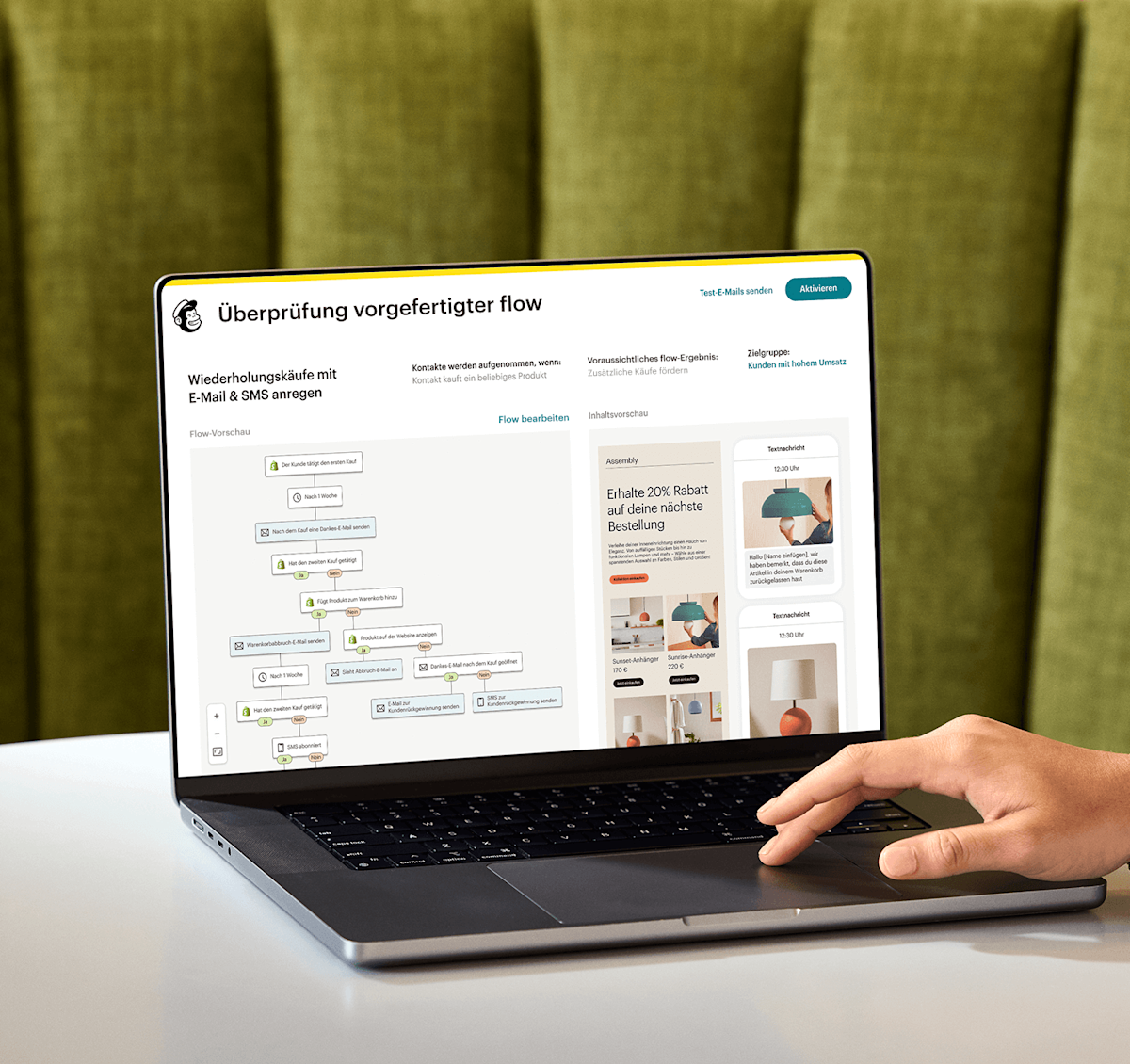
📷 Mailchimp visualizes an automated customer journey alongside the email and message experiences it coordinates. Source: vendor website/documentation.
💚 What we like
Familiar campaign and template workflows make onboarding easier for teams already comfortable with mainstream email marketing tools.
Automation flows support triggers, waits, conditional splits, tags, webhooks and targeted email steps in a visual map.
Broad integrations and adjacent small-business marketing features reduce the need to add separate tools for every basic campaign task.
🟠 What to know
Pricing and feature limits can become less attractive as contact counts and sending requirements rise.
Ecommerce event depth and lifecycle analytics are less specialized than platforms built primarily around online retail behavior.
💡 Why this score: Mailchimp remains a strong general-purpose choice because it is approachable, widely integrated and increasingly capable in automation. It scores lower than ecommerce-first leaders because commerce data and lifecycle depth are not the sole design center, and value can weaken as lists and requirements become more demanding.
💰 Pricing: Standard currently starts around $20/month for up to 500 contacts, with higher tiers and overage costs based on contacts and sending.
✅ Best fit: Small businesses and lean ecommerce teams that value familiar campaign creation, templates and a broad set of general marketing tools.
🚫 Less ideal for: Data-heavy ecommerce programs requiring the deepest store-event segmentation, advanced lifecycle analytics or highly specialized revenue orchestration.
🧩 Key capabilities
Automation flows
Email templates
Audience segmentation
Ecommerce blocks
A/B testing
Campaign reporting
🔎 Official sources: Product · Pricing · Documentation
8️⃣ 8. Brevo
80/100 · 💰 Budget · 🧩 Intermediate · 🏢 SMB–Mid-market · ⚙️ No-code
🎯 Best for: Cost-conscious teams wanting email automation, transactional messaging and multiple channels in one account
⚡ Choose Brevo if you need flexible automation and high contact storage without paying mainly for database size.
Brevo combines campaigns, transactional email, automation and several messaging channels under one customer platform. The new automation editor uses triggers, actions and rules, while event tracking and segmentation can react to website or custom behavior. Its sending-based plans and generous contact storage can suit businesses with large databases but moderate email frequency, especially when transactional and marketing email should live close together.
📷 Brevo’s new automation editor organizes triggers, actions and rules around a drag-and-drop workflow canvas. Source: vendor website/documentation.
💚 What we like
Pricing is tied primarily to sending volume, which can be economical for large contact databases with moderate campaign frequency.
Standard adds unlimited-contact marketing automation, A/B testing, event tracking and send-time optimization at an accessible entry price.
Marketing and transactional email can share one platform, useful for teams trying to reduce operational fragmentation.
🟠 What to know
The product covers many customer communication use cases, so ecommerce workflows are less opinionated than dedicated retail platforms.
Professional jumps sharply in price, which can make the path to advanced ecommerce and team features expensive.
💡 Why this score: Brevo scores well on value, flexible sending economics and practical automation. It ranks below ecommerce-specialists because its core product spans many customer communication jobs, so commerce-specific journeys, analytics and event modeling are not as deep. For the right send pattern, however, the commercial model is very attractive.
💰 Pricing: Free includes 300 emails per day; Starter starts at $9/month, Standard at $18/month, Professional at $499/month, and Enterprise is custom.
✅ Best fit: Small and midsize businesses with large contact databases, moderate send frequency or a need to combine marketing and transactional messaging.
🚫 Less ideal for: Ecommerce teams demanding the deepest merchandising, product recommendation and retail-specific lifecycle intelligence in one platform.
🧩 Key capabilities
Marketing automation
Transactional email
Event tracking
Advanced segmentation
Send-time optimization
Multichannel messaging
🔎 Official sources: Product · Pricing · Documentation
9️⃣ 9. GetResponse
78/100 · 💰 Budget · 🧩 Intermediate · 🏢 SMB · ⚙️ No-code
🎯 Best for: Small businesses wanting email automation plus landing pages, funnels, webinars and broader campaign tools
⚡ Choose GetResponse if email automation should sit beside funnels, landing pages and other acquisition tools in one subscription.
GetResponse combines email marketing with automation, landing pages, funnels and other campaign tools. The Marketer plan unlocks unlimited workflows, advanced segmentation, abandoned-cart recovery and ecommerce reporting, while Starter keeps automation deliberately limited. It is a broad marketing suite rather than an ecommerce specialist, which makes it appealing for smaller businesses that want fewer subscriptions and less so for deeply data-driven retail teams.
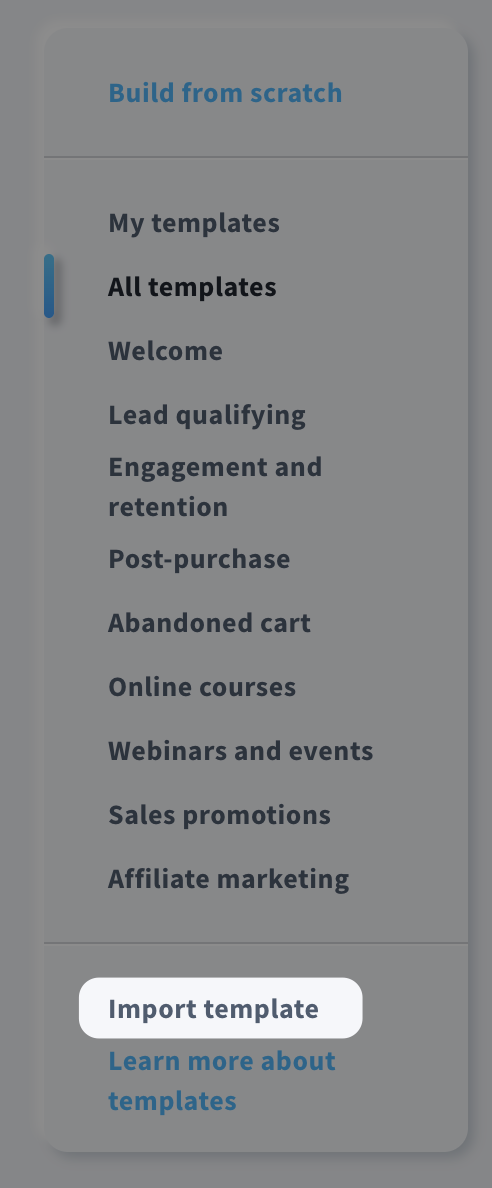
📷 GetResponse’s automation workspace lets marketers start from templates and configure workflow steps visually. Source: vendor website/documentation.
💚 What we like
Marketer combines unlimited workflows, advanced segmentation and abandoned-cart recovery at a relatively accessible published price.
Automation templates help teams launch standard journeys before they are comfortable designing complex workflows from scratch.
Landing pages, funnels and related acquisition tools can reduce the number of separate subscriptions a small marketing team manages.
🟠 What to know
Starter includes only one custom workflow with six elements, so meaningful automation usually requires the Marketer plan.
Ecommerce data and reporting are useful but less specialized than platforms designed first around online-store lifecycle events.
💡 Why this score: GetResponse earns points for transparent pricing, broad included marketing tools and capable automation on the Marketer tier. Its score is held back by limited entry-level automation and less ecommerce specialization. It is most compelling when a smaller team values an integrated marketing suite more than maximum lifecycle depth.
💰 Pricing: Starter is $19/month monthly; Marketer is $59/month and adds unlimited automation, advanced segmentation, abandoned cart and revenue reports.
✅ Best fit: Small businesses that want a broad marketing toolkit with capable ecommerce automation but do not need enterprise-grade customer data orchestration.
🚫 Less ideal for: Advanced ecommerce lifecycle teams that want deep store-event logic, sophisticated revenue attribution and highly specialized retail segmentation.
🧩 Key capabilities
Automation templates
Advanced segmentation
Abandoned cart
Landing pages
Sales funnels
Revenue reports
🔎 Official sources: Product · Pricing · Documentation
🔟 10. Privy
77/100 · 💰 Budget · 🧩 Beginner · 🏢 SMB · ⚙️ No-code
🎯 Best for: Shopify-focused small brands combining list growth popups with straightforward email and SMS automation
⚡ Choose Privy if converting site visitors into subscribers matters as much as running the email automations afterward.
Privy combines onsite conversion tools with email and SMS marketing. Its strength is the handoff from popups, forms and cart-saver experiences into campaigns and automations, which is useful for small ecommerce teams that want list growth and lifecycle messaging under one roof. The automation layer is easier to approach than enterprise platforms, but it offers less depth for highly complex segmentation and data orchestration.

📷 Privy combines ecommerce email automation with onsite capture and conversion workflows for smaller store teams. Source: vendor website/documentation.
💚 What we like
Popups, forms and email automation live together, creating a direct path from onsite capture to welcome and follow-up messaging.
Unlimited email sends simplify budgeting for active small brands whose contact count is more predictable than campaign frequency.
Setup is approachable for lean ecommerce teams that do not have a dedicated marketing operations specialist.
🟠 What to know
Automation and segmentation are less sophisticated than category leaders built for complex lifecycle programs and larger datasets.
The strongest fit is smaller ecommerce, so growing teams may eventually need deeper analytics, integrations or governance elsewhere.
💡 Why this score: Privy scores as a useful ecommerce specialist because it connects acquisition capture with practical email and SMS automation in a simple operating model. It loses points on workflow depth and scale, but that same simplicity can be valuable for small Shopify-centric teams that need results without a large marketing stack.
💰 Pricing: Email plans start at $30/month for mailable contacts with unlimited email sends; a 15-day free trial is available and SMS is optional.
✅ Best fit: Small ecommerce brands that want onsite list growth, campaigns, cart recovery and simple lifecycle automations managed by one lean marketing team.
🚫 Less ideal for: Mid-market teams requiring advanced journey logic, complex customer data models, deep attribution or enterprise controls.
🧩 Key capabilities
Popup capture
Email automation
SMS automation
Audience segmentation
Cart savers
Campaign reporting
🔎 Official sources: Product · Pricing · Documentation
1️⃣1️⃣ 11. MailerLite
76/100 · 💰 Budget · 🧩 Beginner · 🏢 SMB · ⚙️ No-code
🎯 Best for: Budget-conscious small stores that need clean campaigns and approachable automation without heavy platform complexity
⚡ Choose MailerLite if simplicity and price matter more than the deepest ecommerce event model or enterprise controls.
MailerLite keeps email campaigns, forms, landing pages and automation relatively simple. Its refreshed drag-and-drop automation builder supports segment triggers, ecommerce triggers, reordering and visual workflow management. Shopify and WooCommerce integrations add store data and sales tracking. Compared with ecommerce-first leaders it is lighter on advanced lifecycle depth, but the learning curve and current pricing make it attractive for smaller stores building their first structured program.
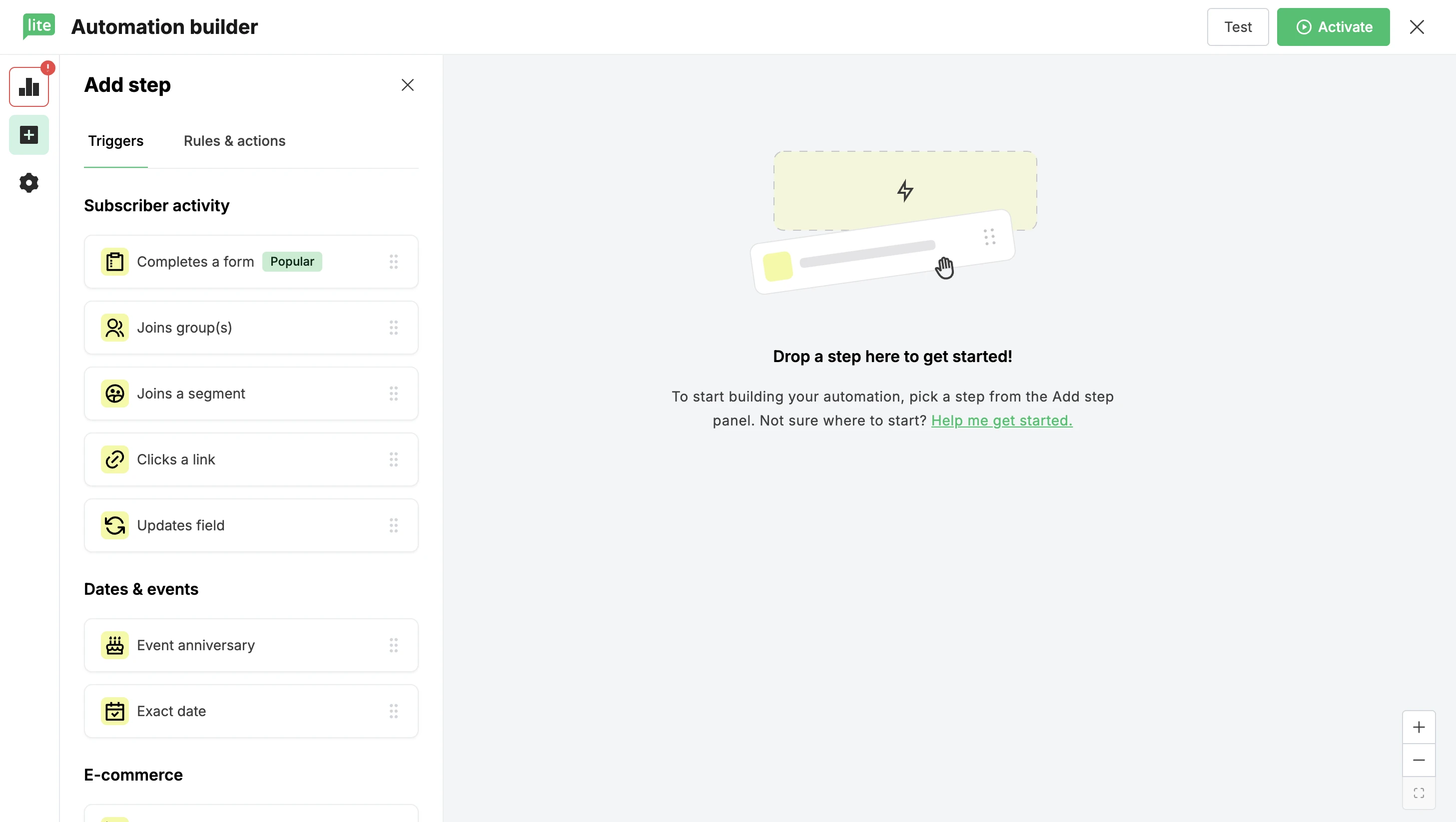
📷 MailerLite’s refreshed drag-and-drop builder exposes triggers and workflow steps in a simple visual canvas. Source: vendor website/documentation.
💚 What we like
The refreshed drag-and-drop automation builder is easy to understand and supports multiple ecommerce triggers and segmentation.
Current plans remain affordable, with a meaningful free tier and paid options that scale beyond basic newsletters.
Forms, landing pages and ecommerce integrations cover the essential acquisition-to-email workflow for many small stores.
🟠 What to know
Advanced ecommerce event logic, revenue modeling and cross-channel orchestration are lighter than specialist lifecycle platforms.
The Free plan now supports only 250 subscribers, so growing stores will reach paid tiers relatively quickly.
💡 Why this score: MailerLite scores as a strong value option because its automation is approachable, pricing is accessible and the ecommerce basics are covered. It trails the leaders on event depth, analytics and scale, but that matters less for a small store that values fast setup and predictable day-to-day operation.
💰 Pricing: Free supports up to 250 subscribers and 2,500 monthly emails; Comfort starts at $12/month, while Power adds unlimited sends and automations.
✅ Best fit: Small ecommerce businesses building their first repeatable email program and prioritizing ease, affordability, simple automation and essential store integrations over advanced orchestration.
🚫 Less ideal for: Larger brands needing sophisticated behavioral orchestration, advanced permissions, deep attribution or complex cross-channel lifecycle programs.
🧩 Key capabilities
Drag-and-drop automation
Ecommerce triggers
Segmentation
Signup forms
Sales tracking
Shopify integration
🔎 Official sources: Product · Pricing · Documentation

1️⃣2️⃣ 12. Shopify Messaging
74/100 · 💰 Budget · 🧩 Beginner · 🏢 SMB · ⚙️ No-code
🎯 Best for: Shopify merchants wanting native campaigns and basic lifecycle automations inside the Shopify admin
⚡ Choose Shopify Messaging if you want the simplest native option and your automation needs remain closely tied to Shopify.
Shopify Messaging, formerly Shopify Email, brings email, SMS and WhatsApp marketing into the Shopify admin. Its email automation templates cover welcome, abandoned browse, abandoned cart, abandoned checkout, post-purchase and customer appreciation, with Shopify Flow available for custom logic. Because customer and product data are already native, setup is unusually simple. The trade-off is less specialization and control than dedicated lifecycle marketing platforms.

📷 Shopify Messaging connects native store events to prebuilt welcome and recovery email automations inside Shopify. Source: vendor website/documentation.
💚 What we like
Native Shopify data removes much of the integration work required before products, customers and store events can drive messages.
The first 10,000 email sends each month are free, making the economics attractive for smaller Shopify stores.
Prebuilt recovery, welcome and post-purchase automations cover the highest-value basics without adding another major platform.
🟠 What to know
The strongest value depends on staying within Shopify, so it is not a natural choice for multi-platform commerce organizations.
Advanced segmentation, experimentation and lifecycle reporting remain lighter than dedicated ecommerce email automation suites.
💡 Why this score: Shopify Messaging ranks as the simplest native choice rather than the deepest email platform. It scores very well on implementation and value for Shopify merchants, but lower on advanced workflow control, cross-platform flexibility and specialist lifecycle analytics. For straightforward Shopify automation, that trade-off can be entirely reasonable.
💰 Pricing: First 10,000 email sends each month are free; additional sends start at $1 per 1,000, with lower marginal rates at high volume.
✅ Best fit: Shopify merchants that want native campaigns, customer segments and essential lifecycle automations without introducing a separate customer data and email platform.
🚫 Less ideal for: Brands operating multiple commerce platforms or requiring advanced lifecycle experimentation, complex segmentation and detailed cross-channel attribution.
🧩 Key capabilities
Native Shopify data
Prebuilt automations
Customer segments
Email campaigns
Shopify Flow logic
Campaign analytics
🔎 Official sources: Product · Pricing · Documentation
🎯 Build your shortlist
If you want the strongest all-around ecommerce lifecycle platform: start with Klaviyo and compare Omnisend for a simpler, lower-cost alternative.
If contact-based pricing is becoming painful: model Sendlane against your real monthly send volume and database size.
If ecommerce is your entire use case: compare Drip with Klaviyo and Omnisend before considering broader marketing suites.
If you need enterprise orchestration: put Dotdigital beside your existing commerce, customer data and governance requirements.
If you want broader automation beyond ecommerce: ActiveCampaign is the most relevant shortlist candidate in this group.
If you are early-stage or highly cost-sensitive: compare MailerLite, Brevo and Shopify Messaging before paying for deeper specialization.
🧪 10 buyer tests before you choose
Use the same test store, customer records and lifecycle scenarios for every vendor. Record time-to-build, missing data, operator friction and projected cost so the comparison reflects your real workflow rather than a demo script.
Connect a test store and verify that orders, products, browsing events and customer properties arrive with the detail you expect.
Build a welcome flow with a split for new versus returning customers and measure how many clicks it takes to configure.
Build abandoned-browse, abandoned-cart and post-purchase flows using native commerce events rather than manual list workarounds.
Create a segment using purchase frequency, product category, recency and email engagement, then check how quickly it updates.
Preview and test a complex flow with delays, branching and suppression rules so you understand how mistakes are prevented.
Authenticate a sending domain and inspect the platform’s deliverability guidance, suppression controls and bounce handling.
Run an A/B test inside an automation and confirm what can be tested, how winners are selected and how results are reported.
Trace a purchase back to a campaign or automation and understand the attribution window and revenue calculation being used.
Model the bill at today’s list size, 2× growth and a seasonal send spike, including SMS or add-ons you realistically need.
Export contacts, events, campaign data and unsubscribe history to confirm you can move data out if your stack changes.
Record the same things every time
For each platform, capture setup time, event coverage, segmentation flexibility, workflow steps, testing controls, reporting quality, deliverability features and monthly cost at the same contact and send assumptions. Consistent inputs make vendor demos comparable.
🎤 10 questions to ask in a demo
Which exact Shopify, WooCommerce, BigCommerce or custom-store events can trigger automations without extra engineering?
How does your billing treat unsubscribed contacts, suppressed profiles, transactional recipients and seasonal list growth?
Which deliverability controls are included, and when do we receive dedicated domain, IP or deliverability support?
Can one customer profile combine browsing, order, refund, subscription and support data for segmentation and personalization?
What limits apply to workflow steps, branches, active automations, custom events, segments or historical data?
How are revenue and conversions attributed to automated messages, and can the attribution window be changed?
What happens to contacts already inside a live workflow when we edit timing, content, branches or eligibility rules?
Which testing options work inside automations, including subject lines, timing, channels, branches and holdout groups?
What migration support is included for templates, contacts, consent records, historical events and existing automations?
What would our monthly invoice be at current volume, double the list, double the sends and a peak-season month?
❓ Frequently asked questions
What is the best ecommerce email marketing platform?
There is no universal winner for every store. Klaviyo scores highest in this comparison because of ecommerce data depth, segmentation and automation, while Omnisend can offer a better balance of simplicity and cost for many smaller teams.
Do I need a separate email platform if I use Shopify?
Not necessarily. Shopify Messaging covers campaigns and several important automations natively. A dedicated platform becomes more useful when you need deeper segmentation, complex branching, stronger experimentation, broader integrations or more specialized lifecycle reporting.
How much should ecommerce email software cost?
Costs vary by contact count, monthly sends, channels and service level. Entry plans can start below $20 per month, while established brands with large databases, heavy sending or enterprise support can spend hundreds or thousands monthly.
Which automations should an ecommerce store build first?
Start with welcome, abandoned checkout or cart, post-purchase and win-back. Add browse abandonment, replenishment, back-in-stock, review requests and cross-sell flows only when your product and customer behavior make those moments relevant.
What does deliverability mean in email marketing?
Deliverability is the ability of legitimate email to reach inboxes rather than spam folders or blocks. It depends on authentication, sender reputation, list quality, engagement, complaint rates, sending practices and how well the platform helps you monitor them.
Can I migrate automations from one platform to another?
Yes, but usually not as a one-click transfer. Contacts, consent, templates and some data can be imported, while flows often need to be rebuilt and retested because event models, logic and reporting differ between platforms.
🔬 About this research
Research last checked 25 September 2026. MarketMaze reviewed official product pages, pricing pages, help centers and product documentation for the 12 assigned platforms. Scores are MarketMaze editorial scores using the same six-dimension 100-point framework across the Tools library. Pricing can change, so verify the current vendor quote before purchasing.
Disclosure: MarketMaze may use affiliate or commercial links on some pages. Commercial relationships do not change the scoring framework, assigned tool inventory or the requirement to ground product and pricing claims in official sources.
