
MARKETMAZE · ECOMMERCE TOOLS · RESEARCH
10 Best Graphic Design & Ad Creative Tools (2026)
Ecommerce creative needs to move fast without turning every campaign into a design bottleneck. We compared 10 tools that help teams build branded graphics, advertising variations and reusable creative systems, from broad visual editors to artificial intelligence generators and feed-based automation.
Updated 25 September 2026 · Pricing and product claims checked against official vendor sources.
👋 New to this category?
Graphic design and ad creative tools sit between raw product imagery and media buying. Ecommerce teams use them to turn product shots, offers and brand systems into social graphics, banners, display ads and repeatable creative variants. The category now spans general visual editors, artificial intelligence-first ad generators and feed-driven automation, so the right choice depends on whether you need flexible brand work, rapid ad iteration or catalog-scale production. We scored the 10 assigned tools on creative quality, ecommerce relevance, workflow control, integrations, value and their ability to scale formats and variants without losing brand consistency.
🧭 Jump to a tool
🏆 The quick answer
🏆 Best overall
Canva
🌱 Best for getting started
Adobe Express
💸 Best value
VistaCreate
🏢 Best for larger teams / enterprise
Pencil
🧠 Best for advanced or technical users
Bannerbear
⚡ Best for ad production at scale
The Brief
MarketMaze take
Canva and Adobe Express are the easiest broad starting points, while The Brief and AdCreative.ai lean into advertising-specific production and automation. Figma remains strong where design-system discipline and collaboration matter. Pencil targets governed enterprise artificial intelligence workflows, and Marpipe specializes in catalog-driven creative. Use the ranking to narrow the field, then shortlist by your real bottleneck: flexible brand work, ad-variant volume, catalog automation or developer-led rendering.
📊 Tool comparison & scores
Rank | Tool | Score | Best for | Pricing |
|---|---|---|---|---|
1 | 93/100 | Broad, fast branded creative for mixed-skill ecommerce teams | Free; Pro from US$144/year | |
2 | 92/100 | High-volume ad production, resizing, localization and deployment | From US$29/month annually | |
3 | 91/100 | Brand-controlled campaign assets with strong Adobe ecosystem connections | Free; Premium US$9.99/month | |
4 | 90/100 | Design systems, collaboration and controlled marketer self-service | Free; Full seat from US$16/month | |
5 | 89/100 | Feed-driven catalog creative across hundreds or thousands of products | Free; Startup US$199/month | |
6 | 87/100 | Programmatic branded image, banner, video and document generation | From US$49/month | |
7 | 86/100 | Rapid paid-ad concepts, variants, scoring and product creative | Starter from US$29/month quarterly | |
8 | 85/100 | Governed enterprise artificial intelligence creative across multiple models | Core US$14/month; US$11 annual | |
9 | 84/100 | Social-first ads, posts, videos and publishing from product inputs | Core US$24/month annually | |
10 | 83/100 | Affordable template-led social and promotional creative for smaller teams | Free; Pro US$10/month |
Scores are MarketMaze’s current assessment as of the research date; pricing reflects public vendor information and may vary by market or contract.
🧠 How the scoring works
This ranking uses MarketMaze proprietary scoring.
Dimension | Weight | What we look for |
|---|---|---|
Core job performance | 30% | Output quality, editor depth, resizing, templates and support for static, animated and video assets. |
Ecommerce fit | 20% | Product-led layouts, offer data, catalog support, ecommerce workflows and advertising-specific creative needs. |
Workflow & control | 15% | Brand kits, reusable templates, approvals, collaboration and practical control over final creative. |
Integrations & implementation | 15% | Ecommerce, advertising, feed and API connections plus realistic implementation effort. |
Pricing & value | 10% | Transparent entry pricing, included assets, usage limits, seat economics and overall value. |
Scale & advanced capabilities | 10% | Bulk variants, localization, catalog automation, APIs, governance and high-volume production controls. |
Scores reflect current product capabilities, ecommerce relevance, buying trade-offs and official vendor information checked on the research date.
🤔 Do you even need graphic design and ad creative software?
Probably yes ✅
You publish paid and organic creative every week, multiple people touch brand assets, or campaigns repeatedly need new sizes, languages and offer variants. A dedicated system will usually save enough coordination and production time to justify the subscription.
Maybe 🟡
Your current volume is manageable, but campaign launches create bottlenecks or freelancers repeatedly rebuild the same layouts. Start with a broad editor first, then move to specialist automation when variants, catalog size or approvals become recurring constraints.
Probably not yet ⏳
You create only a handful of assets each month, one person owns design, and existing platform templates cover your channels. Keep the workflow simple until repetition, handoffs or paid-ad testing volume becomes a measurable operating problem.
🥇 1. Canva
93/100 · 💰 Budget · 🧩 Beginner · 🏢 All sizes · ⚙️ No-code
🎯 Best for: Fast, on-brand ecommerce creative across social, ads and everyday marketing
⚡ Choose Canva if a mixed-skill team needs one easy workspace for high-volume branded assets.
Canva combines a huge template and media library with Brand Kits, team templates, artificial intelligence tools, scheduling and Magic Resize. For ecommerce teams, that makes it a practical default for turning product shots and offers into social posts, banners, email graphics and ad variants without a designer on every task. Business adds approvals and deeper brand capacity. It is broad rather than ad-specialist, but breadth is exactly why it fits so many stores.
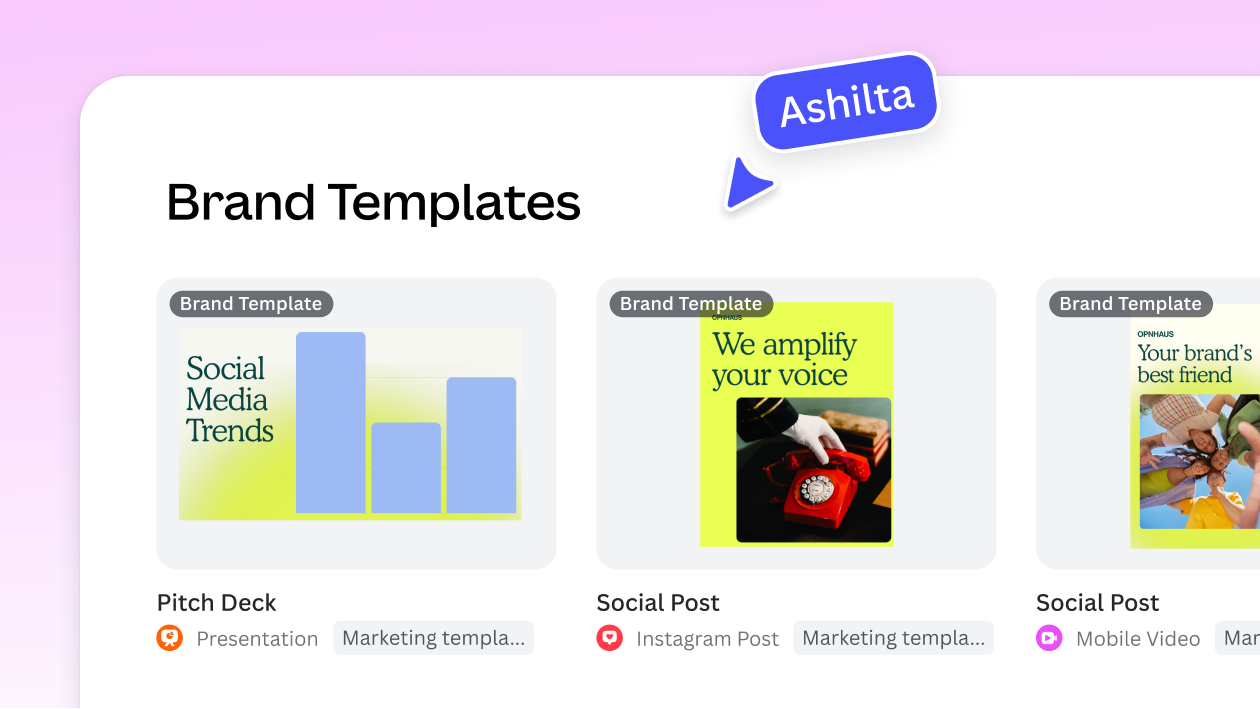
📷 Canva Brand Management shows reusable campaign templates and controls built for faster, more consistent marketing production. Source: vendor website/documentation.
💚 What we like
Huge template and media libraries lower creation friction across teams with very different levels of design experience.
Brand Kits, Brand Templates, approvals and collaboration make repeatable brand-safe production practical across distributed marketing teams.
Magic Resize, bulk creation, artificial intelligence tools and scheduling cover many everyday ecommerce campaign formats in one workspace.
🟠 What to know
Artificial intelligence and premium usage allowances vary by plan, so high-volume teams should model real monthly consumption carefully.
Feed-driven catalog automation and deep ad deployment workflows are less specialized than The Brief or Marpipe.
💡 Why this score: Canva leads because it combines strong creative execution, ecommerce-friendly speed, brand tooling and unusually broad usability. It loses a few points against specialist ad systems for feed-driven automation and performance workflows, but its balance of control, scale and accessibility is difficult to beat.
💰 Pricing: Free plan available. Current US pricing lists Pro from US$144/year for one person and Business at US$250/year per person; prices can vary by market.
✅ Best fit: Small to large ecommerce teams that need one visual workspace for social, campaign graphics, quick resizes and governed brand templates.
🚫 Less ideal for: Teams whose core problem is automated feed-driven ad generation or programmatic creative rendering through an application programming interface.
🧩 Key capabilities
Brand Kits and brand templates
Magic Resize and multi-format adaptation
Social and advertising templates
Bulk and artificial intelligence-assisted creation
Team approvals and collaboration
Content planning and scheduling
🔎 Official sources: Product · Pricing · Documentation
🥈 2. The Brief
92/100 · 💰 Budget · 🧩 Intermediate · 🏢 Mid-market–Enterprise · ⚙️ Specialist-led
🎯 Best for: Performance and creative teams that need ad production, resizing and publishing at scale
⚡ Choose The Brief if your bottleneck is producing and adapting large volumes of on-brand ads across channels.
The Brief, formerly Creatopy, combines Ad Studio, Canvas, artificial intelligence generation, multi-format adaptation and publishing in one ad-production system. Ecommerce teams can import PSD or Figma work, generate or edit campaign concepts, automate sizes and variants, localize creative and push assets into advertising workflows. Feed and Shopify-connected options make it more operational than a general design editor, while its hands-on editor keeps human control over final output.

📷 The Brief Ad Studio shows multiple advertising sizes managed together inside one coordinated production workspace. Source: vendor website/documentation.
💚 What we like
Ad Studio combines manual editing, artificial intelligence generation, animation and automatic multi-size adaptation in one production workspace.
Feed, Shopify and live-data workflows support product-driven variants without rebuilding every layout manually for each campaign.
Direct publishing and ad-serving options reduce the operational gap between finished creative and downstream campaign deployment.
🟠 What to know
Its broader production and deployment scope takes more setup than a simple template-first visual editor.
The value case is strongest at real advertising volume; occasional graphics work does not require this much production system.
💡 Why this score: The Brief scores highly because its core workflow is purpose-built for advertising, including scale, localization, feed data and downstream deployment. It is less universally approachable than Canva or Adobe Express and costs more for advanced use, but its ecommerce ad-production depth is stronger.
💰 Pricing: Pro is US$29/month billed annually, Ultra US$79/month billed annually, and Team US$49 per seat/month billed annually. Enterprise pricing is custom.
✅ Best fit: Performance marketing and creative operations teams producing many ad sizes, languages, products or campaign variations across several channels.
🚫 Less ideal for: Small teams that mainly need occasional social graphics, lightweight templates or a low-cost general design workspace.
🧩 Key capabilities
Ad Studio and Canvas editing
Artificial intelligence generation and editing
Multi-size campaign production
Feed and live-data automation
Direct publishing and ad serving
Localization, testing and reporting
🔎 Official sources: Product · Pricing · Documentation

🥉 3. Adobe Express
91/100 · 💰 Budget · 🧩 Beginner · 🏢 All sizes · ⚙️ No-code
🎯 Best for: Brand-controlled campaign assets with easy resizing, approvals and Adobe ecosystem integration
⚡ Choose Adobe Express if marketing teams want approachable creation with stronger brand governance and Adobe connectivity.
Adobe Express packages template-led design, photo and video editing, Firefly-powered generation, Brand Kits and one-click Resize in a browser workflow aimed at non-specialists and professionals. Ecommerce teams can build social ads, banners, video and campaign adaptations while reusing Creative Cloud assets. Review workflows, template locking and brand controls strengthen handoffs. Its best case is an organization already invested in Adobe that wants faster marketing production without moving every job into Photoshop or Illustrator.

📷 Adobe Express demonstrates rapid campaign resizing inside an approachable browser workflow connected to broader Adobe creative assets. Source: vendor website/documentation.
💚 What we like
Brand controls, locked templates and review workflows support distributed teams without sacrificing practical governance over everyday assets.
One-click Resize, Bulk Create and mixed photo-video tools handle multi-channel campaign repurposing with limited manual rework.
Adobe ecosystem connectivity keeps approved assets close while adding Firefly-powered generation and editing inside the same workflow.
🟠 What to know
The ecosystem advantage matters less if your team does not already use Adobe products, libraries or creative assets.
Premium generative credits and team licensing make usage economics more complex than a single flat monthly subscription.
💡 Why this score: Adobe Express earns a near-top score for combining approachable creation with unusually strong brand controls, review features and ecosystem integration. It trails the ad specialists on feed-driven automation and Canva on broad low-friction adoption, but remains one of the safest general-purpose choices for governed marketing teams.
💰 Pricing: Free plan available. Premium is US$9.99/month in the US. Teams is regularly US$7.99/month per license, with promotional pricing that can vary; Enterprise is sales-led.
✅ Best fit: Marketing and creative teams already using Adobe that want fast, governed production for social, advertising, image and video assets.
🚫 Less ideal for: Catalog-heavy teams needing feed-driven creative generation, or developer-led teams needing an image-generation application programming interface instead of an editor.
🧩 Key capabilities
Brand Kits and locked templates
One-click Resize
Bulk Create workflows
Review and approval workflows
Firefly generation and editing
Creative Cloud asset integration
🔎 Official sources: Product · Pricing · Documentation

4️⃣ 4. Figma
90/100 · 💰 Budget · 🧩 Intermediate · 🏢 Mid-market–Enterprise · ⚙️ No-code
🎯 Best for: Design-led teams building reusable campaign systems with precise collaboration and component control
⚡ Choose Figma if your ecommerce creative process depends on shared libraries, rigorous design systems and real-time teamwork.
Figma is a collaborative design-system environment first, but Figma Buzz now makes it far more relevant to high-volume marketing production. Design teams can create reusable components and shared libraries, then publish controlled Buzz templates for marketers to adapt social posts and ads without breaking brand rules. Bulk create, approvals and multi-edit add campaign scale. It remains less turnkey for ecommerce feeds and direct ad publishing than specialist creative automation platforms.

📷 Figma Buzz gives marketers a simplified editor for customizing controlled brand templates without exposing every underlying design element. Source: vendor website/documentation.
💚 What we like
Components, variables and shared libraries create precise reusable systems for campaign consistency across designers and marketing teams.
Buzz turns designer-built templates into simpler controlled assets that non-designers can customize while preserving core brand rules.
Bulk creation and multi-edit can generate many localized or data-populated branded assets from one approved template.
🟠 What to know
Product-feed automation and direct advertising publishing are not as central as they are in Marpipe or The Brief.
Full design power comes with a steeper learning curve than template-first tools for casual marketing users.
💡 Why this score: Figma scores strongly on core design quality, collaboration, reusable systems and organizational scale. Buzz closes much of the traditional marketing-production gap with restricted templates and bulk creation. Ecommerce-specific connections remain lighter than specialist creative automation tools, preventing it from ranking higher despite excellent workflow control.
💰 Pricing: Starter is free. Professional Full seat is US$16/month; Organization Full seat US$55/month billed annually; Enterprise Full seat US$90/month billed annually. Other seat types price separately.
✅ Best fit: Design-led ecommerce organizations that need reusable brand systems, real-time collaboration and controlled marketer self-service across many campaigns.
🚫 Less ideal for: Teams wanting a one-click ad generator, direct catalog-feed creative or campaign publishing without adjacent tools.
🧩 Key capabilities
Components, variables and libraries
Figma Buzz brand templates
Template restrictions and approvals
Bulk creation from CSV or XLSX
Multi-edit and Grid View
Plugins, artificial intelligence and video
🔎 Official sources: Product · Pricing · Documentation
5️⃣ 5. Marpipe
89/100 · 💰 Mid · 🧩 Intermediate · 🏢 Mid-market–Enterprise · ⚙️ Specialist-led
🎯 Best for: Large catalogs that need dynamic product ad creative driven directly by product feeds
⚡ Choose Marpipe if thousands of stock keeping units make manual catalog ad design and updating impossible.
Marpipe is a specialist catalog-creative platform built for dynamic product ads rather than general-purpose design. Teams create templates that pull images, titles, prices and other fields from a product feed, then apply conditional logic and generate brand-consistent creative across many stock keeping units. Smart cropping, background removal and multi-platform feed support reduce repetitive work. Its narrow focus is a strength for catalog advertisers and a limitation for broader marketing design.
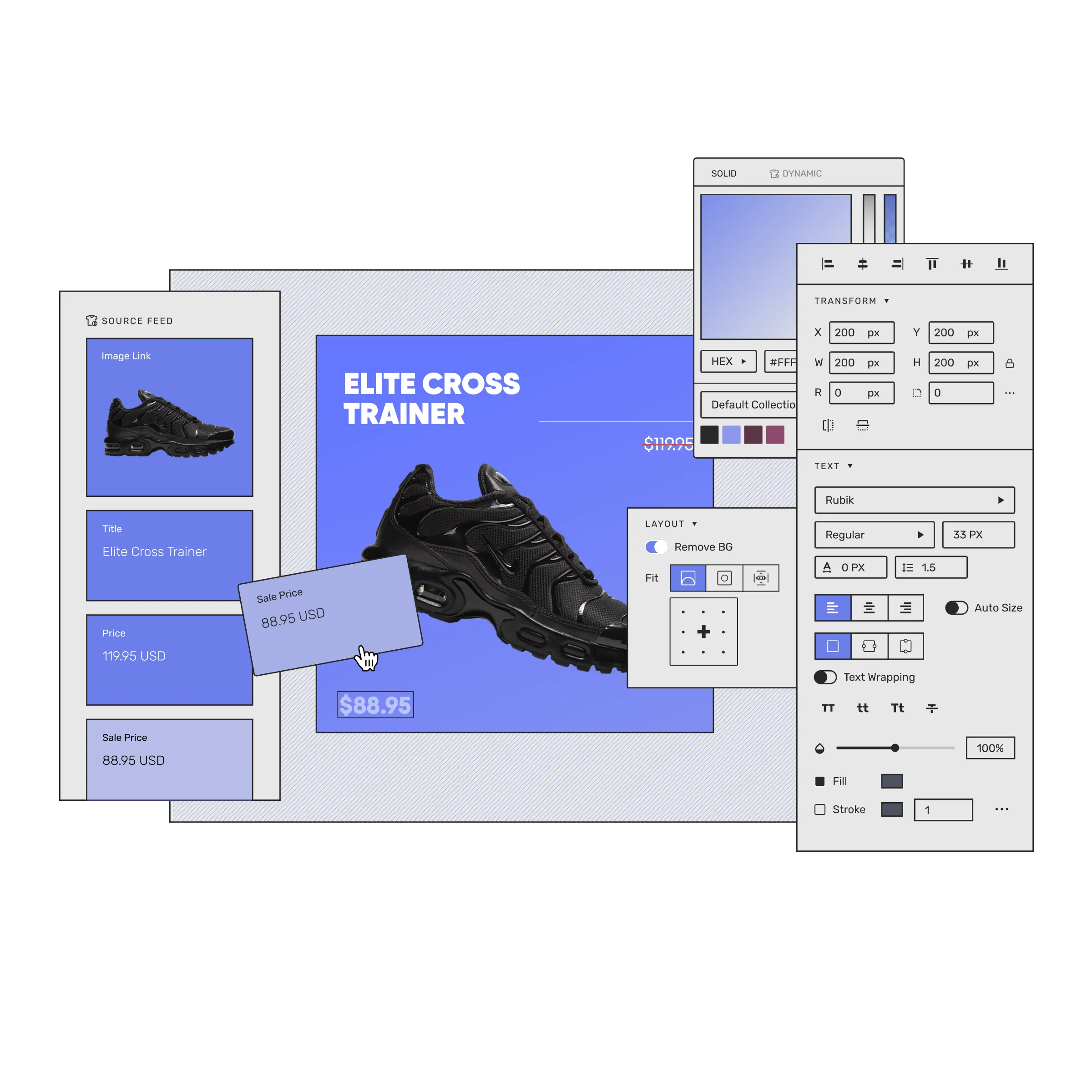
📷 Marpipe’s catalog canvas shows dynamic creative designed to pull changing product data across a large ecommerce feed. Source: vendor website/documentation.
💚 What we like
Dynamic templates bind product-feed fields directly to creative so prices, images and copy can update at catalog scale.
Conditional rules let teams change layouts or promotional elements by category, price, inventory and other product attributes.
No-code design plus Meta, Google, TikTok, Pinterest and Snapchat feed support is unusually ecommerce-specific.
🟠 What to know
It is purpose-built for catalog advertising, not presentations, general social graphics or everyday marketing design work.
Paid tiers start much higher than broad editors, so smaller catalogs may not justify the specialist monthly cost.
💡 Why this score: Marpipe ranks high because ecommerce fit is exceptional: it tackles the exact catalog-scale problem broad design tools largely leave manual. Its dynamic feed logic and multi-platform output are advanced, but the specialist scope and higher pricing reduce its overall versatility and value for smaller teams.
💰 Pricing: Catalog Creative has a free tier. Startup is US$199/month for up to 500 stock keeping units with stated limits; Enterprise starts at US$999/month with larger allowances.
✅ Best fit: Mid-market and enterprise retailers with large catalogs, dynamic product ads and repeated creative changes across many stock keeping units.
🚫 Less ideal for: Brands that mostly create campaign graphics manually or need an all-purpose design workspace for many content types.
🧩 Key capabilities
Dynamic product-feed templates
Product-field binding
Conditional creative rules
Smart crop and background removal
Multi-platform catalog feed support
Catalog-scale batch generation
🔎 Official sources: Product · Pricing · Documentation
6️⃣ 6. Bannerbear
87/100 · 💰 Mid · 🧩 Advanced · 🏢 SMB–Mid-market · ⚙️ Developer-led
🎯 Best for: Developer-led teams automating branded image, banner and video generation through templates and APIs
⚡ Choose Bannerbear if creative production needs to be triggered from software, data or automation tools instead of an editor-first workflow.
Bannerbear is an automation-first rendering platform for generating images, videos and PDFs from reusable branded templates. Instead of asking marketers to redesign every asset, developers or automation tools populate templates through a REST application programming interface, Model Context Protocol, Zapier and other integrations. It supports responsive templates, batch rendering and Figma imports. Ecommerce teams can use that infrastructure to generate repeatable promotions, localized creatives and product-led assets programmatically.
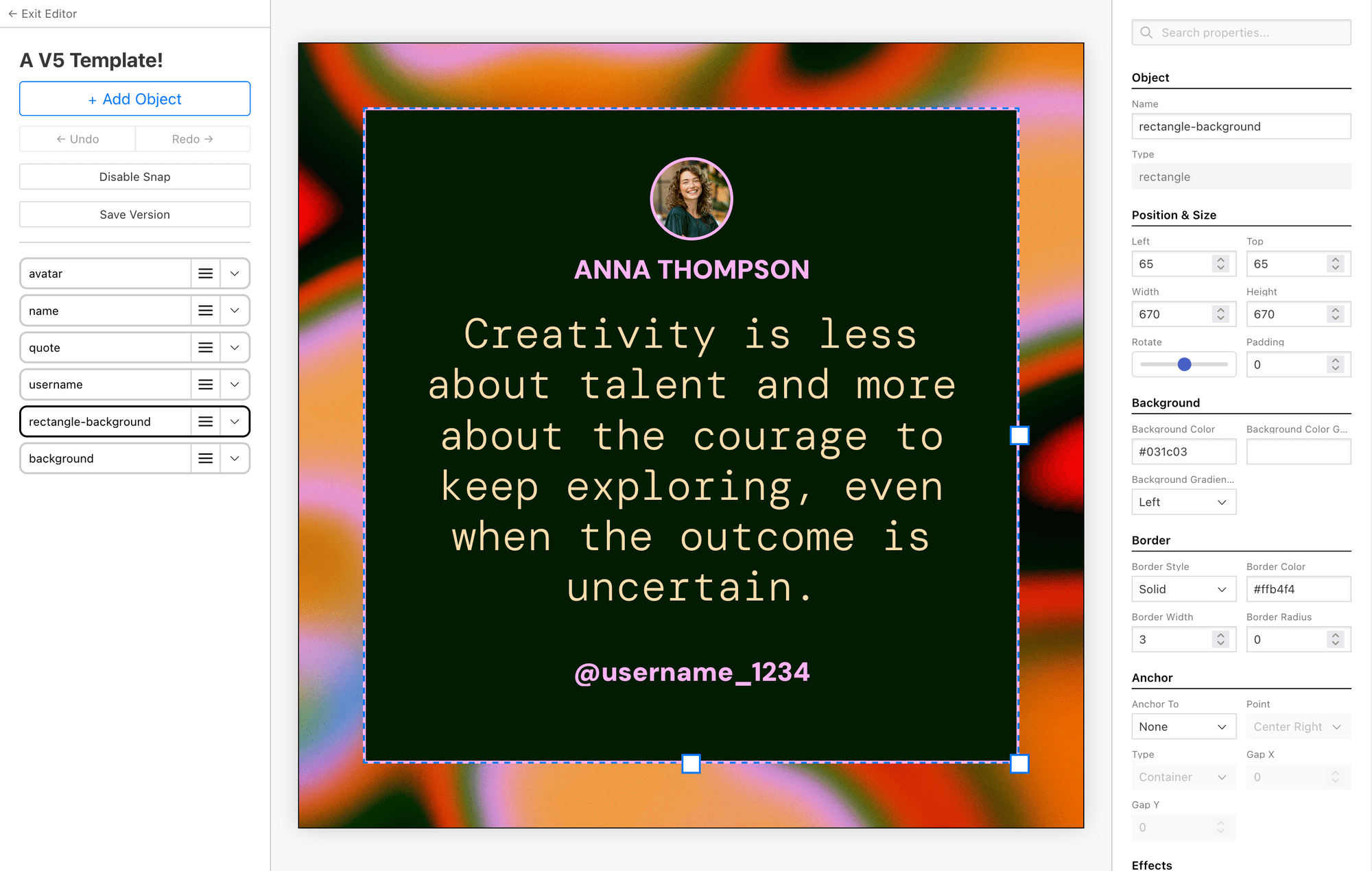
📷 Bannerbear V5 shows its reusable template editor with layers, responsive controls and editable object properties for automated rendering. Source: vendor website/documentation.
💚 What we like
REST application programming interface and batch rendering make high-volume creative generation straightforward to trigger from software or structured data.
Responsive templates, Figma import and versioning give developers production control without rebuilding design logic for every output.
Transparent tiers and many integrations make automation costs easier to model than most enterprise creative systems.
🟠 What to know
Technical setup is higher than a no-code editor, especially when production logic lives inside your own systems.
Free-form design, human approval and marketer-led iteration are not the center of the product experience.
💡 Why this score: Bannerbear scores highly for implementation flexibility, automation depth and scalable rendering. It is especially strong when creative needs to be generated by a system rather than by a person. Its lower workflow score reflects the developer-led setup and lighter built-in approval experience compared with collaborative design suites.
💰 Pricing: Automate is US$49/month with 1,000 API credits, Scale US$149/month with 10,000 credits, and Enterprise US$299/month with 50,000 credits; plan allowances vary.
✅ Best fit: Ecommerce engineering and growth teams automating recurring product, promotion, social or localization assets from structured data and reusable templates.
🚫 Less ideal for: Nontechnical teams wanting a rich free-form design workspace with built-in review and manual campaign creation.
🧩 Key capabilities
Image generation API
Video and PDF rendering
Batch generation workflows
Responsive and versioned templates
Figma template import
Zapier, MCP and other integrations
🔎 Official sources: Product · Pricing · Documentation
7️⃣ 7. AdCreative.ai
86/100 · 💰 Mid · 🧩 Intermediate · 🏢 SMB–Mid-market · ⚙️ No-code
🎯 Best for: Performance marketers who need many paid-ad concepts and variations without manual design from scratch
⚡ Choose AdCreative.ai if creative iteration speed for paid ads matters more than building a general-purpose design system.
AdCreative.ai is an artificial intelligence-first system for producing paid-ad concepts, product imagery, video and copy, with creative scoring and competitor analysis layered around generation. Ecommerce marketers can enter brand context, generate variations for multiple placements, assess predicted creative strength and iterate without waiting on a full design queue. It is focused on performance creative rather than general brand design, which makes the workflow fast but narrower than broad visual editors.
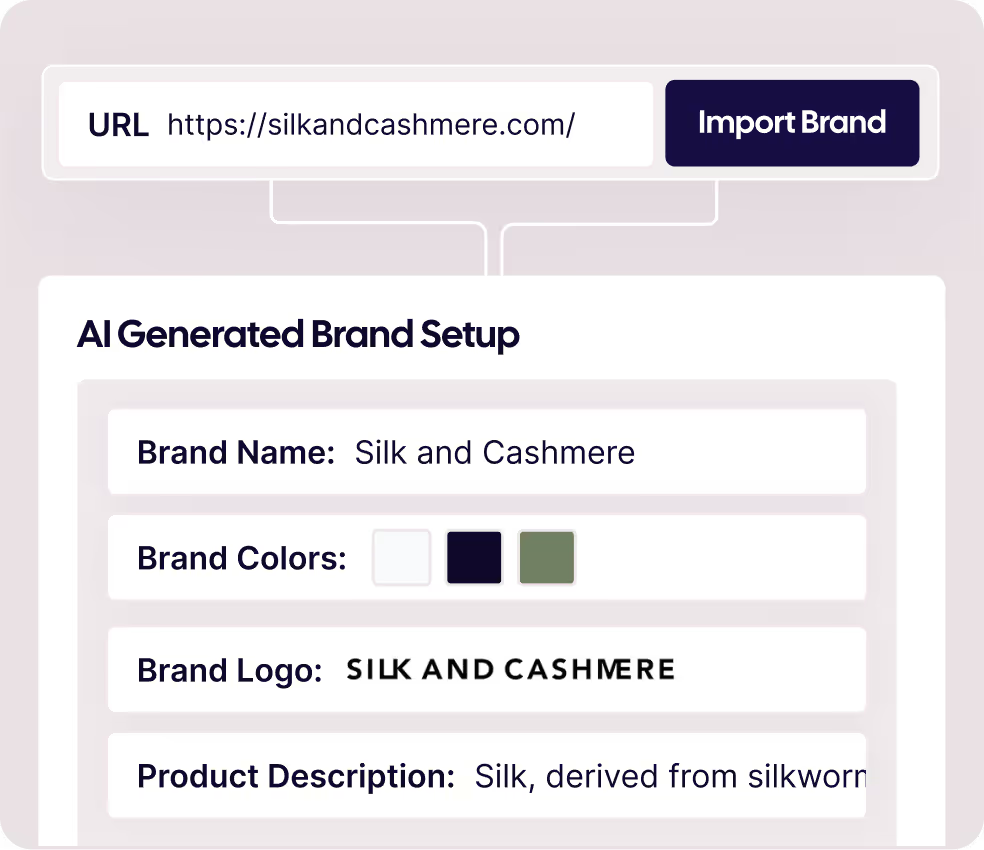
📷 AdCreative.ai shows brand import inside its current creative workflow before generating paid-ad concepts and variations. Source: vendor website/documentation.
💚 What we like
Artificial intelligence generation and batch variation tools reduce manual production time for repeated paid-social creative testing.
Creative scoring and competitor insight add performance-oriented context that broad visual design editors usually do not provide.
Product photo and video features extend the workflow beyond static banner templating into more advertising formats.
🟠 What to know
Credit and plan pricing rises sharply at higher usage, so teams should model regeneration and video volume carefully.
Fine-grained design systems and broad document creation are weaker fits than Canva, Adobe Express or Figma.
💡 Why this score: AdCreative.ai scores well because the product is tightly aligned with paid-ad production and rapid variation, with useful performance-oriented analysis around the creative itself. It ranks below broader leaders because pricing escalates quickly and its workflow is less flexible for general brand systems or non-ad design.
💰 Pricing: Starter is US$29/month billed quarterly or about US$20/month equivalent on annual billing. Professional is US$185 quarterly or US$125 annual equivalent; Ultimate is US$749 quarterly or US$500 annual equivalent.
✅ Best fit: Performance marketing teams, agencies and ecommerce operators that constantly need fresh paid-ad angles, images and videos for testing.
🚫 Less ideal for: Brand teams that need deep reusable design systems, manual precision or broad non-ad creative production.
🧩 Key capabilities
Artificial intelligence ad creative generation
Batch creative variants
Creative Scoring AI
Competitor Insight AI
Product photos and videos
Custom templates and ad integrations
🔎 Official sources: Product · Pricing · Documentation

8️⃣ 8. Pencil
85/100 · 💰 Mid · 🧩 Advanced · 🏢 Enterprise · ⚙️ Enterprise implementation
🎯 Best for: Enterprise marketing organizations needing governed multi-model artificial intelligence creative workflows
⚡ Choose Pencil if legal, brand governance and orchestration across artificial intelligence models matter as much as generation speed.
Pencil positions itself as an artificial intelligence operating system for marketing, aggregating models from providers such as OpenAI, Google, Adobe, Runway and Stability inside governed workflows. Enterprise teams can build or run creative agents, connect brand context, review outputs and move approved work toward ad platforms. The platform emphasizes security, ownership and brand control as much as generation volume, while self-serve Core and Growth plans make the same platform accessible to smaller teams.
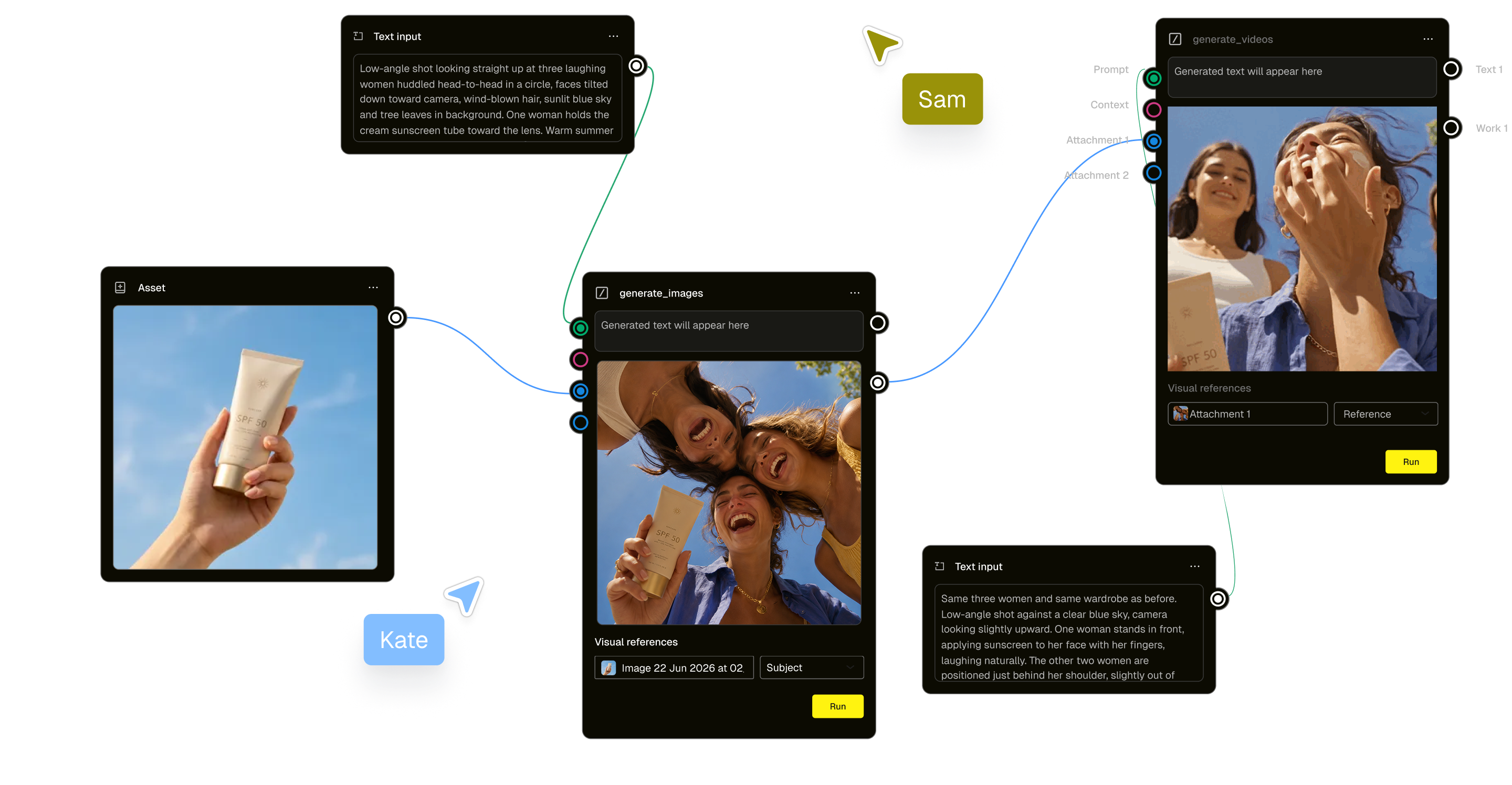
📷 Pencil’s workflow canvas connects prompts, assets and generation nodes inside a governed enterprise creative production process. Source: vendor website/documentation.
💚 What we like
Multi-model orchestration reduces dependence on one provider and lets teams match different models to different creative jobs.
Enterprise controls cover role-based access, brand safety, no-train policies and ownership expectations for governed artificial intelligence adoption.
Workflow tools can link briefs, assets, generation, approvals and launch steps instead of treating artificial intelligence as standalone prompts.
🟠 What to know
Enterprise Pro remains custom priced even though Core and Growth now have transparent self-serve subscriptions.
The operating-system approach can be excessive for teams that mainly need templates, quick resizes or simple social graphics.
💡 Why this score: Pencil scores strongly on scale, governance and advanced artificial intelligence workflow control. The current Core and Growth tiers improve accessibility and pricing transparency, while Pro retains the controls needed for large organizations. Implementation remains more involved than simpler template-led editors.
💰 Pricing: Core is US$14/month billed monthly or US$11/month billed annually for 50 generations. Growth is US$55/month monthly or US$44/month annually for 250 generations. Pro is custom priced with unlimited generations and enterprise controls.
✅ Best fit: Enterprise brands, agencies and global marketing organizations coordinating multiple artificial intelligence models, teams, approvals and brand governance.
🚫 Less ideal for: Small ecommerce teams that only need a lightweight visual editor and do not benefit from multi-model workflow orchestration.
🧩 Key capabilities
Multi-model artificial intelligence generation
Creative workflow agents
Brand context and libraries
Approvals and governance
Bulk creative variation
Meta and Google launch workflows
🔎 Official sources: Product · Pricing · Documentation
9️⃣ 9. Predis.ai
84/100 · 💰 Budget · 🧩 Beginner · 🏢 SMB · ⚙️ No-code
🎯 Best for: Small ecommerce and social teams generating ads, posts and videos plus scheduling
⚡ Choose Predis.ai if you want one artificial intelligence workflow to create and publish a steady stream of social and ad content.
Predis.ai combines artificial intelligence ad generation, social content, video, user-generated-content-style formats, brand controls and publishing tools in one workflow. Teams can start from a prompt, image or product URL, generate creative and copy together, then adapt outputs for multiple platforms. Built-in scheduling and competitor analysis make it broader than a pure image generator. The trade-off is less pixel-level design-system control than dedicated design suites.
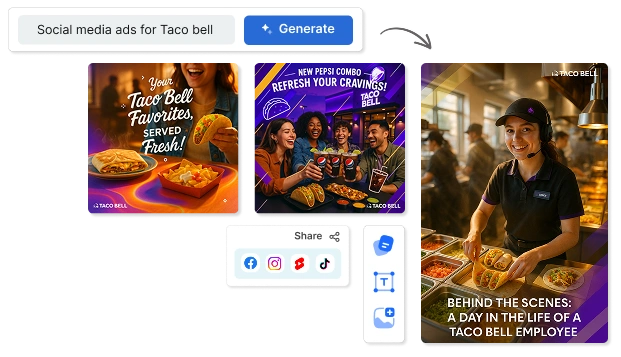
📷 Predis.ai shows prompt-led social advertising creation with generated branded outputs prepared for several publishing channels. Source: vendor website/documentation.
💚 What we like
Product URL, image and prompt inputs make advertising creation accessible without building every concept manually from scratch.
Static, video and user-generated-content-style formats plus scheduling cover both paid and organic social production workflows.
Entry pricing is relatively transparent and accessible compared with enterprise artificial intelligence creative platforms.
🟠 What to know
Pixel-level control and reusable component systems are lighter than Figma, Canva or Adobe Express.
Video and repeated generation can consume credits quickly, so high-volume teams should forecast real monthly usage.
💡 Why this score: Predis.ai scores well on ecommerce relevance, accessible artificial intelligence generation and the convenience of combining creation with publishing. It ranks below the specialists because design control and enterprise workflow depth are lighter, but the integrated social workflow makes it a strong practical option for smaller teams.
💰 Pricing: Core is US$24/month billed annually, Rise US$55/month billed annually, and Enterprise+ US$212/month billed annually. A three-day trial is currently offered.
✅ Best fit: Small ecommerce teams, agencies and social marketers producing frequent ads, posts and short-form creative from product information.
🚫 Less ideal for: Design-led organizations needing granular component systems, sophisticated approvals or production-grade programmatic rendering.
🧩 Key capabilities
Artificial intelligence static ads
Video and UGC-style content
Product URL creative generation
Brand kits and templates
Scheduling and direct publishing
Competitor and performance analysis
🔎 Official sources: Product · Pricing · Documentation
🔟 10. VistaCreate
83/100 · 💰 Budget · 🧩 Beginner · 🏢 SMB · ⚙️ No-code
🎯 Best for: Budget-conscious teams producing social and promotional graphics from polished templates
⚡ Choose VistaCreate if you want a straightforward template-led workflow with generous Pro branding and team features.
VistaCreate is a template-first visual editor for social posts, ads, banners and promotional assets. Its Pro plan adds a large premium asset library, unlimited Brand Kits, one-click Resize, artificial intelligence tools, version history, storage and team collaboration for up to 10 members. For ecommerce teams that want quick, polished creative without an expensive design stack, it offers strong value. It is less differentiated for feed automation or enterprise governance.
📷 VistaCreate’s editor shows its template library and Resize control used to adapt one design across publishing formats. Source: vendor website/documentation.
💚 What we like
Large template and media libraries make social and promotional layouts quick to start without specialist design skills.
Pro’s unlimited Brand Kits, Resize and team collaboration are generous for a relatively low monthly subscription.
Built-in artificial intelligence editing and scheduling extend the workflow beyond basic static template customization.
🟠 What to know
Feed-driven catalog automation and direct programmatic rendering sit outside the product’s core strengths.
Advanced governance, granular design systems and integration depth are lighter than the highest-ranked enterprise options.
💡 Why this score: VistaCreate scores as a strong value tool: it covers the everyday creative job well, keeps pricing accessible and includes useful branding, resizing and collaboration features. It ranks tenth because the assigned field is unusually strong and VistaCreate adds less specialist ecommerce automation, governance or application programming interface depth.
💰 Pricing: Starter is free. Pro is US$10/month and includes up to 10 team seats, with a 14-day trial on current official pricing.
✅ Best fit: Solo sellers and small ecommerce teams needing affordable social, advertising and promotional graphics with reusable brand assets.
🚫 Less ideal for: Large catalogs, advanced creative operations or developer-led workflows that need dynamic feeds, governance or application programming interfaces.
🧩 Key capabilities
Template and media libraries
Unlimited Brand Kits on Pro
One-click multi-format Resize
Artificial intelligence image and copy tools
Social scheduling and publishing
Version history and team collaboration
🔎 Official sources: Product · Pricing · Documentation
🎯 Which tools should you actually shortlist?
Solo or small store needing broad everyday creative: shortlist Canva, Adobe Express and VistaCreate, then compare brand controls and export workflow.
Brand or creative team with strict reusable design systems: shortlist Figma and Adobe Express, with Canva as the broader self-service alternative.
Performance team producing large volumes of paid-ad variations: shortlist The Brief, AdCreative.ai and Pencil, then test generation quality and approval speed.
Social-first team creating and publishing frequent posts and ads: shortlist Predis.ai, Canva and VistaCreate for creation plus lighter publishing workflows.
Large product catalog running dynamic advertising: shortlist Marpipe and The Brief, then test feed mapping, conditional rules and bulk update behavior.
Developer-led automated image or banner production: shortlist Bannerbear first, with The Brief when marketers need more direct control over production.
🧪 Run this test before you buy
Vendor demos make every creative platform look fast. Run the same real campaign through each shortlist candidate instead. Use one product, one offer, your actual brand kit and the formats your team publishes most often. Measure how much manual cleanup remains after resizing, generation, review and export. The best choice is the system that reaches approved, channel-ready creative with the least repeated work while preserving product accuracy and brand control.
Build one real promotion in 1:1, 4:5, 9:16 and 16:9 formats, then inspect every layout for manual fixes.
Lock your brand fonts, colors and logo, then hand the template to a non-designer and see what can still break.
Turn one product image, price and offer into 20 variants, timing both generation and the cleanup required afterward.
Change a price or promotional claim once and see whether that change propagates cleanly across every relevant asset.
Run a real approval cycle from brief through comments, revision and final sign-off with the people who normally review creative.
Export or publish to your actual channels, then inspect image quality, file sizes, aspect ratios and platform-specific formatting.
Import a representative product feed, CSV or structured dataset and test dynamic fields with enough products to reveal edge cases.
Generate artificial intelligence creative from your real product imagery and brand style, tracking inaccurate products and rejected outputs.
Localize one campaign into a second language and record every layout, font, copy-length or approval issue introduced.
Estimate monthly seats, credits, storage, API usage and overages using peak campaign volume rather than an average quiet month.
📏 Record the same things for every vendor: time to first approved asset, time per 10 variants, resize rework, brand-compliance errors, generation rejection rate, export defects, localization fixes, cost per approved asset, setup time and percent of production that can be automated.
🧾 10 questions to ask in every demo
Show us the exact path from one campaign brief to 10 approved format variants. Which steps are still manual?
Which brand controls prevent an operator from changing restricted fonts, colors, logos, layouts or legal elements?
Can reviewers approve or request changes without buying a full creator seat, and what is billable in that workflow?
Which export formats, stock assets and generated outputs have commercial-use restrictions or plan-specific licensing terms?
How do bulk edits work after a price, offer, product image or mandatory claim changes across many assets?
How do Shopify, product feeds, CSV files or APIs connect, and who owns setup and troubleshooting?
Which advertising or social channels support direct publishing, and which steps still require manual export and upload?
Which artificial intelligence models process our data, can our inputs train them, and what ownership or indemnity applies?
At our expected monthly volume, which credits, seats, rendering limits, storage or overages will change the quoted cost?
How are templates versioned, governed, rolled back and exported if we later switch platforms?
❓ Frequently asked questions
What are ecommerce graphic design and ad creative tools?
They are software platforms used to turn product images, offers, copy and brand rules into channel-ready marketing assets. The category includes general design editors, advertising-focused artificial intelligence generators, catalog-feed creative systems and developer rendering tools. Ecommerce teams use them for social posts, paid ads, banners, email graphics, product promotions and repeated size or language variants. The key difference between products is how much design control, automation and workflow governance they provide.
How are ad creative tools different from general design tools?
General design tools such as Canva, Adobe Express and Figma support a broad range of visual work and usually emphasize flexible editing, templates and brand systems. Ad creative tools such as The Brief, AdCreative.ai and Pencil concentrate more heavily on advertising variants, generation, performance workflows or channel deployment. Catalog systems such as Marpipe go further by binding product-feed data to templates. Choose based on the repeated production problem you actually need to solve.
What is the best design tool for Shopify and ecommerce teams?
Canva is the strongest general-purpose starting point in this ranking because it balances templates, brand controls, resizing, collaboration and accessible pricing. The right option changes with the bottleneck, though. The Brief is stronger for high-volume advertising production, Marpipe specializes in catalog-feed creative, Figma suits design-system teams and Bannerbear is better when assets must be rendered programmatically. Test your real campaign workflow before committing.
How much do ecommerce design and ad creative tools cost?
The range is wide. General visual editors can start free or around US$10–20 per month for an individual, while advertising automation and catalog systems can cost hundreds or more each month. Compare more than the headline plan: seats, generation credits, video, stock assets, brand kits, storage, API usage and overages can materially change effective cost. A useful benchmark is the cost per approved asset at your real monthly volume.
When does an ecommerce team need specialist creative software?
Specialist software becomes useful when repetition creates measurable operating cost. Typical signals include large product catalogs, many ad sizes, frequent localization, multiple reviewers, constant creative testing or developers needing automated rendering. If one person can still produce the required assets quickly in an existing editor, adding another platform may create more complexity than value. Move to specialist tooling when volume, governance or automation needs are recurring rather than occasional.
What is feed-based creative automation?
Feed-based creative automation connects structured product data such as images, names, prices and promotional fields to reusable visual templates. When product data changes, the system can generate or update many matching assets without manually editing every file. Marpipe is the clearest specialist example in this comparison, while The Brief also supports data-driven workflows. It is especially useful for retailers running dynamic product advertising across large or frequently changing catalogs.
🔍 About this research
MarketMaze researches and scores each tool using its proprietary scoring methodology. Product details and pricing are checked against official vendor sources. Screenshots are from vendor websites, documentation, official demos, or MarketMaze product captures and are used to illustrate the products being reviewed.
Last research check: 25 September 2026.
All vendor links in this draft point to official vendor websites. MarketMaze did not use vendor-provided scores or third-party review-platform ratings in this ranking.
