
MARKETMAZE · ECOMMERCE TOOLS · RESEARCH
8 Best AI Voiceover & Dubbing Tools for Ecommerce (2026)
AI voice tools can turn scripts and existing video into product explainers, ads and localized creative without booking a studio. We compared eight production-ready options on voice quality, editing, languages, commercial rights, dubbing and practical ecommerce workflow.
Updated 25 September 2026 · Pricing and product claims checked against official vendor sources.
👋 New to this category?
AI voiceover tools generate spoken audio from a script; AI dubbing tools go further by translating and replacing speech in existing video. For ecommerce, the practical difference is workflow. A strong narration tool should handle pronunciation, pacing, commercial usage rights and fast revisions. A strong dubbing tool also needs speaker detection, language quality, voice preservation and useful review controls. Do not assume a free plan can be used in paid advertising: several vendors restrict commercial use until you move to a paid tier.
🧭 Jump to a tool
🥈 2. Murf
🏆 The quick answer
🏆 Best overall
ElevenLabs
🌱 Best for getting started
Speechify Studio
💸 Best value
Typecast
🏢 Best for larger teams / enterprise
WellSaid
🧠 Best for advanced or technical users
Descript
🌍 Best for multilingual dubbing
Rask AI
MarketMaze take
ElevenLabs is the strongest default if you need both premium narration and multilingual dubbing, while Murf is easier for teams that want a conventional studio workflow. Rask AI becomes more compelling when the job starts with finished video and localization is the priority. For small teams, Typecast offers unusually low-cost commercial entry, while Speechify Studio trades some specialist depth for a very approachable all-in-one creator workflow.
📊 Tool comparison & scores
Rank | Tool | Score | Best for | Pricing |
|---|---|---|---|---|
1 | 94/100 | Voice quality + dubbing | Free; paid from $6/mo | |
2 | 90/100 | Studio-style voiceover | Free; Creator $19/mo annual | |
3 | 87/100 | Branded narration | Free; Starter $10/mo annual | |
4 | 86/100 | Easy all-in-one studio | Free; Starter $100/yr | |
5 | 84/100 | Multilingual video localization | Trial; Creator $60/mo | |
6 | 83/100 | Expressive voiceovers | Free; Basic $5/mo | |
7 | 81/100 | Licensed business narration | Starter $29/mo or $198/yr | |
8 | 79/100 | Integrated video editing | Free; Hobbyist $16/mo annual |
🧠 How the scoring works
This ranking uses MarketMaze proprietary scoring.
Dimension | Weight | What we look for |
|---|---|---|
Core job performance | 30% | Natural voice quality, pronunciation control, consistency and dubbing output across real scripts. |
Ecommerce fit | 20% | Commercial rights, ad suitability, brand terminology handling and rapid revision for product content. |
Workflow & control | 15% | Script editing, timing, speaker management, approvals, exports and useful creative-direction controls. |
Integrations & implementation | 15% | Setup effort, collaboration, APIs, project organization and fit with existing video production workflows. |
Pricing & value | 10% | Usable commercial output per plan, transparent limits and cost scaling across languages and volume. |
Scale & advanced capabilities | 10% | Voice cloning, multilingual depth, enterprise controls, lip sync and high-volume production options. |
🤔 Do you need an AI voiceover or dubbing tool?
✅ Yes, if…
You regularly produce product videos, ads, tutorials or training content and revisions are slowed by recording sessions. AI voice is especially useful when you need many variants, languages or quick script changes without re-recording from scratch.
🤷 Maybe, if…
You only publish occasional video or already have a reliable narrator. A tool can still help with scratch tracks, localization and last-minute line fixes, but the subscription may not pay back unless production volume is recurring.
🚫 Probably not, if…
Your brand depends on a specific performer, regulated claims require controlled human read-throughs, or every piece is a one-off flagship production. In those cases, human voice direction and studio review may remain the better default.

🥇 1. ElevenLabs
94/100 · 💰 Premium · 🧩 Intermediate · 🏢 SMB–Enterprise · ⚙️ No-code
🎯 Best for: High-quality multilingual narration and dubbing where natural delivery and voice consistency matter most.
⚡ Choose ElevenLabs if voice realism, multilingual range and authorized voice cloning outweigh having a traditional timeline editor.
ElevenLabs is the strongest all-round audio generation option here for ecommerce teams producing product explainers, paid-social narration and localized video. Its Creative platform combines expressive text-to-speech with Dubbing, voice libraries and authorized voice cloning. Dubbing v2 supports more than 90 languages and can preserve speaker identity across translations. The trade-off is a credit-based model that needs active cost control once teams produce many languages or long-form assets.
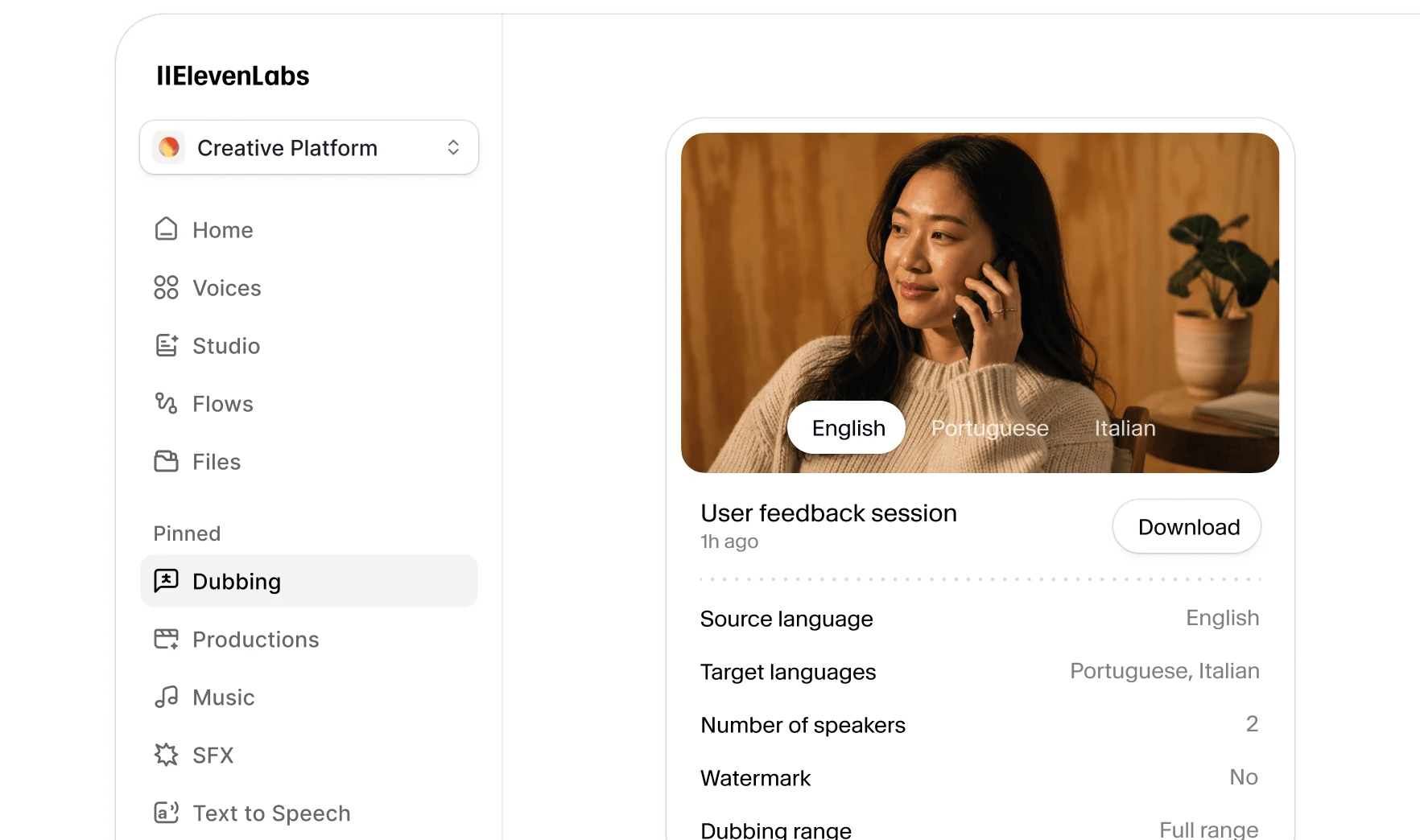
📷 ElevenLabs Dubbing interface showing source and target languages. Source: vendor website/documentation.
What we like
Very natural speech with a broad voice library and strong expressive control.
Dubbing v2 supports 90+ languages and automatically preserves speaker voice across translations.
Commercial licensing starts on Starter, with professional voice cloning available on higher self-serve tiers.
What to know
Credits can disappear quickly when one source video is dubbed into several target languages.
Dubbing v2 currently offers less in-app transcript editing than the older Studio workflow; advanced correction can require API or enterprise workflows.
💡 Why this score: ElevenLabs scores highest because it combines top-tier voice quality, broad multilingual dubbing and practical commercial licensing in one self-serve product. It loses a few points for credit complexity and for a dubbing editing workflow that is less hands-on than specialist localization suites.
💰 Pricing: Free; Starter $6/month; Creator $22/month; Pro $99/month; Scale $299/month; Business $990/month; Enterprise custom. Commercial license begins on Starter.
✅ Best fit: Brands and agencies making frequent product videos, ads or explainers that need premium narration plus repeatable localization across several markets.
🚫 Less ideal for: Teams that need frame-accurate video localization operations, deep human review workflows or highly predictable flat-rate audio costs.
🧩 Key capabilities
Text-to-speech
90+ language dubbing
Voice cloning
Voice library
Speaker preservation
API access
🔎 Official sources: Product · Pricing · Documentation
🥈 2. Murf
90/100 · 💰 Mid · 🧩 Beginner · 🏢 SMB–Enterprise · ⚙️ No-code
🎯 Best for: Marketing teams that want studio-style voiceover editing, pronunciation control and straightforward commercial production.
⚡ Choose Murf if you want a familiar production studio with voice, timing, pronunciation and media controls in one workspace.
Murf combines AI voices with a browser-based studio that feels closer to a conventional voiceover production environment than a developer tool. Teams can tune pitch, speed, emphasis and pronunciation, add music or visuals, and export commercial work on paid plans. Its dubbing workflow adds transcription, translation and voice controls across dozens of languages. For ecommerce teams, that makes it particularly practical for repeatable campaign narration without handing every revision to an audio specialist.
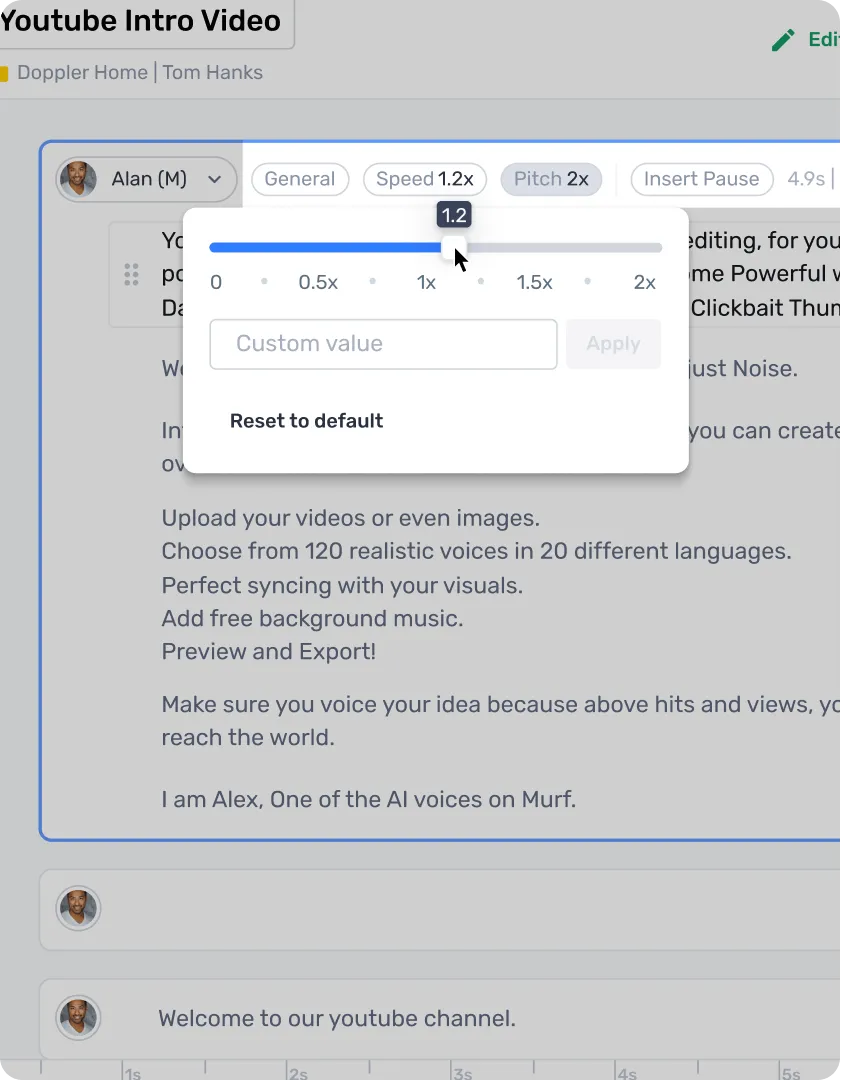
📷 Murf Studio workflow for editing an AI voiceover project. Source: vendor website/documentation.
What we like
Studio workflow puts script, voice settings, timing and supporting media in one place.
300+ voices across 33+ languages, with pronunciation and delivery controls for brand terms.
Paid plans include commercial rights; Business adds materially more annual generation capacity.
What to know
The Free plan is useful for testing but does not include downloads or commercial rights.
Dubbing language coverage and voice availability vary by source and destination language, so test your exact markets before committing.
💡 Why this score: Murf scores strongly on workflow and commercial usability. Its editor is approachable, pronunciation controls are practical for product names, and paid tiers clearly support business use. It trails ElevenLabs on raw voice breadth and state-of-the-art multilingual cloning, but is easier for many marketing teams to operate day to day.
💰 Pricing: Free; Creator $19/month billed annually; Business $66/month billed annually; Enterprise custom. Paid plans include commercial rights.
✅ Best fit: In-house creative, growth and content teams that need polished English and multilingual voiceovers with minimal audio-production expertise.
🚫 Less ideal for: Localization teams whose main requirement is high-volume video dubbing with complex speaker mapping, lip sync and reviewer workflows.
🧩 Key capabilities
Studio editor
300+ voices
Pronunciation control
AI dubbing
Voice cloning
Media mixing
🔎 Official sources: Product · Pricing · Documentation
🥉 3. WellSaid
87/100 · 💰 Premium · 🧩 Beginner · 🏢 Mid-market–Enterprise · ⚙️ No-code
🎯 Best for: Professional branded narration where consistency, approval-friendly workflows and business usage rights matter more than breadth.
⚡ Choose WellSaid if your priority is controlled, polished brand narration with straightforward exports and enterprise governance options.
WellSaid is built around professional narration rather than novelty voice effects. Studio projects let teams work section by section, generate multiple takes, adjust pace, loudness, pitch and pauses, manage pronunciation, and export common audio formats with captions. Self-serve plans are strongest for English production, while broader language and translation capabilities are positioned toward enterprise customers. That makes WellSaid especially attractive for branded training, product explainers and repeatable campaign voiceover.
📷 WellSaid Studio editing workflow with script and voice controls. Source: vendor website/documentation.
What we like
Clean Studio workflow with multiple takes, pronunciation tools and fine delivery controls.
Commercial rights are included on paid self-serve plans, with team and enterprise options for governed use.
Voice styles cover narration, conversational and promotional delivery without turning the product into a complex audio workstation.
What to know
The free tier allows limited downloads but does not grant commercial rights.
Broader non-English language support and translation are more enterprise-oriented than on multilingual-first competitors.
💡 Why this score: WellSaid earns a high score for polished branded narration, predictable workflows and strong business positioning. It is less competitive for broad self-serve multilingual dubbing, and pricing rises quickly for teams, but it remains a strong choice when quality control and consistent brand delivery matter more than experimentation.
💰 Pricing: Free; Starter $10/month billed annually or $19 monthly; Pro $33/month billed annually or $49 monthly; Business $160/user/month billed annually; Enterprise custom.
✅ Best fit: Established brands producing explainers, training, campaign assets and product education where consistent tone and controlled commercial use are priorities.
🚫 Less ideal for: Small teams that primarily need low-cost multilingual dubbing or creators who want the widest possible language library on self-serve plans.
🧩 Key capabilities
Studio projects
Voice cues
Pronunciation tools
Multiple takes
Caption export
Team workspaces
🔎 Official sources: Product · Pricing · Documentation
4. Speechify Studio
86/100 · 💰 Mid · 🧩 Beginner · 🏢 Creator–SMB · ⚙️ No-code
🎯 Best for: Creators and lean ecommerce teams wanting voiceover, dubbing and cloning in an accessible all-in-one studio.
⚡ Choose Speechify Studio if you want a low-friction path from script to voiceover or dubbed asset without specialist software.
Speechify Studio packages voiceovers, dubbing and voice cloning into a creator-friendly production suite. The free tier is enough to explore the interface and voice catalog, while paid Studio plans add commercial usage rights and cloning. The product is easy to start with and offers a large voice selection, which makes it useful for fast product videos and social creative. Its credit system is less intuitive than minute-based plans, so teams should benchmark real projects before forecasting costs.
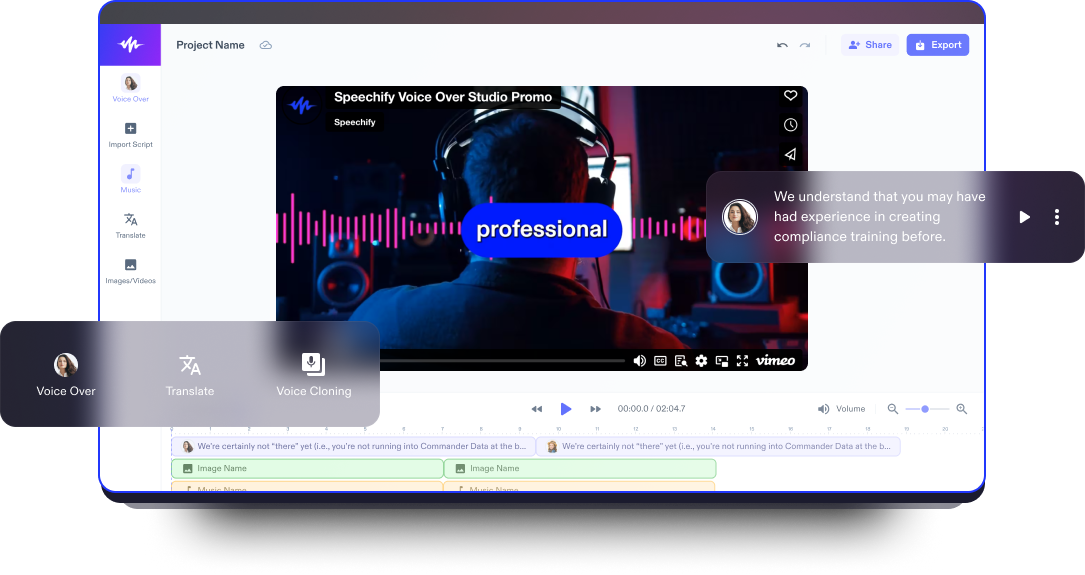
📷 Speechify Studio workspace for producing spoken content and localized media. Source: vendor website/documentation.
What we like
One Studio covers voiceover, dubbing, voice changing and voice cloning.
Large voice catalog and beginner-friendly workflow make it easy to test many delivery styles quickly.
Paid Starter and Creator plans include commercial usage rights for business content.
What to know
The Free plan does not permit commercial usage, despite offering access to Studio tools for testing.
Credits cover multiple AI features, so actual usable output depends on which Studio functions you use most.
💡 Why this score: Speechify Studio scores well because it bundles several practical audio-production jobs into a low-friction interface with a relatively accessible annual entry price. It trails the top products on specialized dubbing controls and enterprise governance, but is a strong fit for smaller ecommerce teams moving quickly.
💰 Pricing: Free; Studio Starter $100/year; Studio Creator $300/year. Paid Studio plans add commercial usage rights and voice cloning.
✅ Best fit: Creators, small brands and performance-marketing teams producing frequent short-form product videos, ads and social content across several formats.
🚫 Less ideal for: Large localization operations needing complex reviewer permissions, granular speaker workflows or enterprise-grade controls across many concurrent projects.
🧩 Key capabilities
AI voiceover
AI dubbing
Voice cloning
Voice changer
Large voice library
Studio credits
🔎 Official sources: Product · Pricing · Documentation
5. Rask AI
84/100 · 💰 Premium · 🧩 Intermediate · 🏢 SMB–Enterprise · ⚙️ No-code
🎯 Best for: Video localization teams that care more about multilingual dubbing, speaker preservation and lip sync than standalone narration.
⚡ Choose Rask AI if localization is the main job and you need to turn existing video into many language versions.
Rask AI is the most localization-focused product in this list. Rather than starting from a blank narration script, it is designed to translate and dub existing video, preserve speaker characteristics, and help teams expand one master asset into many markets. It supports more than 130 languages, with voice cloning available across a smaller set, plus lip-sync and team features on relevant plans. For ecommerce, that is valuable when scaling product demos, creator ads and training videos globally.
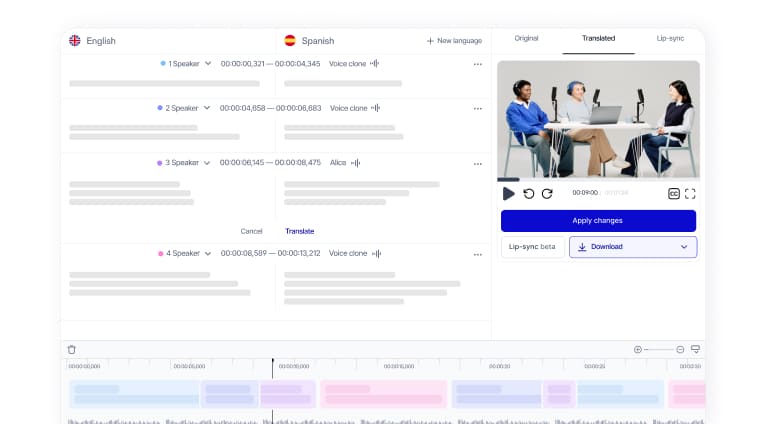
📷 Rask AI localization interface for translating and dubbing video content. Source: vendor website/documentation.
What we like
Built specifically for video translation and dubbing rather than generic text-to-speech.
Supports 130+ languages and offers voice cloning in dozens of languages for speaker continuity.
Lip-sync, teamspaces and higher-volume workflows fit localization programs better than creator-only voice tools.
What to know
Pricing is materially higher than basic narration tools, so it makes most sense when localization volume justifies it.
Language support is broad, but voice-cloning quality and feature availability still vary by language and plan.
💡 Why this score: Rask AI scores highly on the specific job of multilingual video localization. It is stronger than general voice generators for turning finished videos into market-ready variants, but less compelling for simple narration and more expensive at entry level. Its narrower use case keeps it below broader all-rounders.
💰 Pricing: Free trial includes 3 minutes; Creator $60/month or $33/month billed annually; higher Creator Pro, Business and Enterprise tiers scale minutes and collaboration.
✅ Best fit: Brands, agencies and localization teams adapting product videos, UGC-style ads, tutorials and training content for many geographic markets.
🚫 Less ideal for: Teams that mostly need inexpensive English narration or occasional text-to-speech for product pages and short social clips.
🧩 Key capabilities
130+ languages
AI dubbing
Voice cloning
Lip sync
Speaker detection
Teamspaces
🔎 Official sources: Product · Pricing · Documentation
6. Typecast
83/100 · 💰 Budget · 🧩 Beginner · 🏢 Creator–SMB · ⚙️ No-code
🎯 Best for: Expressive short-form voiceovers when emotion, delivery style and low self-serve entry cost are priorities.
⚡ Choose Typecast if you want to direct emotional delivery quickly and need commercial voiceover at a low starting price.
Typecast focuses on expressive AI voice generation, with an editor that lets creators choose voices and shape emotion, speed and delivery. The product advertises hundreds of voices and support for more than 35 languages, while paid plans progressively unlock higher-quality exports, commercial licensing and more capable cloning or emotion controls. It is especially appealing for social ads, characterful product videos and creator-style content where a flat neutral narrator would feel too generic.
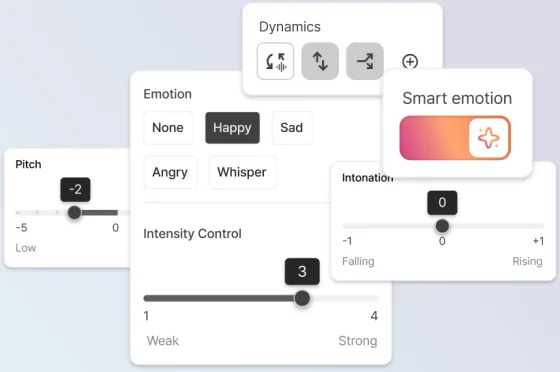
📷 Typecast editor for selecting voices and shaping AI speech delivery. Source: vendor website/documentation.
What we like
Large voice library with emotion and delivery controls suited to short-form creative.
Basic starts at a low monthly price and includes a commercial license.
Higher plans add more cloning capacity, emotion control and production credits without requiring enterprise sales.
What to know
The free plan requires attribution and has very limited lifetime download credits.
It is a voice-generation studio first, not a full localization operations platform with review and video lip-sync workflows.
💡 Why this score: Typecast scores well on value, speed and expressive delivery. Its inexpensive commercial tier lowers the barrier for small teams, while Pro and Business expand emotional control and cloning. It gives up points for narrower dubbing and localization depth compared with Rask, ElevenLabs and Murf.
💰 Pricing: Free; Basic $5/month; Plus $19/month; Pro $29/month; Business $69/month; Enterprise custom. Annual billing is discounted.
✅ Best fit: Small ecommerce teams, creators and agencies making product ads or social videos that benefit from more animated, characterful voice delivery.
🚫 Less ideal for: Enterprise localization teams requiring extensive governance, large-scale multilingual dubbing operations or complex human review and approval processes.
🧩 Key capabilities
700+ voices
35+ languages
Emotion control
Voice cloning
44.1 kHz export
Commercial license
🔎 Official sources: Product · Pricing · Documentation
7. NaturalReader Commercial
81/100 · 💰 Mid · 🧩 Beginner · 🏢 Creator–SMB · ⚙️ No-code
🎯 Best for: Straightforward commercially licensed narration with multi-model voices, pronunciation editing and predictable creator plans.
⚡ Choose NaturalReader Commercial if you want licensed business voiceovers without mixing them up with a personal text-reading subscription.
NaturalReader Commercial is explicitly the business-use voice generator, separate from NaturalReader’s personal reading product. It combines commercial licensing with a studio editor, pronunciation tools, script assistance, voice design and multiple underlying voice providers. Current plans include more than 90 languages and up to four cloned voices. The product is a sensible middle ground for teams that need reliable narration and exports but do not need a specialized video-localization system.
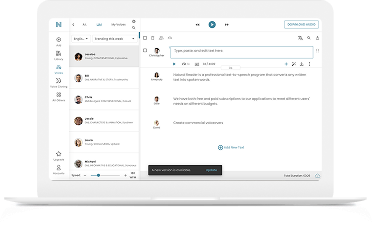
📷 NaturalReader Commercial workspace for creating licensed business voiceovers. Source: vendor website/documentation.
What we like
Commercial version is clearly licensed for professional audio use, reducing confusion with the personal product.
Supports multiple voice-model providers plus 90+ languages and pronunciation editing.
MP3 and WAV exports, script assistance and cloned voices cover common ecommerce narration workflows.
What to know
Its interface and positioning are more utilitarian than creative-first studios built around advertising workflows.
Voice cloning requires permission, and teams should still validate model-specific output quality for each target language.
💡 Why this score: NaturalReader Commercial earns a solid score for clear commercial rights, broad language access and straightforward production controls. It is less differentiated on creative direction and video dubbing, but offers a practical, relatively predictable path for teams that mainly need legally usable narration at scale.
💰 Pricing: Starter $29/month or $198/year; Creator $49/month or $297/year; Team $33/user/month or $192/user/year with a two-user minimum.
✅ Best fit: Teams producing product explainers, tutorials, educational clips and other narration-heavy assets where licensing clarity and simple exports matter.
🚫 Less ideal for: Creative teams looking for sophisticated ad-style emotional direction or localization departments needing automated dubbing, lip sync and reviewer workflows.
🧩 Key capabilities
90+ languages
Commercial license
Pronunciation editor
Voice design
Voice cloning
MP3/WAV export
🔎 Official sources: Product · Pricing · Documentation
8. Descript
79/100 · 💰 Mid · 🧩 Intermediate · 🏢 Creator–SMB · ⚙️ No-code
🎯 Best for: Teams that want AI speech inside a broader text-based audio and video editing workflow.
⚡ Choose Descript if editing the entire video or podcast matters more than having the deepest standalone AI voice platform.
Descript is the outlier in this comparison because AI speech is one feature inside a broader text-based audio and video editor. You can use stock AI voices or custom voice clones, generate or replace spoken lines by editing text, then continue with captions, screen recordings, video edits and other production tasks in the same project. That integrated workflow is valuable for lean content teams, but dedicated voice and dubbing vendors offer deeper specialization.

📷 Descript editor showing AI-powered audio and video production workflow. Source: vendor website/documentation.
What we like
AI speech lives inside a full text-based audio and video editing workflow.
Custom voice clones can make small script fixes without re-recording an entire narration.
Captions, recording and broader editing tools reduce the need to move assets between multiple applications.
What to know
Voice generation and dubbing are not the sole focus, so specialized controls can lag dedicated voice platforms.
AI usage is governed by plan credits and feature allowances, which should be tested against your real production mix.
💡 Why this score: Descript scores well for workflow integration but lower for the core voiceover and dubbing job. Its strength is eliminating handoffs between script editing, AI speech, captions and video post-production. Teams buying primarily for multilingual dubbing or the broadest voice catalog will get more depth elsewhere.
💰 Pricing: Free; Hobbyist $16/person/month billed annually; Creator $24/person/month billed annually; Business $50/person/month billed annually. Monthly billing costs more.
✅ Best fit: Lean content teams editing product videos, podcasts, demos or social clips that want AI speech embedded directly in the same production workspace.
🚫 Less ideal for: Buyers whose main requirement is best-in-class multilingual dubbing, very large voice libraries or dedicated enterprise localization operations.
🧩 Key capabilities
Text-based editing
AI speech
Voice cloning
Video editing
Captions
Screen recording
🔎 Official sources: Product · Pricing · Documentation
🎯 Which tools should you actually shortlist?
If you want the best general-purpose voice quality: start with ElevenLabs and compare the exact voices you would use in paid social and product explainers.
If marketers will operate the tool themselves: shortlist Murf and Speechify Studio, then time how long a non-editor takes to produce and revise a 60-second asset.
If localization is the main requirement: compare Rask AI with ElevenLabs using the same multi-speaker video, at least three target languages and native-speaker review.
If brand narration matters more than language breadth: test WellSaid for consistent tone, pronunciation of product terminology and how easily reviewers can request revisions.
If budget matters most: test Typecast and NaturalReader Commercial with the exact commercial-use scenario you need, then compare usable minutes rather than headline subscription price.
If voice is only one part of your editing workflow: shortlist Descript when keeping script, captions, audio fixes and video edits in one project would remove meaningful handoffs.
🧪 Run this test before you buy
Do not compare AI voices with generic demo sentences. Build a small test pack from real ecommerce work: product names, abbreviations, prices, numbers, calls to action, emotional ad copy and a short video with two speakers. Generate the same material in every shortlisted tool, then have both marketers and native speakers score the outputs before anyone signs an annual contract.
Generate a 45-second product explainer with at least five brand or product terms.
Correct one deliberately difficult pronunciation and measure how many steps it takes.
Create three delivery variants: neutral, energetic and conversational.
Replace one sentence after approval without regenerating the whole asset.
Dub a 60-second two-speaker video into three target languages.
Ask a native speaker to score translation naturalness and pronunciation in each language.
Check whether voice identity remains consistent across the original and dubbed versions.
Export the format your video workflow actually uses and verify audio quality.
Confirm commercial usage rights for your exact plan, channel and advertising scenario.
Calculate the real monthly cost at your expected minutes, languages and revision rate.
📏 Record the same things for every vendor:
Time to first usable export · pronunciation fixes required · reviewer score for naturalness · translation errors · speaker consistency · revision time · output minutes consumed · effective cost per finished minute · commercial-use restrictions.
🧾 10 questions to ask in every demo
What commercial rights apply to generated audio on the exact plan we are considering?
Can we use generated voices in paid advertising, marketplace listings and customer-facing product videos?
How do credits or minutes change when one source video is dubbed into multiple target languages?
Which target languages support the same voice-cloning and emotion features we see in English?
What consent or authorization is required before cloning an employee, creator or customer voice?
How are product names, acronyms, numbers and pronunciation dictionaries managed across projects?
Can reviewers edit translations or transcripts without regenerating an entire video?
What workspace, approval, role and audit controls are available for larger teams?
What happens to our uploaded scripts, audio, video and cloned voice data after a project is deleted?
Which API, export and integration options exist if our production volume grows significantly?
❓ Frequently asked questions
What is the best AI voiceover tool for ecommerce?
There is no universal winner for every workflow. ElevenLabs is the strongest general-purpose starting point in this comparison because it combines high-quality narration, broad language support and dubbing. Murf is easier for teams that prefer a studio-style editor, while WellSaid is attractive for controlled branded narration. Test your own product terminology and advertising scripts before deciding.
Can I use free AI voices in paid ads?
Do not assume so. Several vendors let you test generation on a free plan but reserve commercial usage rights for paid subscriptions. Speechify Studio and WellSaid, for example, distinguish testing access from commercial rights, while Murf’s free tier does not include commercial downloads. Always check the vendor’s current plan terms for your channel and intended advertising use.
What is the difference between AI voiceover and AI dubbing?
Voiceover usually starts with a script and generates a new narration track. Dubbing starts with existing spoken video or audio, transcribes it, translates it and replaces the speech in another language. Strong dubbing tools also preserve speakers, timing and sometimes lip movement. Ecommerce teams often need both: narration for new creative and dubbing for international variants.
Is AI voice cloning safe for brand use?
It can be, provided the person whose voice is cloned has explicitly authorized the use and your workflow follows the vendor’s consent requirements. Treat a voice model like a controlled brand asset. Document permission, restrict workspace access, decide who can generate new audio, and establish an approval process before cloned speech is used in paid advertising or public customer content.
How should I compare AI voice pricing?
Convert every plan into your own production unit: finished minutes per month across all target languages. Credit systems can be misleading because dubbing, cloning and higher-quality models may consume credits differently. Include failed takes and revisions, not just final exports. Then compare effective cost per approved minute alongside reviewer time, because a cheaper model can cost more if humans must fix it repeatedly.
Which tool is best for multilingual ecommerce video?
Rask AI deserves a shortlist when the job is primarily video localization because its product is centered on translating and dubbing existing video, with broad language coverage and localization features such as voice cloning and lip sync. ElevenLabs is the stronger all-round option if you also need premium standalone narration. For either, test your exact target languages with native reviewers.
🔍 About this research
MarketMaze researches and scores each tool using its proprietary scoring methodology. Product details and pricing are checked against official vendor sources. Screenshots are from vendor websites, documentation, official demos, or MarketMaze product captures and are used to illustrate the products being reviewed.
Last research check: 25 September 2026.
Disclosure: This page is editorial research. Links above point to official vendor pages; placement in the ranking is not paid.
