
MARKETMAZE · ECOMMERCE TOOLS · RESEARCH
8 Best Ecommerce Accounting & Bookkeeping Software (2026)
Compare the accounting ledgers, ecommerce reconciliation connectors and managed bookkeeping platforms that turn store and marketplace activity into books you can actually close. The important first decision is not vendor versus vendor; it is which accounting layer you are missing.
Updated 27 September 2026 · Pricing and product claims checked against official vendor sources.
👋 New to this category?
A general ledger is the system of record that produces your profit and loss, balance sheet and other financial statements. A reconciliation connector sits between a store or marketplace and that ledger, translating payouts into sales, refunds, fees and taxes that match the bank deposit. Managed bookkeeping adds people who operate or review the books for you. Ecommerce also makes inventory and cost of goods sold (COGS) unusually important. If Amazon deposits $18,400 after fees and refunds against $21,000 of gross sales, the job is not “import $18,400.” It is explaining every dollar between the order data, payout and ledger.
🧭 Jump to a tool
🏆 The quick answer
🧾 Best ecommerce-native full ledger
Finaloop
📚 Best mainstream ledger
QuickBooks Online
🌐 Best app-led cloud ledger
Xero
🔄 Best payout-reconciliation connector
A2X
💸 Best value connector
Link My Books
📦 Best for order-level sync + inventory
Webgility
MarketMaze take
The fastest way to waste money here is to compare products that do different jobs. First decide whether you need a ledger, a reconciliation layer feeding an existing ledger, or people to run the books for you. Then test the ugly parts of your real commerce flow: partial refunds, marketplace fees, sales tax, gift cards, chargebacks, inventory adjustments and payouts that cross month-end. A cheaper connector that reconciles every settlement correctly can be more valuable than a broader accounting suite that still leaves your accountant rebuilding marketplace deposits in a spreadsheet.
📊 Tool comparison & scores
Rank | Tool | Score | Best for | Pricing |
|---|---|---|---|---|
1 | 95/100 | Commerce-native ledger + managed accounting | $245/mo Starter; larger plans custom | |
2 | 94/100 | Settlement reconciliation into existing ledgers | From $29/mo; channel/volume based | |
3 | 92/100 | Mainstream ledger + broad ecosystem | Free; paid from $38/mo | |
4 | 91/100 | Cloud ledger + specialist ecommerce apps | $25/mo now; $27 from Oct 1 | |
5 | 90/100 | Order-level sync + inventory workflows | From $79/mo monthly; $69 annual | |
6 | 89/100 | Simple Xero/QuickBooks payout summaries | From $20/mo; order/channel based | |
7 | 88/100 | Configurable multi-platform transaction sync | From $65/mo; sync-volume based | |
8 | 86/100 | Value ledger inside the Zoho ecosystem | Free; paid from $20/mo |
🧠 How the scoring works
This ranking uses MarketMaze proprietary scoring.
Because this category mixes ledgers, connectors and managed accounting, Core job performance is judged against the job each product is actually sold to do. A connector is not penalized simply for not issuing invoices, but it is evaluated on how safely and completely it gets ecommerce activity into the system of record.
Dimension | Weight | What matters in this category |
|---|---|---|
Core job performance | 30% | Ledger completeness or, for connectors, accurate posting and reconciliation of sales, refunds, fees, taxes and payouts. |
Ecommerce fit | 20% | Marketplace and storefront coverage, settlement logic, inventory and COGS relevance, multichannel workflows and commerce-specific exceptions. |
Workflow & control | 15% | Mapping, review, exception handling, approval, accountant access, audit trail and month-end operating clarity. |
Integrations & implementation | 15% | Sales-channel and accounting integrations, setup effort, migration, automation depth and application programming interface (API) options. |
Pricing & value | 10% | Price transparency, useful entry tiers and total value after required ledger, connector or service layers are included. |
Scale & advanced capabilities | 10% | Order volume, entities, channels, currencies, inventory complexity, controls and finance-team requirements. |
🤔 Do you even need dedicated ecommerce accounting software?
Probably yes ✅
You sell through multiple channels, payouts no longer match obvious sales totals, fees and refunds create monthly cleanup, inventory materially affects profit, or closing the books depends on spreadsheets only one person understands.
Maybe 🟡
You have one main channel and modest order volume, but the native connector still leaves reconciliation work. First prove whether the problem is the ledger, the data arriving in it, or simply an inconsistent bookkeeping process.
Probably not yet ⏳
You are very early, sell through one simple channel, have few monthly transactions and can reconcile the books cleanly in a basic ledger. Fix ownership, chart-of-accounts discipline and monthly close habits before adding another tool.
🥇 1. Finaloop
95/100 · 💰 Premium · 🧩 Intermediate · 🏢 SMB–Mid-market · ⚙️ Guided setup
🎯 Best for: Ecommerce brands wanting a commerce-native ledger plus the option to outsource bookkeeping and finance operations
⚡ Choose Finaloop if you want the accounting system itself to understand multichannel ecommerce instead of stitching a generic ledger to several reconciliation layers.
Finaloop is the only product here positioned as a commerce-native general ledger and a managed accounting service on the same platform. It reconciles multichannel revenue, payment processors, inventory and cost of goods sold (COGS), then exposes financial statements and operating dashboards from the same data model. Brands can let Finaloop’s accountants run the books or use the platform with an internal finance team, which makes it unusually flexible across growth stages.
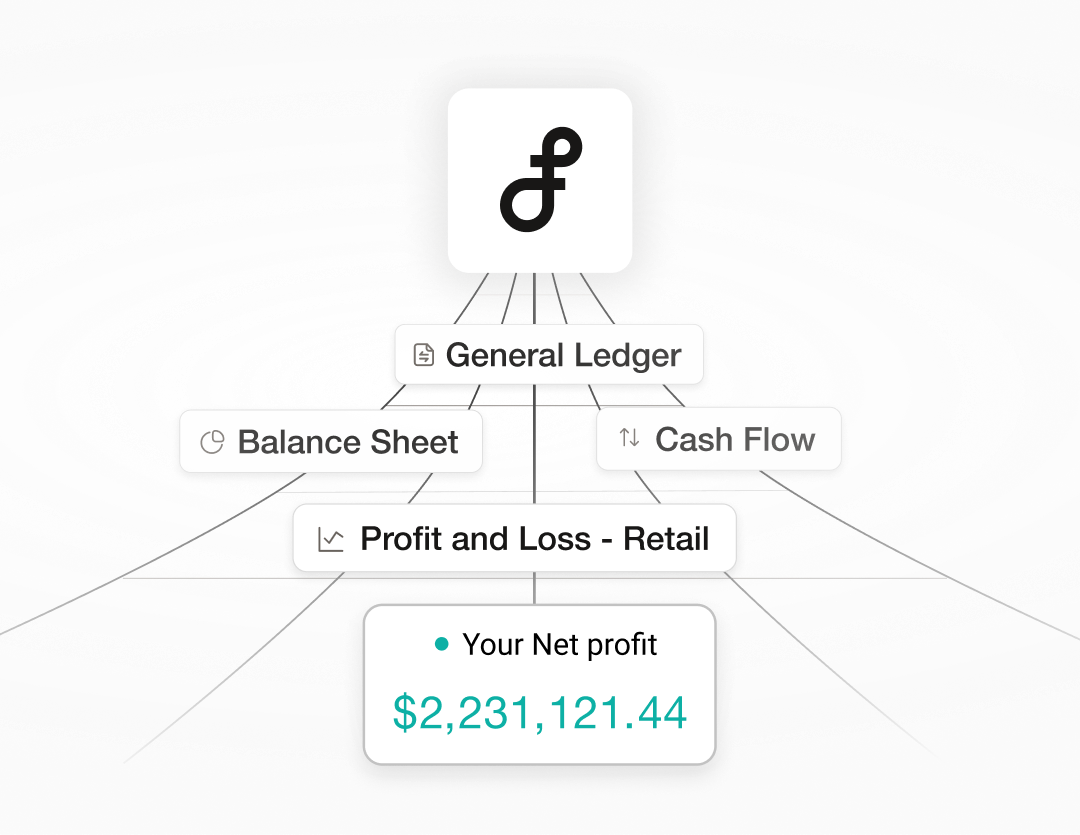
📷 Finaloop commerce-native accounting view brings reconciled financial statements and ecommerce operating data into the same system. Source: official vendor website/documentation.
💚 What we like
Commerce-native ledger handles revenue, payouts, inventory and COGS as first-class workflows rather than bolt-ons.
Full-service and platform modes let a brand outsource the work or keep accounting in-house without changing systems.
Broad ecommerce integrations connect stores, marketplaces, payment processors, banks, inventory systems and other operating apps.
🟠 What to know
The $245 Starter plan is limited to qualifying early-stage brands; larger businesses move into sales-led pricing.
Moving from QuickBooks or Xero changes the core financial system, so migration and accountant alignment deserve more scrutiny than adding a connector.
💡 Why this score: Finaloop scores highest because it combines a true ledger with unusually deep ecommerce reconciliation, inventory and operating context. Its platform can replace the ledger-plus-bookkeeper stack rather than merely feed it. The main tradeoff is buying complexity and premium pricing once a brand grows beyond the Starter eligibility window.
💰 Pricing: Starter $245/month; Full-Service and Platform are custom quote
✅ Best fit: Growing direct-to-consumer and multichannel brands that want one ecommerce-aware financial system, with expert bookkeeping available when the internal team is lean.
🚫 Less ideal for: Businesses that are committed to keeping QuickBooks or Xero as the system of record and only need a lightweight reconciliation connector.
🧩 Key capabilities
Commerce-native general ledger
Multichannel revenue reconciliation
Inventory and COGS accounting
Financial statements and dashboards
Managed bookkeeping option
Ecommerce and operations integrations
🔎 Official sources: Product · Pricing · Documentation / integration
🥈 2. A2X
94/100 · 💰 Budget–Mid · 🧩 Intermediate · 🏢 SMB–Mid-market · ⚙️ Low-code
🎯 Best for: Marketplace and Shopify sellers that already use an accounting ledger and need clean payout-level ecommerce reconciliation
⚡ Choose A2X if the ledger is staying put but marketplace settlements, fees, refunds, taxes and payouts are making month-end reconciliation unreliable.
A2X sits between sales channels and accounting software. Instead of replacing QuickBooks Online, Xero, Sage or NetSuite, it turns ecommerce settlements and payouts into accounting-ready summaries that map sales, fees, refunds, taxes and COGS to the right accounts. That boundary matters: A2X is excellent at ecommerce reconciliation, especially for marketplace sellers, but it still expects a separate ledger to hold the books and produce the statutory financial statements.
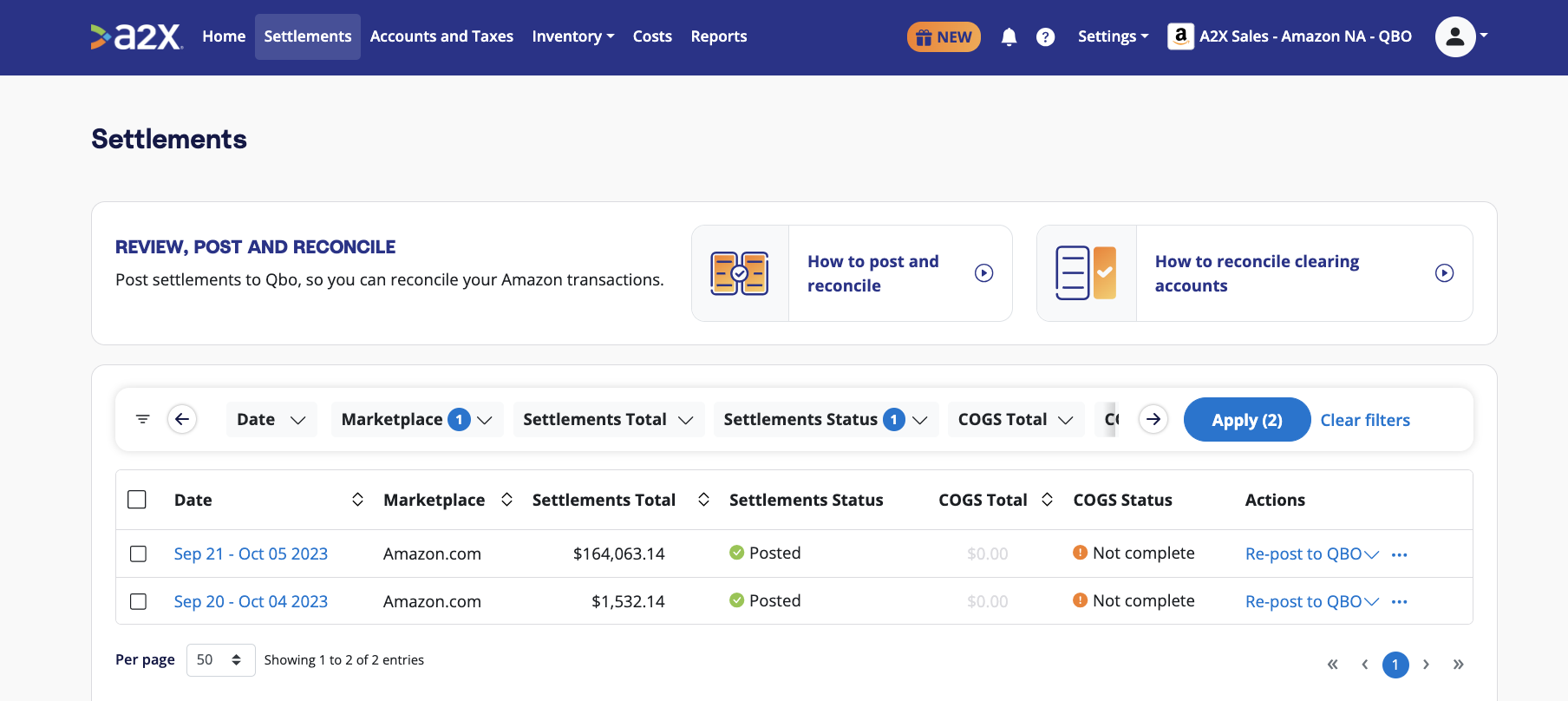
📷 A2X Settlements view showing settlement totals, posting status, COGS status and reconciliation controls. Source: official vendor website/documentation.
💚 What we like
Settlement-first workflow matches how Amazon and other marketplaces actually pay sellers, which makes bank reconciliation cleaner.
Supports QuickBooks Online, Xero, Sage and NetSuite, giving finance teams more ledger choice than several connector rivals.
Channel-specific plans and onboarding make it possible to start with one store and add complexity as order volume grows.
🟠 What to know
A2X is not a complete accounting ledger; you still need accounting software and an accountant or bookkeeping process around it.
Pricing is fragmented by channel and volume, so a multichannel seller must model the combined plan rather than compare only the lowest Shopify price.
💡 Why this score: A2X scores near the top because payout reconciliation is the hardest ecommerce-specific accounting job for many sellers, and A2X handles that job across multiple ledgers and marketplaces. It loses points only because it is a connector layer rather than a complete accounting system and because multichannel pricing needs careful modeling.
💰 Pricing: From $29/month for Shopify Mini; pricing varies by channel, order volume and number of seller accounts
✅ Best fit: Amazon, Shopify, eBay, Etsy and Walmart sellers that want accurate settlement summaries posted into an existing accounting system.
🚫 Less ideal for: Businesses looking for invoicing, accounts payable, a full general ledger or managed bookkeeping in one product.
🧩 Key capabilities
Settlement and payout summaries
Sales, fee and refund mapping
Tax and account mapping
COGS workflows
QuickBooks, Xero, Sage and NetSuite connections
Bank reconciliation support
🔎 Official sources: Product · Pricing · Documentation / integration
🥉 3. QuickBooks Online
92/100 · 💰 Free to Premium · 🧩 Beginner to Intermediate · 🏢 Small business to mid-market · ⚙️ Guided or self-serve
🎯 Best for: Mainstream accounting ledger, broad accountant adoption and increasingly capable native ecommerce connectors
⚡ Choose QuickBooks Online if you want a mainstream accounting system many US accountants already know, with native ecommerce connectors plus a large app ecosystem.
QuickBooks Online is a full general ledger. In 2026 Intuit rebuilt its ecommerce connectors for Shopify, Amazon, eBay, Etsy, Wix, WooCommerce, BigCommerce and Squarespace. Shopify and Amazon now support payout-based reconciliation inside QuickBooks, while the wider connector set imports detailed transactions, products, customers and tax mappings.
💚 What we like
Complete ledger with financial statements, bank reconciliation, invoicing, bills and accountant access.
Shopify and Amazon connectors import sales, refunds, fees and payouts with structured reconciliation.
Large accountant and app ecosystem makes specialist workflows easier to add.
🟠 What to know
The new connectors do not yet provide two-way inventory sync, and unpaid ecommerce orders cannot currently be imported.
Inventory management is in Plus and above, so entry pricing understates the cost for inventory-heavy sellers.
💡 Why this score: QuickBooks combines a mature ledger with much better native ecommerce connectivity than before. It loses points versus ecommerce-native specialists because capability still varies by channel and complex sellers may still need extra layers.
💰 Pricing: Free $0; Simple Start $38/month; Essentials $85; Plus $140; Advanced $340 before temporary promotions
✅ Best fit: US-led ecommerce businesses that want a widely adopted ledger, easy accountant access and a large integration ecosystem.
⛔ Less ideal for: Sellers that want one ecommerce-native system to own settlement logic, inventory accounting and bookkeeping operations without adding specialist layers.
🧩 Key capabilities
Full cloud ledger
Bank reconciliation and reporting
Native ecommerce connectors
Shopify and Amazon payout reconciliation
Inventory on Plus and above
Large app ecosystem
🔎 Official sources: Pricing · Ecommerce connectors
4️⃣ 4. Xero
91/100 · 💰 Budget to Premium · 🧩 Beginner to Intermediate · 🏢 Small business to mid-market · ⚙️ Guided or self-serve
🎯 Best for: Cloud-first businesses that want a collaborative ledger and a large ecosystem of ecommerce apps
⚡ Choose Xero if you want a clean cloud ledger and prefer to assemble ecommerce depth through Xero and specialist apps.
Xero is a full cloud ledger with bank reconciliation, reporting, invoicing and bills. Its ecommerce approach is ecosystem-led, connecting Shopify, Amazon, eBay, Walmart, Etsy and other commerce systems through native or partner apps. Inventory Plus adds product, cost of goods sold and inventory workflows for supported channels.
💚 What we like
Strong bank reconciliation, reporting and accountant collaboration.
Large app ecosystem lets finance teams choose reconciliation and inventory tools by channel.
The Shopify integration can post sales and reconcile Shopify Payments payouts.
🟠 What to know
Ecommerce depth depends heavily on the connector selected.
Xero says its US Shopify integration does not currently account for sales tax, so that must be handled from Shopify data.
💡 Why this score: Xero scores well for ledger quality and ecosystem flexibility. It sits just behind QuickBooks because operators often need to design the surrounding app stack carefully and some channel limitations remain.
💰 Pricing: Early $25/month, Growing $55 and Established $90 through September 30, 2026; from October 1 they rise to $27, $59 and $97
✅ Best fit: Cloud-first ecommerce businesses with an accountant or finance partner that already works comfortably in Xero.
⛔ Less ideal for: Teams wanting the accounting product itself to standardize every marketplace settlement and inventory workflow without relying on additional apps.
🧩 Key capabilities
Cloud general ledger
Bank feeds and reconciliation
Financial reporting
Shopify integration
Large ecommerce app ecosystem
Inventory Plus option
5️⃣ 5. Webgility
90/100 · 💰 Mid to Premium · 🧩 Intermediate · 🏢 Small business to mid-market · ⚙️ Guided setup
🎯 Best for: Multichannel sellers that need order-level accounting automation plus inventory and cost of goods sold workflows
⚡ Choose Webgility if payout summaries are too coarse and finance needs order, customer, product and inventory detail moving into the books.
Webgility is an ecommerce accounting automation layer rather than a standalone ledger. It connects storefronts and marketplaces to QuickBooks and Xero and can sync orders, returns, refunds, fees, customers, products, inventory and cost of goods sold.
💚 What we like
Order-level sync preserves more operational detail than payout summaries.
Supports major channels alongside QuickBooks Online, QuickBooks Enterprise and Xero.
Inventory and cost of goods sold workflows help keep accounting and operations aligned.
🟠 What to know
Pricing scales with order volume and sales-channel limits.
The deepest reconciliation and close workflows sit on higher tiers.
💡 Why this score: Webgility handles more operational detail than most connectors and supports inventory-sensitive workflows. The tradeoff is greater setup complexity and higher cost as volume and channel count rise.
💰 Pricing: Pro from $79/month monthly or $69 billed annually; Advanced from $149/$129; Complete from $349/$299
✅ Best fit: Established multichannel merchants that need detailed ecommerce transactions and inventory data synchronized into an existing ledger.
⛔ Less ideal for: Very small sellers that only need clean payout summaries and want the simplest possible month-end workflow.
🧩 Key capabilities
Order, return and refund sync
Payout and fee accounting
Customer and item detail
Inventory synchronization
COGS workflows
QuickBooks and Xero integrations
🔎 Official sources: Pricing · Integrations
6️⃣ 6. Link My Books
89/100 · 💰 Budget to Mid · 🧩 Beginner to Intermediate · 🏢 Small business to mid-market · ⚙️ Guided setup
🎯 Best for: Sellers that want a simple payout-summary layer feeding Xero or QuickBooks Online
⚡ Choose Link My Books if you want settlement reconciliation to stay simple and do not need order-level accounting detail in the ledger.
Link My Books is a reconciliation connector built around ecommerce payouts and settlement summaries. It prepares accounting-ready summaries and posts them into Xero or QuickBooks Online, keeping the ledger from filling with thousands of individual orders.
💚 What we like
Payout-summary accounting keeps Xero or QuickBooks cleaner.
Supports major channels including Amazon, Shopify, eBay, Etsy, Walmart and TikTok Shop depending on market.
Low entry pricing works well for modest order volumes.
🟠 What to know
It is still a connector, so you need Xero or QuickBooks Online and a bookkeeping process.
Pricing scales with order volume, channel count and history, so peak months matter.
💡 Why this score: Link My Books makes settlement reconciliation simple at a low entry price. It trails A2X on ledger breadth and advanced flexibility but is compelling for sellers that value simplicity.
💰 Pricing: US plans start at $20/month for Lite; price scales with monthly orders, channels and historical data allowance
✅ Best fit: Small and mid-sized ecommerce sellers that want clean settlement summaries into Xero or QuickBooks Online without an enterprise implementation.
⛔ Less ideal for: Teams that need a standalone ledger, detailed order-level postings or accounting systems outside Xero and QuickBooks Online.
🧩 Key capabilities
Payout summaries
Sales, fees, refunds and tax mapping
Xero and QuickBooks posting
Multiple channels
COGS support
Historical data plans
🔎 Official sources: Pricing · US 2026 pricing
7️⃣ 7. Synder
88/100 · 💰 Mid to Premium · 🧩 Intermediate to Advanced · 🏢 Small business to enterprise · ⚙️ Configurable setup
🎯 Best for: Businesses with several payment processors and channels that need configurable transaction synchronization
⚡ Choose Synder if your finance stack spans several gateways or sales channels and you need more mapping control than a simple payout-summary connector provides.
Synder connects ecommerce platforms and payment processors to QuickBooks Online, Xero and, on eligible plans, enterprise ledgers such as NetSuite and Sage Intacct. It can sync sales, fees, refunds and other transaction detail with configurable mappings.
💚 What we like
Broad ecommerce and payment integration coverage.
Higher plans support enterprise accounting platforms.
Configurable transaction-level mappings give finance teams more control.
🟠 What to know
Pricing depends on synced transaction volume.
More configuration means more testing and mapping responsibility.
💡 Why this score: Synder scores well on integration breadth and configurability. It ranks below simpler specialists because total cost and operating complexity rise with transaction volume and advanced requirements.
💰 Pricing: Basic from $65/month on the displayed monthly price basis; Essential from $129; Pro from $299; Pro Max from $599
✅ Best fit: Multichannel businesses with several gateways or an enterprise accounting platform that need configurable transaction synchronization.
⛔ Less ideal for: Operators that want a minimal payout-summary workflow with very little setup or ongoing mapping responsibility.
🧩 Key capabilities
Multi-channel transaction sync
Sales, refunds and fee mapping
Reconciliation workflows
30+ integrations
QuickBooks and Xero connections
Enterprise ledger support on higher plans
🔎 Official sources: Pricing · Integrations
8️⃣ 8. Zoho Books
86/100 · 💰 Free to Premium · 🧩 Beginner to Intermediate · 🏢 Small business to mid-market · ⚙️ Self-serve
🎯 Best for: Value-conscious businesses already using Zoho that want a full accounting ledger
⚡ Choose Zoho Books if you want a capable low-cost ledger and already use Zoho, but test the exact ecommerce and inventory features at the plan you can justify.
Zoho Books is a full cloud accounting system with bank reconciliation, invoicing, bills, reporting and progressively deeper inventory capabilities. Zoho Commerce can synchronize orders, customers, payments, items and taxes, while higher Books tiers add sales-channel integrations and advanced inventory.
💚 What we like
Full ledger starts with a genuinely free tier and inexpensive paid plans.
Professional and higher plans add inventory; upper tiers add deeper warehouse and ecommerce capabilities.
Zoho Commerce can keep orders, customers, payments, products and tax data connected with the books.
🟠 What to know
The $20 Standard plan is not the right benchmark if you need inventory or deeper sales-channel features.
The fit improves materially when the wider Zoho ecosystem is already part of the operating stack.
💡 Why this score: Zoho Books scores well on value and core accounting breadth. It ranks lower because advanced ecommerce and inventory capabilities are more plan-dependent and the specialist ecommerce ecosystem is smaller than the leaders.
💰 Pricing: Free $0; Standard $20/month; Professional $50; Premium $70; higher inventory and analytics tiers cost more
✅ Best fit: Price-conscious small and mid-sized businesses, particularly those already using Zoho Commerce or other Zoho applications.
⛔ Less ideal for: Complex marketplace sellers that want best-of-breed settlement reconciliation across several external accounting ecosystems.
🧩 Key capabilities
Cloud general ledger
Bank reconciliation and reporting
Invoicing and payables
Inventory on Professional and above
Zoho Commerce integration
Sales-channel features on higher tiers
🔎 Official sources: Pricing · Zoho Commerce
🎯 Which tools should you actually shortlist?
Replacing the generic ledger: Finaloop.
Keeping an existing ledger and fixing settlement reconciliation: A2X; add Link My Books if a simpler lower-cost Xero or QuickBooks summary workflow fits.
Mainstream ledger plus broad accountant familiarity: QuickBooks Online; compare Xero if cloud collaboration and app choice matter more.
Order-level detail plus inventory and COGS synchronization: Webgility.
Several gateways, channels or an enterprise ledger with configurable sync: Synder.
Low-cost ledger inside an existing Zoho stack: Zoho Books, priced at the tier that includes the ecommerce features you need.
🧪 Run this test before you buy
Use one real 14 to 30 day period, not a clean demo store. Include a payout crossing month-end, a partial refund, a chargeback, marketplace fees, a gift card, marketplace-collected tax, a reserve or adjustment and an inventory correction. If you sell internationally, include one foreign-currency settlement. Give every vendor the same chart of accounts and target close. The useful result is a bank deposit you can explain, an audit trail your accountant can follow and a month you can close without a private reconciliation spreadsheet.
Connect one real channel to a sandbox or controlled accounting file.
Import the same fixed date range and record setup time.
Map revenue, discounts, refunds, fees, taxes, gift cards, reserves and chargebacks.
Reconcile one actual payout all the way to the bank deposit.
Process a partial refund or chargeback after the original payout.
Post COGS and one inventory adjustment and compare against the source system.
Close the month, resync and check for duplicates or backdated changes.
Export journal detail, reconciliation evidence and audit history, then test how you would unwind the integration.
Measure the same things across vendors: setup hours, manual journals, unresolved differences, duplicates, time to close, ledger transaction volume, exception-fix time, export completeness and support response.
🧾 10 questions to ask in every demo
Which of our channels, payment processors and countries are supported natively, and which require another paid app?
How do sales, discounts, refunds, fees, taxes, gift cards, reserves and chargebacks map into the ledger?
Do you post one summary per payout or individual transactions, and what does that do to ledger volume?
How does the system prove that a payout matches the bank deposit, and which exceptions remain manual?
Where does COGS and inventory come from, and how are returns, adjustments, landed costs and multiple locations handled?
What drives subscription price, and what happens when orders, channels, users, entities or sync volume exceed the plan?
How much history can we backfill, how are duplicates prevented and what happens when source data changes after month-end?
Which journals, mappings, audit logs and reconciliation reports can we export?
Who owns implementation and support when a sync breaks, and what accountant access and response time are included?
If we cancel, what historical data remains and how do we reverse, migrate or reconstruct the postings?
❓ Frequently asked questions
What is ecommerce accounting software?
It is the stack that turns store, marketplace, payment, tax and inventory activity into reliable financial records. A ledger can be the system of record; a connector can feed commerce activity into that ledger; a managed platform can combine software with bookkeeping.
Do I need QuickBooks or Xero plus an ecommerce connector?
Not always. If the native connection reconciles payouts correctly, the ledger alone may be enough. Add a specialist connector when deposits, fees, refunds, taxes or transaction volume make the native workflow unreliable or too manual.
What is payout-summary versus transaction-level accounting?
Payout-summary tools group settlement activity into accounting entries that reconcile to the deposit. Transaction-level tools post much more order detail. Choose the level of detail finance actually uses.
How should sales tax or VAT be handled?
Separate tax collected on your behalf from tax you owe and validate how each channel maps tax to liability accounts. Test marketplace-collected tax, merchant-liable tax and at least one refund before automation goes live.
How hard is implementation?
Even a simple connector needs account mapping, historical cut-off rules and reconciliation testing. Transaction-level and inventory-heavy setups take longer because product mappings, COGS, tax logic and duplicate prevention need validation. The real milestone is closing a month without hidden spreadsheet work.
How much does ecommerce accounting software cost?
Entry prices range from free ledgers to connectors around $20 to $30 per month. Higher-volume automation and managed accounting can reach hundreds per month or custom pricing. Compare total stack cost, including ledger, connector, inventory tools, implementation, bookkeeping and staff time.
Should inventory and COGS live in the accounting tool?
Only if the accounting product can represent your inventory complexity. Many brands keep operational inventory elsewhere and send valuation and COGS into accounting. Define one source of truth for quantities and one controlled method for posting inventory value.
🔍 About this research
MarketMaze reviewed official pricing pages, product pages, integration catalogs and vendor help documentation for the eight products in this guide. Product claims are grounded in the official vendor sources linked in each section. This ranking uses MarketMaze proprietary scoring and does not blend third-party review scores into the result.
Screenshots are vendor-hosted product or marketing interface images sourced from official vendor websites or documentation. They may contain example data and may not represent every current plan or configuration.
Last research check: 27 September 2026.
